
Primea ReviewsAll Reviews

Primea Reviews is reader-supported. When you buy through our Amazon links we may earn a commission, at no extra cost to you. Rankings are set by our editors and never sold. Learn more

Ranked & Reviewed by Primea Reviews

The 8 Best Office Chairs for Back Pain of 2026, Ranked & Reviewed

By the Primea Editorial TeamUpdated November 1, 202610 min read8 products ranked
The 8 Best Office Chairs for Back Pain of 2026, Ranked & Reviewed

The short answer

The Steelcase Leap V2 is the best overall for persistent back pain, with adjustable lower back firmness and a glide system that keeps lumbar contact in recline. The Gesture suits multi-device users, and the Series 1 brings Steelcase support to a mid price. The SIHOO Doro C300 and CLOUVOU cover the mid-range, while QLTPLUS, FelixKing and BestOffice serve smaller budgets.

The Primea Scoreboard

Ranked & Reviewed

  1. Adjustable lower back firmness and a glide system that keeps lumbar contact as you move.

    96Outstanding
    Check price
  2. 02
    Steelcase Gesture Office Chair

    Best for Multi-Device Users

    Steelcase Gesture Office Chair

    3D LiveBack lumbar and arms that follow your devices, so shoulders do not strain.

    94Outstanding
    Check price
  3. 03
    Steelcase Series 1 Office Chair

    LiveBack flexible lumbar and a 12-year warranty for under $500.

    91Excellent
    Check price
  4. An auto-following backrest that adapts without any manual adjustment.

    89Excellent
    Check price
  5. 05
    CLOUVOU Ergonomic Office Chair

    Best Flexible Lumbar

    CLOUVOU Ergonomic Office Chair

    A flexible S-curve lumbar, suspended mesh and 4D armrests at a mid price.

    87Excellent
    Check price
  6. Extra-thick foam that resists bottoming out, with adjustable lumbar.

    85Excellent
    Check price
  7. Adjustable lumbar, high-back mesh and a headrest for under $130.

    83Very Good
    Check price
  8. The cheapest chair here, a stopgap with a basic lumbar cushion.

    80Very Good
    Check price

Desk-related back pain usually comes from staying still, not from sitting itself. A chair that locks you into one posture for six hours will wear on you however supportive it looks in photos. The chairs worth buying for a sore back let you shift, recline and keep contact with the lower spine as you move, which is a mechanical feature, not a cushion.

Our editors ranked eight chairs from their listed specifications: lumbar design, seat depth and height range, arm adjustment, recline control and warranty. No chair here is a medical device, and persistent pain deserves a doctor's attention, but a chair that adapts to your body is a reasonable part of a broader plan. Warranty length counted as evidence of build quality.

Before you buy

What Actually Matters

01

Lumbar that moves with you

A fixed lumbar pad supports one posture, while a flexible or auto-following back keeps contact as you lean and recline. If you shift often, look for flexible, LiveBack or auto-following in the listing rather than just lumbar support. The Leap V2, Series 1 and Doro C300 all list moving lumbar designs, and the FelixKing's pad stays fixed.

02

Seat depth

A seat that is too deep presses behind the knee, and one too shallow leaves thighs unsupported. Seat depth adjustment lets you leave about two fingers of space between seat edge and knee, which keeps the pelvis neutral. Look for seat depth or seat edge adjustment in the listing. Not every chair here has it, so check before you assume.

03

Recline and tilt control

Changing angle through the day reduces static load and gives the spine a rest from a single position. Check for a tilt lock and tension control so the chair reclines without tipping you back. Some chairs, such as the Leap V2, keep lumbar contact in recline, which matters if you lean back to think. Others lose contact as the back tilts.

04

Armrests that match your desk

Armrests that sit too high shrug the shoulders, and too low drag them down. Height-adjustable arms, and ideally width and angle, keep forearms level with the desk. Check the listing for 4D or 360 degree arms. A chair with fixed arms cannot match your desk height, and the shoulder strain follows.

05

Warranty length

A 10 to 12 year warranty signals a mechanism built to hold up to daily use. The Steelcase chairs list 12 years, the mid-range chairs list 3, and the cheapest lists none. A short warranty on a chair that reclines hard usually means the lumbar and tilt wear first. Read the term and what it covers, since some policies exclude upholstery and gas lifts.

In-depth reviews

Our Ranked Picks, Reviewed

1

Best Overall

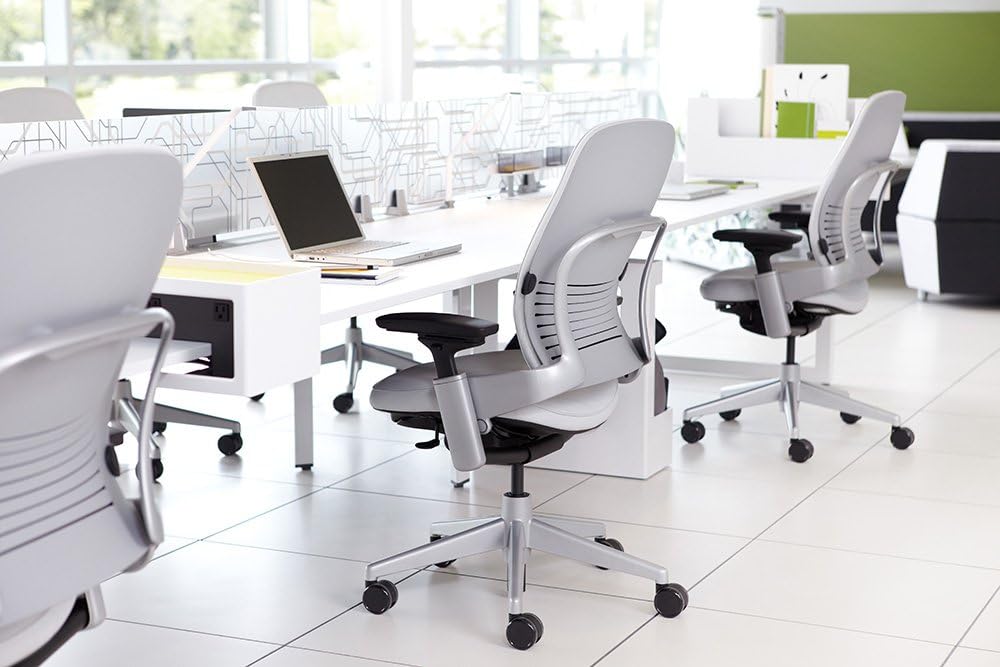
Steelcase Leap V2 Office Chair

Our verdict: Adjustable lower back firmness and a glide system that keeps lumbar contact as you move.

The Leap V2 gives you a flexible lower back firmness adjustment and a separate upper back force control, so you can tune support to the area that actually hurts. Its Natural Glide system keeps the backrest touching your spine as you recline, instead of letting the chair pull away. Seat edge adjustment and height-adjustable arms complete the fit, and a 12-year warranty backs it.

It is the most expensive of the lumbar-focused picks in the $500 and up bucket, but that adjustability is the reason it leads. Against the Gesture it suits one screen better.

Buy it for persistent discomfort and long days. The honest caveats are the high cost and the absence of a headrest. If you want to recline with your head supported, look elsewhere.

Lumbar
Adjustable lower back firmness
Glide
Natural Glide system
Arms
Height adjustable
Warranty
12 years

What we like

  • +Adjustable lower back firmness
  • +Keeps lumbar contact in recline
  • +Seat edge adjustment
  • +12-year warranty

Watch out for

  • −High investment
  • −No headrest
  • −Overbuilt for light use

Buy it if: People with persistent back pain who sit for long days.

Skip it if: You want to spend little or need a headrest.

2

Best for Multi-Device Users

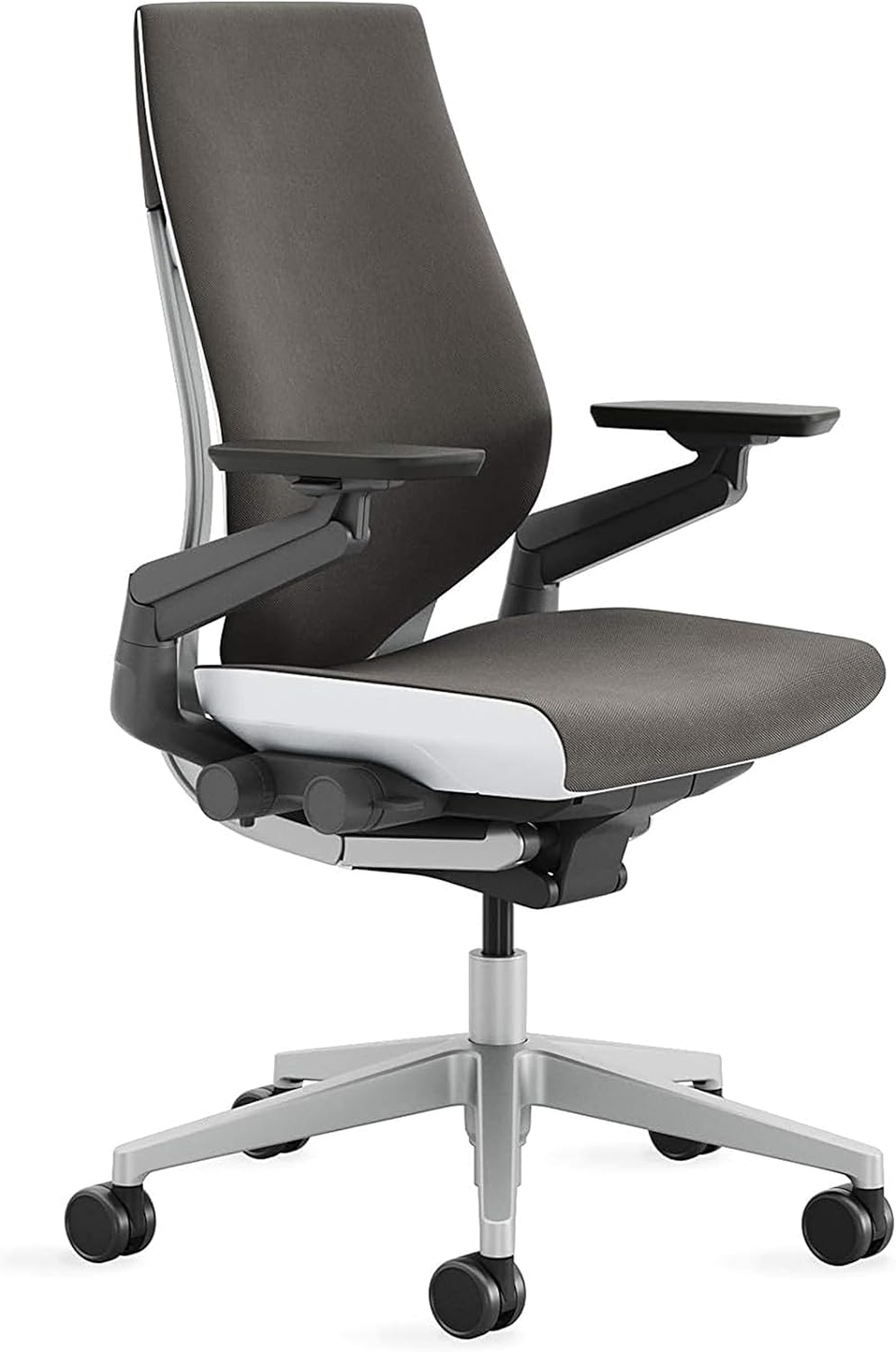
Steelcase Gesture Office Chair

Our verdict: 3D LiveBack lumbar and arms that follow your devices, so shoulders do not strain.

The Gesture combines a 3D LiveBack lumbar with arms that move through 360 degrees. That arm design matters for back and shoulder comfort because reaching to a laptop, tablet or phone with unsupported arms pulls the shoulders and upper back forward. A tilt limiter, seat depth adjustment and the same 12-year warranty round it out.

It costs the most of the Steelcase chairs and is overkill for a single-screen desk. It ranks below the Leap V2 because the lumbar control is less flexible, but it beats it for people who juggle devices.

Buy it if you move between a laptop, a phone and a tablet all day. Skip it if you sit upright at one monitor. The caveat: it needs setup time to fit, and the price is the highest in the guide.

Lumbar
3D LiveBack
Arms
360 degree
Adjust
Seat depth and height
Warranty
12 years

What we like

  • +3D LiveBack lumbar
  • +Arms follow device use
  • +Tilt limiter
  • +12-year warranty

Watch out for

  • −Highest price in the guide
  • −Overkill for one screen
  • −Setup needed for best fit

Buy it if: Multi-device workers who feel strain in shoulders and back.

Skip it if: You use a single screen and sit upright.

3

Best Steelcase Value

Steelcase Series 1 Office Chair

Our verdict: LiveBack flexible lumbar and a 12-year warranty for under $500.

The Series 1 brings Steelcase's LiveBack flexible lumbar to a much lower price, in the $200 to $500 bucket. It adds seat depth and tilt tension adjustments, seat height from 15.5 to 20.5 inches, and comes armless or with 4D arms, plus the 12-year warranty.

It costs more than the non-Steelcase chairs here, and the LiveBack is less advanced than the Leap V2's system, so fine tuning is limited. In return, you get a well-proven design and a warranty four times as long as the mid-range competition.

Buy it for Steelcase support at a mid price. Skip it if you want the finest lumbar control. The caveat: with limited fine tuning, a very particular back may find the Leap V2 a better match, and arms vary by option, so choose the version that suits your desk height.

Lumbar
LiveBack flexible
Seat height
15.5 to 20.5 in
Arms
Armless or 4D
Warranty
12 years

What we like

  • +LiveBack under $500
  • +12-year warranty
  • +Seat depth adjustment
  • +Proven design

Watch out for

  • −Costs more than non-Steelcase chairs
  • −Less advanced than Leap V2
  • −Limited fine tuning

Buy it if: Buyers who want Steelcase support at a mid price.

Skip it if: You want the finest lumbar control.

4

Best Mid-Range

SIHOO Doro C300 Ergonomic Chair

Our verdict: An auto-following backrest that adapts without any manual adjustment.

The Doro C300's backrest follows your movement automatically, which means support stays in place without constant lumbar knob adjustments. A suspended mesh spreads pressure, the seat depth adjusts, and the seat height runs 17.7 to 21.7 inches. It costs under $300.

It carries a 3-year warranty, a big drop from the Steelcase chairs, and the seat tops out at 21.7 inches. It ranks above the CLOUVOU for the self-adjusting back, which suits people who do not want to fiddle.

Buy it if you want automatic support in the mid-range. Skip it if a long warranty matters to you. The caveat: mid-range hardware is less refined than Steelcase, so check the return window and the recline tension in the first weeks.

Back
Auto-following
Material
Suspended mesh
Seat height
17.7 to 21.7 in
Warranty
3 years

What we like

  • +Auto-following lumbar
  • +Suspended mesh spreads pressure
  • +Seat depth adjustment
  • +Under $300

Watch out for

  • −3-year warranty
  • −21.7 in seat height limit
  • −Less refined than Steelcase

Buy it if: Those who want automatic support without fiddling.

Skip it if: You want a long warranty.

5

Best Flexible Lumbar

CLOUVOU Ergonomic Office Chair

Our verdict: A flexible S-curve lumbar, suspended mesh and 4D armrests at a mid price.

The CLOUVOU pairs a flexible S-curve lumbar with a suspended mesh back, an adjustable headrest and 4D armrests. Mesh reduces pressure points compared with foam and runs cooler, and the seat range of 17 to 21 inches fits most desks.

It is a mid-range investment in the $200 to $500 bucket. Against the Doro C300 it gives you a headrest and 4D arms but not the self-adjusting back, so you set the lumbar yourself.

Buy it for a full-featured mesh chair at a mid price. Skip it if you work in a cold room, since mesh breathes. The caveats are the 3-year warranty and the cost relative to the budget options. If you want the headrest for reclined work, it is the cheapest route here.

Lumbar
Flexible S-curve
Arms
4D
Seat height
17 to 21 in
Warranty
3 years

What we like

  • +Flexible lumbar follows spine
  • +Mesh reduces pressure points
  • +4D armrests
  • +Adjustable headrest

Watch out for

  • −Mid-range cost
  • −Mesh runs cool
  • −3-year warranty

Buy it if: Mid-budget buyers who want a full-featured mesh chair.

Skip it if: You work in a cold room.

6

Best Thick Foam

QLTPLUS Ergonomic Office Chair

Our verdict: Extra-thick foam that resists bottoming out, with adjustable lumbar.

The QLTPLUS uses high-density foam on seat and back, with adjustable lumbar, padded armrests and a tilt function. Thick foam resists bottoming out, which some sitters with back pain prefer over mesh. The seat height runs 16.5 to 20.5 inches and the chair costs under $200.

It ranks below the CLOUVOU because mesh spreads pressure and foam holds heat, and the seat tops out at 20.5 inches. The warranty is 3 years.

Buy it if you want a padded seat on a budget. Skip it if you run warm or are tall, because heat builds in long sessions. The caveat: fewer adjustments than the mesh chairs above it means you cannot tune the fit as finely, so check the lumbar position on arrival.

Seat and back
High-density foam
Seat height
16.5 to 20.5 in
Lumbar
Adjustable
Warranty
3 years

What we like

  • +Thick foam does not bottom out
  • +Adjustable lumbar
  • +Padded armrests
  • +Under $150

Watch out for

  • −Foam holds heat
  • −20.5 in max seat height
  • −Fewer adjustments

Buy it if: Sitters who prefer a padded seat on a budget.

Skip it if: You run warm or are tall.

7

Best Budget Mesh

FelixKing Ergonomic Office Chair

Our verdict: Adjustable lumbar, high-back mesh and a headrest for under $130.

The FelixKing offers a high-back mesh with adjustable lumbar support, a headrest and adjustable armrests, a lot of features for the money. The seat height runs 17 to 21 inches, and the tilt function lets you recline.

The lumbar is a fixed pad rather than dynamic support, so it does not follow your movement like the Doro C300. It is less advanced than the premium options, but it gets you a proper mesh chair cheaply, in the $100 to $200 bucket.

Buy it for better support than a basic chair on a tight budget. Skip it if you need dynamic lumbar support. The caveat is build: a basic frame suggests a shorter life, and a fixed pad cannot adapt if you shift a lot during the day.

Back
High-back mesh
Lumbar
Adjustable pad
Seat height
17 to 21 in
Extra
Headrest

What we like

  • +Adjustable lumbar at low cost
  • +High-back mesh breathes
  • +Headrest included
  • +Budget friendly

Watch out for

  • −Fixed lumbar pad
  • −Less advanced than premium
  • −Basic build

Buy it if: Budget buyers who need better support than a basic chair.

Skip it if: You need dynamic lumbar support.

8

Cheapest Option

BestOffice Ergonomic Office Chair

Our verdict: The cheapest chair here, a stopgap with a basic lumbar cushion.

The BestOffice is a mesh back chair with a lumbar cushion, adjustable armrests and a 250 lb capacity. At $25 to $50 it is the cheapest in the guide, and minimal assembly means it is usable within minutes.

It offers minimal ergonomic support and only a basic tilt, and you should not expect a long life from it. It ranks last because every other chair here gives more adjustment, and the lumbar is a cushion, not a built-in support.

Buy it as a stopgap for a temporary desk or short sessions. Skip it if you have ongoing back pain. The caveat: a cushion shifts out of place, and the 15.7 to 19.3 inch seat height range suits shorter users more than tall ones.

Back
Mesh with cushion
Seat height
15.7 to 19.3 in
Capacity
250 lb
Tilt
Basic

What we like

  • +Cheapest in the guide
  • +Mesh breathes
  • +Low seat height option
  • +Easy assembly

Watch out for

  • −Minimal ergonomic support
  • −Cushion-only lumbar
  • −Short expected life

Buy it if: Temporary desks and short sessions.

Skip it if: You have ongoing back pain.

Methodology

How We Ranked These

Lumbar design

Fixed pads, flexible curves and auto-following backs were compared on how well they hold contact as you shift.

Adjustability

Seat depth, tilt, arms and headrest options were counted, since a chair you cannot fit to your body will not help your back.

Material comfort

Mesh, foam and suspended designs were compared for pressure spread and heat.

Warranty and durability

Warranty length was used as a proxy for build confidence.

Value within the field

Features were weighed against each pick's price bracket.

Every Primea Score uses the same weights: Performance 30% · Build & Materials 20% · Everyday Usability 20% · Value 20% · Owner Satisfaction 10%. Full scoring rules

Buyer's guide

How to Pick the Right One for You

By Pain Location

Match the chair to where you hurt.

Where it hurtsOur pick
Lower back, persistentSteelcase Leap V2 Office Chair
Shoulders and upper backSteelcase Gesture Office Chair
Lower back, moderateSIHOO Doro C300 Ergonomic Chair
Tailbone, seat pressureQLTPLUS Ergonomic Office Chair
Mild stiffness, tight budgetFelixKing Ergonomic Office Chair

By Budget

SpendOur pick
Under $50BestOffice Ergonomic Office Chair
$100 to $150FelixKing Ergonomic Office Chair
$200 to $300SIHOO Doro C300 Ergonomic Chair
Around $500Steelcase Series 1 Office Chair
$1,400 and upSteelcase Leap V2 Office Chair

Mesh vs Foam

Mesh

Breathes and spreads pressure, with some give. Picks: CLOUVOU, SIHOO Doro C300, FelixKing and BestOffice.

Foam

Padded and supportive, but warmer and can compress over time. Picks: QLTPLUS, plus upholstered options on the Steelcase chairs.

Default to mesh unless you dislike its firmness.

By How Much You Move

Sitting styleOur pick
Constantly shifting and recliningSteelcase Leap V2 Office Chair
Sit still, want auto supportSIHOO Doro C300 Ergonomic Chair
Upright, desk-focusedCLOUVOU Ergonomic Office Chair
Short sessions onlyBestOffice Ergonomic Office Chair

For Work From Home Specifically

Look for

A chair you can adjust once and forget, a lumbar that follows movement, and a warranty that outlasts a few years of daily use.

In this comparison

The Steelcase Series 1 Office Chair for a long-lasting, adjustable base, or the SIHOO Doro C300 if budget is limited.

When to Spend More

Spend more if

Pain is persistent and you sit for six hours or more. The Steelcase Leap V2's adjustable lower back firmness is the feature you are paying for.

Save if

Discomfort is occasional. The FelixKing offers adjustable lumbar and mesh for a small outlay.

Questions

Frequently Asked Questions

Can an office chair fix back pain?+

It can support better posture and reduce strain, but it does not treat a condition. If pain is persistent, see a doctor, and use the chair as one part of a broader plan, alongside regular breaks and movement.

Is the Leap V2 worth the cost for back pain?+

If your discomfort is constant and you sit for long hours, its adjustable lower back firmness and 12-year warranty justify it. For milder discomfort a cheaper chair such as the Series 1 is enough, and it keeps the same 12-year warranty.

Is mesh or foam better for a sore back?+

Mesh spreads pressure and breathes, while foam such as the QLTPLUS's thick pad feels softer but runs warm. Pick based on what you tolerate in long sessions, and your room temperature.

How should lumbar support sit?+

It should fill the curve of your lower back, roughly at belt height. Adjustable lumbar like the FelixKing's lets you move it to your spine, though it stays fixed once set, so check the height again after a few days.

Do I need a headrest?+

Only if you recline while working. The Leap V2 has none, while the CLOUVOU and FelixKing include one. A headrest matters little for upright typing, but helps when you lean back to think or read.

Is the cheapest chair good enough?+

The BestOffice works as a temporary option. It offers only a basic lumbar cushion, so it is not a good answer for ongoing back pain, and the cushion can slide out of position, which defeats its purpose.

Final take

Buy the Leap V2 if you sit all day and have constant discomfort, and the Series 1 for Steelcase support at a lower price. Choose the Doro C300 if you want automatic support, and use the budget chairs only for lighter use. Skip the BestOffice for any ongoing pain.

More Ranked & Reviewed Guides