
Primea ReviewsAll Reviews

Primea Reviews is reader-supported. When you buy through our Amazon links we may earn a commission, at no extra cost to you. Rankings are set by our editors and never sold. Learn more

Ranked & Reviewed by Primea Reviews

The 5 Best Microphone Arms for Podcasting of 2026, Ranked & Reviewed

By the Primea Editorial TeamUpdated November 4, 20268 min read5 products ranked
The 5 Best Microphone Arms for Podcasting of 2026, Ranked & Reviewed

The short answer

The Shure by Gator Deluxe Broadcast arm is our top pick for serious podcasters because its threaded extension adapter clears XLR cables and it is designed around vocal mics. The FIFINE BM88 is the better value, with a low profile and built-in cable management. The InnoGear is the cheapest dependable choice for Blue Yeti-class mics, and the KRISKUL fits only lightweight mics.

The Primea Scoreboard

Ranked & Reviewed

  1. A broadcast-style arm built around vocal mics, with an extension adapter that clears XLR cables.

    94Outstanding
    Check price
  2. A sturdy metal low-profile arm with cable management for the price of a lunch out.

    90Excellent
    Check price
  3. A heavy-duty free-position arm named for popular USB mics, at the lowest price tier.

    86Excellent
    Check price
  4. 04
    QuadCast Boom Arm

    Best Spring Arm

    QuadCast Boom Arm

    A spring-supported boom arm with dual suspension springs, for a mic that fits its design.

    83Very Good
    Check price
  5. A low-profile arm with a metal ball head and heavy-duty clamp, limited to lightweight mics.

    79Very Good
    Check price

Podcasters usually blame the microphone for bad audio when the real culprit is the way it is held. A mic on a desk stand picks up every keyboard tap, elbow bump and coffee cup set down, because the desk carries those vibrations straight into the capsule. An arm lifts the microphone off the desk and puts it where your mouth is, which cuts desk noise and lets you speak at a steady distance.

We ranked five arms by reading the listings for what actually matters on a recording desk: what weight and mic type each is built for, how the cable is handled, how the clamp attaches and how much the arm intrudes into your field of view. The spec detail varies a lot between listings, so we scored cautiously where a number was missing.

Before you buy

What Actually Matters

01

Microphone weight rating

Boom arms hold a limited weight, and a mic that is too heavy makes the arm droop after a few minutes. Dynamic broadcast mics are heavier than USB condensers. Look for a rated weight range on the listing and compare it to your mic including its shock mount and pop filter, and be wary of arms that state only a brand name and give no figure.

02

Cable management

A loose cable swinging off the arm adds handling noise, and a straight XLR plug can foul on the arm. Built-in channels or clips route the lead along the arm. Look for named cable clips, and for the Shure's threaded extension adapter, which moves the connector clear of the arm so the cable hangs free.

03

Clamp design

A desk clamp must grip firmly without marking the surface or wobbling when you lean on the desk. Check the maximum desk thickness it accepts and whether the clamp pads are protected. A loose clamp transmits desk vibration straight into the microphone, which defeats the purpose of using an arm, so tighten it fully and test it by bumping the desk.

04

Low profile versus tall arm

A low-profile arm sits near the desk and stays out of your camera frame, while a tall arm gives more reach but can block sightlines. Podcasters on video should favor low-profile designs. Check the listing photos for how far the arm rises, and place the pivot point so the mic sits just below your chin.

05

Spring tension and drift

Internal springs balance the weight of the mic so it stays where you put it, but springs can lose tension over time and let the arm drift. Dual spring arms balance heavier loads more evenly. Look for adjustable tension, and tighten the joints after setup to stop a slow downward sag. If you swap to a heavier microphone later, retension the arm again.

In-depth reviews

Our Ranked Picks, Reviewed

1

Best Overall

Shure by Gator Deluxe Broadcast Desktop Mic Boom Arm (SH-BROADCAST1)

Our verdict: A broadcast-style arm built around vocal mics, with an extension adapter that clears XLR cables.

The SH-BROADCAST1 is designed to hold Shure and other-brand vocal microphones, clamps to any desk, table or similar-sized surface, and includes a threaded extension adapter that gives XLR connectors room to clear the mount.

It ranks first because that adapter solves a real podcasting annoyance: a straight XLR plug can foul on the arm and kink the cable, adding handling noise. None of the cheaper arms here list an equivalent. It also belongs to the broadcast category, built around professional dynamic mics rather than gaming condensers.

Buy it for an XLR dynamic mic on a permanent desk. The drawback is that it sells in the $100 to $200 range with no weight rating listed, so check your mic against the listing before you order.

Design
Broadcast desktop boom
Mounting
Desk or table clamp
Cable help
Threaded extension adapter
Mic type
Shure and other vocal mics

What we like

  • +Extension adapter clears XLR plugs
  • +Built around vocal mics
  • +Clamps to any desk or table
  • +Broadcast-style construction

Watch out for

  • −Priciest arm of the five
  • −No weight rating listed
  • −More arm than USB mics need

Buy it if: XLR dynamic mics on a permanent podcasting desk.

Skip it if: You use a light USB mic and want the lowest price.

2

Best Value

FIFINE BM88 Low Profile Microphone Boom Arm Stand for Gaming Streaming

Our verdict: A sturdy metal low-profile arm with cable management for the price of a lunch out.

The FIFINE BM88 is a sturdy metal arm with a low profile and built-in cable management. Low profile means the arm sits close to the desk and swings out of your line of sight, so it does not block your monitor or camera.

It ranks second to the Shure because the Shure is aimed at XLR vocal mics and adds a cable-clearance adapter, while the BM88 is pitched at gaming and streaming setups. It is a better design than the cheaper arms below, with its built-in cable routing keeping the lead from dangling across the desk.

Pick it for a USB or XLR mic on a tidy desk. The caveat is the $50 to $100 bucket with no weight rating listed, so confirm your mic's weight.

Build
Sturdy metal
Profile
Low profile
Cables
Built-in cable management
Mounting
Desk clamp

What we like

  • +Low profile stays out of view
  • +Built-in cable management
  • +Sturdy metal construction
  • +Good for camera sightlines

Watch out for

  • −No weight rating listed
  • −Pitched at gaming streams
  • −Costs $50 to $100

Buy it if: Desks where the arm must stay out of the camera frame.

Skip it if: You want a vocal-mic adapter or the lowest price.

3

Best Budget

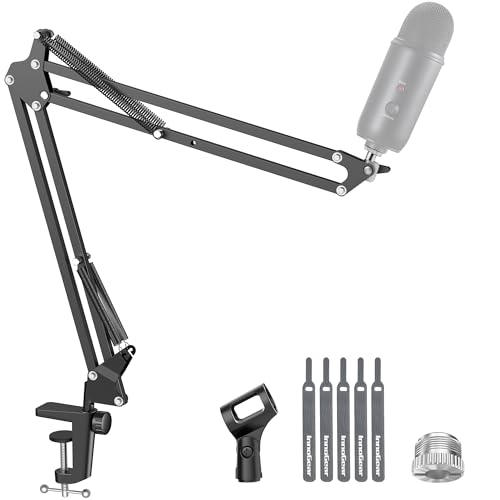
InnoGear Boom Arm Microphone Mic Stand for Blue Yeti Fifine HyperX

Our verdict: A heavy-duty free-position arm named for popular USB mics, at the lowest price tier.

InnoGear is a free-position mic arm described as solid and heavy-duty, with a name that points at Blue Yeti, Fifine and HyperX microphones. The under $25 price is its main draw.

It ranks third because the listing offers little hardware detail: no weight rating, no clamp spec. The FIFINE BM88 gives you a stated low profile and cable management for the next price step, while this is the arm to buy when the budget is the constraint.

Choose it for a USB mic on a home podcast desk. The caveat is the missing specs, so match your mic against the model names in the title.

Type
Free-position boom arm
Build
Solid, heavy-duty
Named mics
Blue Yeti, Fifine, HyperX
Price tier
Under $25

What we like

  • +Under $25 price bucket
  • +Free-position arm movement
  • +Named for popular USB mics
  • +Described as heavy-duty

Watch out for

  • −No weight rating listed
  • −No cable management listed
  • −Sparse hardware details

Buy it if: USB mics on a budget home podcasting desk.

Skip it if: You need cable routing or a documented weight limit.

4

Best Spring Arm

QuadCast Boom Arm

Our verdict: A spring-supported boom arm with dual suspension springs, for a mic that fits its design.

The QuadCast Boom Arm is listed as a mic boom arm with dual suspension springs, sold in the under $25 bucket. Springs inside the arm counter the weight of the mic so it floats in place and moves smoothly.

It ranks fourth because the listing gives no weight rating or mount details, and its name points at one microphone family. It is cheaper than the BM88, but the BM88 documents cable management and a low profile that this listing does not.

Buy it if you use the mic the arm is named after, since that pairing is the one the maker designed around. The caveat is compatibility: confirm the mount thread and the weight before trusting it with a different microphone, because a mismatch shows up as a slow sag mid-episode.

Type
Boom arm with springs
Suspension
Dual springs
Role
Mic stand
Price tier
Under $25

What we like

  • +Dual suspension springs
  • +Under $25 price bucket
  • +Smooth arm movement
  • +Simple boom design

Watch out for

  • −No weight rating listed
  • −Named for one mic family
  • −No cable routing listed

Buy it if: Owners of the QuadCast-style mic the arm is named for.

Skip it if: You use a different mic and want documented compatibility.

5

Best for Light Mics

KRISKUL Low Profile Mic Arm for Lightweight Mics

Our verdict: A low-profile arm with a metal ball head and heavy-duty clamp, limited to lightweight mics.

KRISKUL is a low-profile arm with smooth adjustment, a heavy-duty desk clamp and an upgraded all-metal ball head. The ball head holds the mic angle firmly after you set it.

It ranks last because the title says it is for lightweight mics, which rules out heavier dynamic mics common in podcasting. Against the InnoGear it offers a clearer clamp spec and a metal head, but narrower compatibility.

Buy it for a small, light condenser or lavalier-style mic. The caveat is that anything heavy will sag, so do not pair it with a large dynamic microphone.

Profile
Low profile
Clamp
Heavy-duty desk clamp
Head
All-metal ball head
Mic weight
Lightweight mics only

What we like

  • +Low profile arm
  • +All-metal ball head
  • +Heavy-duty desk clamp
  • +Under $25 price bucket

Watch out for

  • −Lightweight mics only
  • −No weight rating listed
  • −No cable management listed

Buy it if: Small, light microphones on a tidy desk.

Skip it if: You use a heavy dynamic or large condenser mic.

Methodology

How We Ranked These

Mic compatibility

Which microphone types and weights each arm is built for, based on the listing.

Cable handling

Built-in routing or adapters that keep leads from dragging or clashing with the arm.

Clamp and base

Desk clamp design and how securely the arm anchors to a table.

Profile and reach

How well the arm stays out of the camera and monitor sightline.

Build quality

Metal construction, ball heads and springs that hold position.

Every Primea Score uses the same weights: Performance 30% · Build & Materials 20% · Everyday Usability 20% · Value 20% · Owner Satisfaction 10%. Full scoring rules

Buyer's guide

How to Pick the Right One for You

By Mic Type

The arm must match the mic it holds.

MicOur pick
XLR vocal or dynamic micShure by Gator Deluxe Broadcast Desktop Mic Boom Arm (SH-BROADCAST1)
Blue Yeti, Fifine, HyperX USB micInnoGear Boom Arm Microphone Mic Stand for Blue Yeti Fifine HyperX
QuadCast-style micQuadCast Boom Arm
Small lightweight micKRISKUL Low Profile Mic Arm for Lightweight Mics

By Budget

SpendOur pick
Under $25InnoGear Boom Arm Microphone Mic Stand for Blue Yeti Fifine HyperX
Under $25, spring armQuadCast Boom Arm
Under $25, light micsKRISKUL Low Profile Mic Arm for Lightweight Mics
$50 to $100FIFINE BM88 Low Profile Microphone Boom Arm Stand for Gaming Streaming
$100 to $200Shure by Gator Deluxe Broadcast Desktop Mic Boom Arm (SH-BROADCAST1)

Low Profile vs Broadcast Boom

Low profile

Keeps the arm near the desk and out of the camera frame. The FIFINE BM88 and KRISKUL use this layout.

Broadcast boom

A longer reach designed for studio-style recording with vocal mics. The Shure by Gator is built this way.

Pick low profile for video podcasts, broadcast boom for audio-only studios.

By Cable Routing

Cable needOur pick
XLR connector clearanceShure by Gator Deluxe Broadcast Desktop Mic Boom Arm (SH-BROADCAST1)
Built-in cable managementFIFINE BM88 Low Profile Microphone Boom Arm Stand for Gaming Streaming
No routing listedInnoGear Boom Arm Microphone Mic Stand for Blue Yeti Fifine HyperX
No routing listed, light micKRISKUL Low Profile Mic Arm for Lightweight Mics

For Video Podcasts Specifically

Look for

A low profile that tucks below the frame, cable management and a mic held just out of shot.

In this ranking

The FIFINE BM88 is built for this, with a low profile and cable routing, while the KRISKUL suits a small mic you can hide.

When to Spend More

Spend more if

You use an XLR dynamic mic, where the Shure's adapter and broadcast design justify $100 to $200.

Save if

You use a light USB mic, where the InnoGear under $25 does the basic job.

Questions

Frequently Asked Questions

Will these arms fit my USB mic?+

Most arms use a standard thread, but check your mic's weight against the listing. The InnoGear names Blue Yeti, Fifine and HyperX mics, while the KRISKUL is limited to lightweight mics. If the weight is not listed, ask the seller.

What is the most common mistake with a mic arm?+

Mounting the mic too far from the mouth. An arm lets you hold a steady distance, but the Shure by Gator or FIFINE BM88 only helps if you position it a hand's width from your lips and slightly off-axis.

Is an arm worth it over a desk stand?+

For podcasting, yes. A desk stand carries keyboard and table vibration into the mic, while the Shure or BM88 clamp lifts the mic off the desk. The InnoGear adds that benefit under $25.

How do I set one up?+

Clamp the base to the desk edge, screw the mic mount on, route the cable along the arm with clips and set the tension. On the Shure, fit the extension adapter first so the XLR plug clears the mount.

How do I stop the arm drooping?+

Tighten each joint and check the mic is within the arm's weight rating. Spring arms such as the QuadCast Boom Arm can lose tension over time. If it still sags, the mic is likely too heavy for that arm.

Can I use an arm with a shock mount?+

Yes, in most cases. The shock mount threads onto the arm end, then the mic sits in the mount. The Shure by Gator is designed for vocal mics, but check thread size on the other arms before buying a separate shock mount.

Final take

Buy the Shure by Gator Deluxe Broadcast arm if you record on an XLR dynamic mic: the extension adapter and broadcast build suit the job. The FIFINE BM88 is the smarter buy for most home podcasters, with low profile and cable routing at a mid price. Pick the InnoGear when budget rules, and keep the KRISKUL for small lightweight mics only.

More Ranked & Reviewed Guides