
Primea ReviewsAll Reviews

Primea Reviews is reader-supported. When you buy through our Amazon links we may earn a commission, at no extra cost to you. Rankings are set by our editors and never sold. Learn more

Ranked & Reviewed by Primea Reviews

The 7 Best Medical Alert Systems of 2026, Ranked & Reviewed

By the Primea Editorial TeamUpdated November 4, 202610 min read7 products ranked
The 7 Best Medical Alert Systems of 2026, Ranked & Reviewed

The short answer

Bay Alarm Medical SOS Mobile GPS is the all-rounder: cellular GPS, professional monitoring and no landline. Medical Guardian MGMobile suits people who walk, shop and travel every day. LifeStation Mobile fits homes that already run Alexa, and SureSafeGO is the pick when fall detection must be included from day one. Every pick here is a mobile unit, so the real decision is which monitoring plan you pair it with.

The Primea Scoreboard

Ranked & Reviewed

  1. Cellular GPS, no landline and a professional response centre. The safest default for most seniors.

    94Outstanding
    Check price
  2. 02
    Medical Guardian MGMobile

    Best for Active Seniors

    Medical Guardian MGMobile

    GPS plus a step counter and water resistance, built for people who leave the house daily.

    92Outstanding
    Check price
  3. 4G LTE GPS with nationwide coverage and Alexa integration for households that already talk to a speaker.

    90Excellent
    Check price
  4. A fall-detection pendant on LTE and GPS, from a name families already recognise.

    88Excellent
    Check price
  5. 05
    SureSafeGO Medical Alert

    Best Included Fall Detection

    SureSafeGO Medical Alert

    GPS and fall detection included, plus a stated four-day battery. Costs more up front, aimed at lower monthly spend.

    86Excellent
    Check price
  6. GPS, a two-way speaker and a water-resistant pendant at a lower monitoring cost.

    84Very Good
    Check price
  7. Auto fall detection and GPS with no contract, and alerts that go straight to family.

    82Very Good
    Check price

The device is the cheap part of a medical alert system. The monthly monitoring plan is where the money goes, and it is also where buyers get caught: a pendant that looks like a bargain on the shelf can be useless until a plan is activated, and some features, fall detection above all, are sold as add-ons. Anyone comparing only the sticker on the box is comparing the wrong thing.

So we ranked seven mobile units, the kind that work on a cellular network and need no landline, on what actually decides whether help arrives: GPS location accuracy, how fall detection is offered, battery life between charges, water resistance for the shower, and how the company handles the call. The Primea framework did the scoring, and the features a person cannot fix after a fall counted for the most.

Before you buy

What Actually Matters

01

The monitoring plan, not the device

Most mobile units are inert without a paid monitoring plan, and the plan is the recurring cost for as long as the system is used. Read the listing for what is bundled, then check the company's own site for the monthly fee and contract terms before you buy. A cheap device with a costly plan is the usual trap.

02

How fall detection is offered

Fall detection uses a motion sensor to judge a sudden drop and trigger a call, and it is sold as included, optional or absent. It matters because someone who is unconscious cannot press a button. Look for the words included or automatic, and treat optional as an extra cost to confirm.

03

Cellular GPS versus a base station

A mobile unit uses a cellular network and GPS so help can find the wearer outdoors. A base-station system only works near its base. If the wearer ever leaves the house, choose cellular. Check that the listing says 4G or LTE and that coverage matches the area where they actually live and walk.

04

Battery life between charges

A dead pendant gives no protection, and many seniors forget to charge. A stated multi-day battery gives more margin than a daily top-up. Look for a runtime figure in the listing, and build a charging habit, such as placing the cradle beside the bed, rather than trusting memory.

05

Waterproof versus water-resistant

Falls are common in bathrooms, and wearers tend to take the pendant off there if it is not rated for water. Waterproof is the stronger claim, while resistant covers splashes only. Read the exact wording on the listing and check the rating before wearing the unit in a running shower.

In-depth reviews

Our Ranked Picks, Reviewed

1

Best Overall

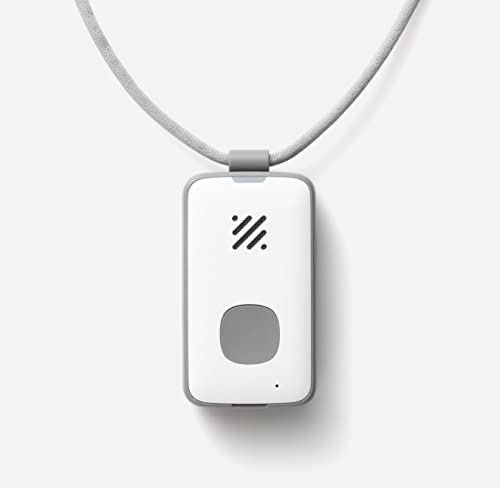
Bay Alarm Medical SOS Mobile GPS

Our verdict: Cellular GPS, no landline and a professional response centre. The safest default for most seniors.

Bay Alarm's SOS Mobile runs on a 4G cellular connection with GPS, so it works in the house, the garden and the car park without a base station. Nothing has to plug into a phone jack, which matters now that so many homes have dropped their landline.

It tops this ranking because it removes the most setup mistakes. A mobile pendant with GPS and an operator behind it covers more situations than the Wi-Fi-dependent or speaker-based units lower down, and fall detection is available when you want it. Medical Guardian's MGMobile adds a step counter, but nothing on the spec sheet pushes it ahead of Bay Alarm on the core job.

Buy it for a parent who lives alone and moves around. The caveat is that fall detection is listed as optional, so confirm it is switched on in the plan you choose.

Network
4G cellular with GPS
Landline needed
No
Fall detection
Optional add-on
Device cost
$50 to $100

What we like

  • +Works anywhere with cell coverage
  • +No landline or base needed
  • +Professional monitoring behind the button
  • +Fall detection available if wanted

Watch out for

  • −Fall detection is not automatic
  • −Needs an active monitoring plan
  • −Pendant needs regular charging

Buy it if: Seniors who live alone and want one device for home and outings.

Skip it if: You want fall detection included with no plan decisions to make.

2

Best for Active Seniors

Medical Guardian MGMobile

Our verdict: GPS plus a step counter and water resistance, built for people who leave the house daily.

The MGMobile is a GPS-tracked mobile unit that adds a step counter and water resistance, which tells you who it was designed for: the senior who walks to the shops, gardens, or swims at the community pool, and wants a device that goes along.

It ranks just under Bay Alarm because the extra features are lifestyle touches rather than safety upgrades. A step counter will not summon an ambulance. What lifts it above the lower picks is the combination of GPS with a water-resistant body, so the wearer is less tempted to take it off in the shower, where many falls happen.

It suits independent seniors who are out of the house often. Water resistance is not the same as waterproof, so check the rating before it goes under a running showerhead.

Location
GPS tracking
Extra
Step counter
Water
Water-resistant
Device cost
$50 to $100

What we like

  • +GPS works away from home
  • +Step counter encourages walking
  • +Water-resistant for daily wear
  • +Suits active, independent seniors

Watch out for

  • −Resistant is not fully waterproof
  • −Step counter is no safety feature
  • −Plan needed for monitoring

Buy it if: Active seniors who walk, travel or garden every day.

Skip it if: You mostly stay home and want the lowest-effort setup.

3

Best for Alexa Homes

LifeStation Mobile 4G LTE Medical Alert System

Our verdict: 4G LTE GPS with nationwide coverage and Alexa integration for households that already talk to a speaker.

LifeStation's mobile system pairs 4G LTE GPS with nationwide coverage and Alexa integration. The coverage claim matters most for travellers and for rural addresses, where a network gap can turn a pendant into jewellery.

It lands third because the Alexa link is a convenience, not a substitute for the pendant. A senior who already asks an Echo for the weather will find it natural, but a speaker only helps in the room it sits in, and a fall in the garden still depends on the wearable. Against Bay Alarm and Medical Guardian it gives up a clear lead on features.

Good for a home already built around Alexa devices. Check the listing for the price tier before ordering, since specs and pricing for this unit are not fully stated.

Network
4G LTE with GPS
Coverage
Nationwide
Smart home
Alexa integration
Best for
Alexa households

What we like

  • +Nationwide cellular coverage
  • +Alexa link for smart-home users
  • +GPS location outside the house
  • +No landline required

Watch out for

  • −Alexa helps only near a speaker
  • −Fewer stated safety extras
  • −Pricing detail is thin on listing

Buy it if: Households that already run Alexa speakers in several rooms.

Skip it if: You do not use a smart speaker and want the strongest feature list.

4

Best Known Brand

ADT On-The-Go Mobile Medical Alert System

Our verdict: A fall-detection pendant on LTE and GPS, from a name families already recognise.

ADT's On-The-Go is a waterproof wearable that combines a fall detection pendant with LTE and GPS. The waterproof wording is stronger than the water-resistant label on Medical Guardian's unit, which is a real point for anyone who wears it in the bath.

It sits fourth because the brand is the main separator. Fall detection and cellular GPS are table stakes at this level, and Bay Alarm matches them. What ADT adds is name recognition, which reassures adult children choosing for a parent. Against SureSafeGO it gives up the stated four-day battery life.

Buy it when the family wants a familiar company behind the device. The caveat is that fall detection is never perfect, so teach the wearer to press the button after any fall they can still manage.

Fall detection
Pendant based
Network
LTE with GPS
Water
Waterproof wearable
Device cost
$50 to $100

What we like

  • +Waterproof for shower wear
  • +Fall detection pendant included in listing
  • +LTE and GPS together
  • +Brand families recognise

Watch out for

  • −No stated battery life
  • −Fall detection can miss slow falls
  • −Monitoring plan required

Buy it if: Families who want a recognised company behind a parent's pendant.

Skip it if: Battery life between charges is your top concern.

5

Best Included Fall Detection

SureSafeGO Medical Alert

Our verdict: GPS and fall detection included, plus a stated four-day battery. Costs more up front, aimed at lower monthly spend.

SureSafeGO lists GPS tracking, fall detection as included and a four-day battery, which is the longest stated runtime in this ranking. That detail is rarer than it sounds: a pendant that dies at 3 a.m. protects no one, and four days gives a forgetful charger some slack.

It ranks fifth because the device costs more than the leaders and it has less of a track record than ADT or Bay Alarm. The tradeoff is the point of the pick. Paying more for the device with fall detection already included can mean fewer paid add-ons later, which suits a tighter monthly budget.

Choose it for a person who forgets to charge. The caveat is the higher up-front cost, in the $100 to $200 bracket, so compare the full monthly plan before you commit.

Fall detection
Included
Battery
4 days stated
Location
GPS tracking
Device cost
$100 to $200

What we like

  • +Fall detection included
  • +Four-day battery life stated
  • +GPS tracking outside the home
  • +Aimed at lower monthly spend

Watch out for

  • −Highest device cost in the ranking
  • −Less established than big names
  • −Plan details need checking

Buy it if: People who forget to charge and want fall detection built in.

Skip it if: You want the lowest up-front price on the device.

6

Best for Two-Way Talk

MobileHelp Solo 4G On-The-Go Medical Alert Systems

Our verdict: GPS, a two-way speaker and a water-resistant pendant at a lower monitoring cost.

The MobileHelp Solo combines GPS tracking with a two-way speaker and a water-resistant pendant. The speaker is the feature that stands out: the wearer can talk to the operator through the device itself, with no phone needed.

It ranks sixth because fall detection is not listed in the specs we reviewed, and that is the feature most families ask about first. Against Bay Alarm and ADT it is positioned as the cheaper way to get monitoring, which is a real appeal but a weaker safety offer. LifeStation sits above it on coverage claims.

Works for someone who is steady on their feet but wants a button for emergencies. Confirm whether fall detection can be added, because without it a person who is knocked unconscious cannot call for help.

Location
GPS tracking
Voice
Two-way speaker
Water
Water-resistant pendant
Network
4G

What we like

  • +Two-way speaker on the pendant
  • +GPS tracking away from home
  • +Water-resistant pendant
  • +Positioned for lower running cost

Watch out for

  • −Fall detection not listed
  • −Limited detail on battery life
  • −Resistant is not waterproof

Buy it if: Steady, independent seniors who want a button and a voice link.

Skip it if: A fall while alone is your main worry.

7

Best No-Contract Option

SecuLife Medical Alert Pendant for Seniors

Our verdict: Auto fall detection and GPS with no contract, and alerts that go straight to family.

SecuLife offers automatic fall detection and GPS tracking with no contract, and its alerts go directly to family contacts rather than to a monitoring centre. That makes it the most flexible unit here and the lightest on commitment.

It sits last because direct family alerts are a different safety model. A professional centre will keep calling and can dispatch services; a phone call to a daughter who is in a meeting, or asleep, is not the same. That gap is why Bay Alarm and the other staffed options rank higher.

Buy it when family is close, reliably reachable and you want no contract. The honest caveat is that if nobody answers, no one else is notified, so set several contacts and test the chain.

Fall detection
Automatic
Location
GPS tracking
Contract
None
Alerts go to
Family contacts

What we like

  • +No contract to sign
  • +Automatic fall detection listed
  • +Alerts go straight to family
  • +GPS location included

Watch out for

  • −No staffed response centre
  • −Depends on family answering
  • −Less proven than staffed rivals

Buy it if: Seniors with nearby, reachable family who want no contract.

Skip it if: Nobody can reliably answer a call at any hour.

Methodology

How We Ranked These

Location and coverage

Whether the unit uses cellular GPS or relies on a base station, and how widely the network is stated to reach, since a pendant is only as good as its signal.

Fall detection

Whether it is included, optional or missing, because the people who most need it often cannot press a button.

Battery and charging

Stated runtime and how forgiving it is for someone who forgets to charge.

Water resistance

Waterproof or resistant rating, because the bathroom is where wearers most often take a pendant off.

Response model and cost

A staffed centre or family alerts, and what the monitoring plan adds to the device price.

Every Primea Score uses the same weights: Performance 30% · Build & Materials 20% · Everyday Usability 20% · Value 20% · Owner Satisfaction 10%. Full scoring rules

Buyer's guide

How to Pick the Right One for You

By Who Is Wearing It

Start with the person's daily routine, because that decides which features earn their keep.

WearerOur pick
Lives alone, moves aroundBay Alarm Medical SOS Mobile GPS
Walks or travels dailyMedical Guardian MGMobile
Forgets to chargeSureSafeGO Medical Alert
Already uses AlexaLifeStation Mobile 4G LTE Medical Alert System
Wants family to be alertedSecuLife Medical Alert Pendant for Seniors

By Budget

Spend on the deviceOur pick
$50 to $100Bay Alarm Medical SOS Mobile GPS
$50 to $100ADT On-The-Go Mobile Medical Alert System
$100 to $200SureSafeGO Medical Alert
Lowest running costMobileHelp Solo 4G On-The-Go Medical Alert Systems

Staffed Centre vs Family Alerts

Staffed centre

Trained operators keep trying contacts and can dispatch services if nobody answers. Picks: Bay Alarm Medical SOS Mobile GPS, Medical Guardian MGMobile, ADT On-The-Go.

Family alerts

Alerts go direct to your chosen contacts, with no contract. It only works if someone always answers. Pick: SecuLife Medical Alert Pendant for Seniors.

Default to a staffed centre. Choose family alerts only when several reliable contacts live close by.

By Water Exposure

Wear patternOur pick
Showers and bathsADT On-The-Go Mobile Medical Alert System
Splashes and rainMedical Guardian MGMobile
Splashes and rain, talk backMobileHelp Solo 4G On-The-Go Medical Alert Systems
Dry-hands, indoor onlyLifeStation Mobile 4G LTE Medical Alert System

For Someone Who Lives Alone Specifically

Look for

Cellular GPS, fall detection that is included or easy to add, a staffed response centre and a battery that tolerates a missed charge.

In this ranking

Bay Alarm Medical SOS Mobile GPS for the balanced setup, or SureSafeGO Medical Alert if fall detection and battery life matter most.

When to Spend More

Spend more if

The wearer has had a fall or has a condition that can cause sudden collapse. SureSafeGO Medical Alert builds in fall detection and a longer battery.

Save if

The wearer is steady and mostly wants an emergency button. MobileHelp Solo 4G On-The-Go covers GPS and two-way talk for less.

Questions

Frequently Asked Questions

Do these systems need a landline or Wi-Fi?+

No. Every pick here is a mobile unit on a cellular network, so it works without a landline or home Wi-Fi. The Bay Alarm Medical SOS Mobile GPS and LifeStation Mobile both list 4G, which means coverage depends on signal where the wearer lives.

What is the most common mistake when buying one?+

Judging by the device price alone. The monitoring plan is the recurring cost, and fall detection may be an add-on, as it is with Bay Alarm. Read the plan terms, contract length and what is bundled before you decide.

Is it worth paying more for SureSafeGO over cheaper units?+

It is when fall detection and battery matter most. SureSafeGO lists fall detection as included and a four-day battery, while Bay Alarm lists fall detection as optional. If you would add that option anyway, the gap narrows.

How should I set up a medical alert pendant?+

Charge it fully, register it with the company, and enter the wearer's address, medical notes and contacts. Then press the button once to confirm the operator can hear and locate the wearer. Do this with the ADT On-The-Go or any pick before relying on it.

How do I look after the pendant day to day?+

Charge on a fixed routine, such as beside the bed each night, and wipe it clean periodically. On the Medical Guardian MGMobile, check water resistance wording before it meets the shower. Replace it if the case cracks or the battery stops holding a charge.

What if the person will not wear it?+

A device left on a shelf does nothing. Pick a form the wearer accepts, such as the water-resistant MGMobile for someone who walks daily, and make it part of getting dressed. If it is refused, a wall-mounted or speaker-based option is a weaker substitute.

Final take

Bay Alarm Medical SOS Mobile GPS is the most complete answer for a senior who lives alone: cellular, GPS, no landline and a staffed centre. Choose Medical Guardian MGMobile for someone who is out and about, and SureSafeGO when fall detection and battery must be built in. Whichever you pick, read the monitoring plan before the device, because that is the part you pay for every month.

More Ranked & Reviewed Guides