
Primea ReviewsAll Reviews

Primea Reviews is reader-supported. When you buy through our Amazon links we may earn a commission, at no extra cost to you. Rankings are set by our editors and never sold. Learn more

Ranked & Reviewed by Primea Reviews

The 6 Best Privacy Screens for Lenovo ThinkVision Monitors, Ranked & Reviewed

By the Primea Editorial TeamUpdated November 3, 20269 min read6 products ranked
The 6 Best Privacy Screens for Lenovo ThinkVision Monitors, Ranked & Reviewed

The short answer

The SightPro 23.8 inch filter is the right buy for the most common Lenovo ThinkVision size, since a true 23.8 inch panel is slightly different from a nominal 24. The Peslv 24 inch removable two-pack is the pick for a pair of full-size screens, the 23.8 inch two-pack adds blue-light reduction, and the SightPro 21.5 and Vxaop 22 inch cover smaller and older panels.

The Primea Scoreboard

Ranked & Reviewed

  1. A single filter cut for the true 23.8 inch, 16:9 panel found on many ThinkVision monitors.

    94Outstanding
    Check price
  2. Two removable 24 inch, 16:9 filters for full-size screens at a desk pair.

    92Outstanding
    Check price
  3. A pair of 23.8 inch filters with blue-light reduction, for a two-screen ThinkVision desk.

    90Excellent
    Check price
  4. A single filter for a true 24 inch, 16:9 screen from the same maker.

    88Excellent
    Check price
  5. A single 21.5 inch, 16:9 filter for entry-level ThinkVision screens.

    86Excellent
    Check price
  6. A pair of 22 inch, 16:10 filters for older ThinkVision monitors.

    84Very Good
    Check price

Lenovo's ThinkVision monitors expose a quirk that catches buyers out: the popular office panel is 23.8 inches, not 24. Marketing rounds it to 24, and plenty of privacy filters are cut for a true 24 inch screen. The difference is only about two tenths of an inch on the diagonal, but across the width it shows as a thin uncovered strip or a filter that overhangs the bezel. A filter built for 23.8 inches is the cleaner match.

So we ranked six filters around exact size first, then pack count and extras. We reviewed the listings for diagonal size, aspect ratio, pack count, removability and any blue-light film. Most pages say little about viewing angle or brightness loss, so we do not quote those. None of these filters is Lenovo-branded, and fit depends on the actual panel in front of you, so check the label on the back of your monitor.

Before you buy

What Actually Matters

01

True panel size

The size printed on a monitor can be a rounded figure, and a 23.8 inch panel is often sold as 24. A filter cut for the nominal size may not fit the real panel. Read the model number on the back of the monitor and look up the exact diagonal.

02

Aspect ratio

Aspect ratio is the proportion of width to height, with 16:9 the norm and 16:10 taller. A filter for the wrong ratio will either leave a strip uncovered or hang past the bezel. Match the ratio shown on the listing to your monitor's specification.

03

Mounting and removability

Filters attach with adhesive strips, hanging tabs or magnets. A removable type comes off in seconds for a shared screen, while an adhesive one stays put. Check the listing for the method, and avoid guessing if it is not described.

04

Blue-light film

Some filters add a blue-light reducing layer, which warms the screen tone. It can feel easier on the eyes in the evening, but it alters color. Choose a plain filter if you do photo or design work.

05

Brightness loss

A privacy filter absorbs light, so the screen looks darker than before. Raise the monitor's brightness to compensate, and expect some loss at any setting. On a dim panel, that can matter more than on a bright one.

In-depth reviews

Our Ranked Picks, Reviewed

1

Best Overall

SightPro 23.8 Inch 16:9 Computer Privacy Screen Filter for Monitor

Our verdict: A single filter cut for the true 23.8 inch, 16:9 panel found on many ThinkVision monitors.

The SightPro 23.8 inch filter is a single unit sized for 23.8 inch, 16:9 monitors. The listing gives no extra features, and it is priced in the $25 to $50 band.

It wins because a precise size match is the main quality in a privacy filter. Many Lenovo ThinkVision office monitors use a 23.8 inch panel, and a filter cut for that size sits flush where a nominal 24 inch one leaves a gap. A single filter is the sensible quantity for most people, who have one screen, and it costs less than a pair. The listing is short on details, so we do not know the viewing angle or how it mounts.

Buy it for a single 23.8 inch Lenovo monitor. Measure the visible screen to confirm before ordering.

Size
23.8 inch
Aspect ratio
16:9
Pack
Single filter
Price bracket
$25 to $50

What we like

  • +Cut for the true 23.8 inch size
  • +Single filter for one screen
  • +Lower price band
  • +Clear 16:9 listing

Watch out for

  • −Mounting method is not described
  • −Viewing angle is not stated

Buy it if: Buyers with a 23.8 inch ThinkVision monitor, a size distinct from standard 24 inch.

Skip it if: You have two monitors and want a pair.

2

Best Removable Pair

Peslv [2-Pack] 24 Inch Privacy Screen for Computer Monitor, 16:9 Aspect Ratio

Our verdict: Two removable 24 inch, 16:9 filters for full-size screens at a desk pair.

The Peslv set contains two removable privacy screens for 24 inch, 16:9 monitors. Expect a price of $50 to $100.

Second place suits it because a removable pair gives flexibility on a two-monitor desk: take them off for a review meeting and put them back after. The 24 inch size matches Lenovo ThinkVision models that are a true 24, though not the 23.8 inch ones, so check your panel. It costs more than the single SightPro filters, which is the price of getting two and the ability to remove them.

Choose it if you run two 24 inch screens and sometimes share them. If your monitors are 23.8 inch, pick that size instead.

Size
24 inch
Aspect ratio
16:9
Pack
2 removable filters
Price bracket
$50 to $100

What we like

  • +Removable for sharing screens
  • +Two filters per pack
  • +Fits true 24 inch panels
  • +Clear aspect ratio

Watch out for

  • −Higher price than singles
  • −Slightly large for 23.8 inch panels

Buy it if: Buyers with a standard 24 inch ThinkVision monitor.

Skip it if: Your Lenovo monitor is 23.8 inch.

3

Best for Blue-Light Reduction

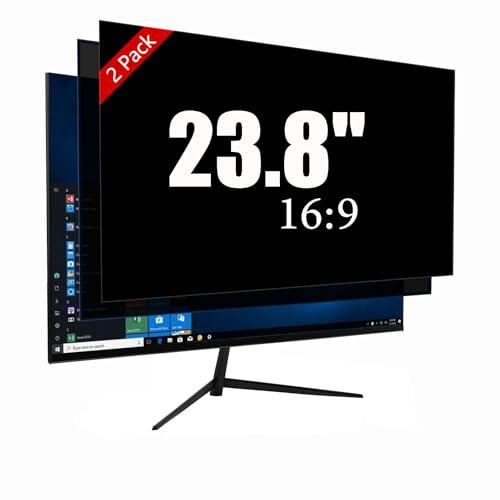
[2 Pack] 23.8 Inch Computer Monitor Privacy Screen, Blue Light Filter

Our verdict: A pair of 23.8 inch filters with blue-light reduction, for a two-screen ThinkVision desk.

This 2-pack holds two 23.8 inch, 16:9 privacy screens with blue-light filtering. It is priced at $25 to $50, so each filter costs less than the single SightPro.

It sits third because two exact-size filters for the price of one is a strong offer, but the blue-light film changes the look of the screen. Blue-light films shift whites toward a warmer tone, which many people like for long evenings and some dislike for color work. For writing, spreadsheets and email it rarely matters. The listing does not tell you how the filters mount.

Buy it for two 23.8 inch monitors used mostly for office work. Skip it for photo or video editing, where color accuracy matters.

Size
23.8 inch
Aspect ratio
16:9
Pack
2 filters
Extra
Blue-light filtering

What we like

  • +Exact 23.8 inch size, in pairs
  • +Blue-light filtering included
  • +Lower cost per filter
  • +Good for dual monitors

Watch out for

  • −Film warms the picture
  • −Mounting method not described

Buy it if: Buyers with a 23.8 inch ThinkVision monitor who also want blue-light reduction.

Skip it if: You do color-critical work.

4

Best Single 24 Inch

SightPro 24 Inch 16:9 Computer Privacy Screen Filter for Monitor

Our verdict: A single filter for a true 24 inch, 16:9 screen from the same maker.

The SightPro 24 inch filter is a single unit for 24 inch, 16:9 monitors. The price is in the $25 to $50 range.

Fourth place goes to it because the 24 inch size is a narrower fit for Lenovo's range. Some ThinkVision monitors use a true 24 inch panel, mostly in the newer lines, and for those this filter is right. For the many 23.8 inch ones, it may leave a margin on the edge. It is otherwise the same as the 23.8 inch version, so choose by your panel's real size.

Buy it if your label says 24 inch and you only have one screen. Measure before ordering to avoid a return.

Size
24 inch
Aspect ratio
16:9
Pack
Single filter
Price bracket
$25 to $50

What we like

  • +Fits true 24 inch panels
  • +Single filter keeps cost low
  • +Same maker as the leader
  • +Clear size and ratio

Watch out for

  • −May not suit 23.8 inch panels
  • −Few details on mounting

Buy it if: Buyers with a single 24 inch ThinkVision monitor.

Skip it if: Your panel measures 23.8 inches.

5

Best for Compact Monitors

SightPro 21.5 Inch 16:9 Computer Privacy Screen Filter for Monitor

Our verdict: A single 21.5 inch, 16:9 filter for entry-level ThinkVision screens.

This SightPro filter fits 21.5 inch, 16:9 monitors and is sold as a single unit. The listing puts it at $25 to $50.

It lands fifth because the 21.5 inch size is less common now, though it is still found on entry-level office and reception ThinkVision monitors. Small screens in public-facing roles, such as a front desk, are the very place a privacy filter earns its keep, so this is not a minor use case. The listing offers nothing beyond size and ratio.

Buy it for a 21.5 inch monitor at a reception desk, a till or a clinic. Confirm the size on the monitor's label first.

Size
21.5 inch
Aspect ratio
16:9
Pack
Single filter
Price bracket
$25 to $50

What we like

  • +Fits 21.5 inch panels
  • +Useful for reception desks
  • +Single filter
  • +Clear listing of size

Watch out for

  • −Less common size
  • −No other listed features

Buy it if: Buyers with a 21.5 inch entry-level ThinkVision monitor.

Skip it if: Your monitor is 23.8 inch or larger.

6

Best for 16:10 Panels

Vxaop [2-Pack] 22 Inch Computer Privacy Screen Filter (16:10 Aspect Ratio)

Our verdict: A pair of 22 inch, 16:10 filters for older ThinkVision monitors.

The Vxaop pack has two 22 inch filters cut for a 16:10 aspect ratio, priced at $25 to $50.

It ranks last because it addresses a narrow case. Older Lenovo ThinkVision monitors of 22 inches used a 16:10 shape, with a taller picture than today's 16:9 panels, and a standard filter will not cover them. For those screens, this pair is the correct shape. For modern 16:9 monitors, it will be wrong.

Choose it only if your older ThinkVision measures 16:10. If in doubt, measure the visible screen width and height and compare the ratio.

Size
22 inch
Aspect ratio
16:10
Pack
2 filters
Price bracket
$25 to $50

What we like

  • +Correct shape for 16:10 screens
  • +Two filters per pack
  • +Lower price band
  • +Compact 22 inch size

Watch out for

  • −Wrong shape for 16:9 monitors
  • −Few listing details

Buy it if: Buyers with an older or compact ThinkVision monitor using a 16:10 aspect ratio.

Skip it if: Your Lenovo monitor is a modern 16:9 model.

Methodology

How We Ranked These

Exact size match

We ranked filters by how closely their diagonal matches common ThinkVision panels, particularly the true 23.8 inch size.

Aspect ratio

We checked 16:9 against 16:10 listings, as the wrong ratio leaves part of the screen uncovered.

Pack count and value

We compared singles with pairs by cost per screen, because dual-monitor desks are common in offices.

Removability

We looked for removable designs, which let you share a screen and restore privacy afterward.

Extras and listing clarity

We considered blue-light films and how much each listing tells you about mounting and performance.

Every Primea Score uses the same weights: Performance 30% · Build & Materials 20% · Everyday Usability 20% · Value 20% · Owner Satisfaction 10%. Full scoring rules

Buyer's guide

How to Pick the Right One for You

By ThinkVision Panel Size

Match the real diagonal printed on the monitor's label, not the rounded number on the box.

Your monitorOur pick
23.8 inch, one screenSightPro 23.8 Inch 16:9 Privacy Screen Filter
23.8 inch, two screens[2 Pack] 23.8 Inch Monitor Privacy Screen, Blue Light Filter
True 24 inchSightPro 24 Inch 16:9 Privacy Screen Filter
21.5 inchSightPro 21.5 Inch 16:9 Privacy Screen Filter

By Budget

SpendOur pick
$25 to $50, singleSightPro 23.8 Inch 16:9 Privacy Screen Filter
$25 to $50, pair[2 Pack] 23.8 Inch Monitor Privacy Screen
$25 to $50, older panelVxaop [2-Pack] 22 Inch Privacy Screen Filter
$50 to $100Peslv [2-Pack] 24 Inch Privacy Screen

Plain Filter vs Blue-Light Filter

Plain filter

Keeps colors neutral and only dims and narrows the view. Right for design, photo or video work. Picks: SightPro and Peslv.

Blue-light filter

Adds a warmer tint that some find kinder in the evening. Slightly alters colors. Pick: the 23.8 inch 2-pack.

Choose plain if color matters, and blue-light for general office use.

By Number of Screens

Your deskOur pick
One 23.8 inch monitorSightPro 23.8 Inch 16:9 Privacy Screen Filter
Two 23.8 inch monitors[2 Pack] 23.8 Inch Monitor Privacy Screen
Two true 24 inch monitorsPeslv [2-Pack] 24 Inch Privacy Screen
One older 16:10 monitorVxaop [2-Pack] 22 Inch Privacy Screen Filter

For Reception and Front-Desk Screens Specifically

Look for

A filter that matches the exact size, stays in place and cuts the side view sharply. Front desks face the public, so privacy matters.

In this ranking

The SightPro 21.5 Inch fits small front-desk monitors, and the SightPro 23.8 Inch suits the standard ThinkVision.

When to Spend More

Spend more if

You share your desk screens and need to take the filters off. The Peslv removable pair is worth $50 to $100.

Save if

You have one screen and want basic privacy. The SightPro 23.8 Inch filter keeps the cost low.

Questions

Frequently Asked Questions

Is my Lenovo monitor 23.8 or 24 inch?+

Many ThinkVision office monitors are 23.8 inch panels sold as 24. Check the model number and the specification page. A filter for the wrong size will fit poorly.

What is the most common mistake with these filters?+

Buying by the name on the box. A rounded size or the wrong aspect ratio leaves a gap. Measure the visible screen width and height before ordering.

Is a privacy filter worth it for a Lenovo office monitor?+

It is if the screen can be seen by visitors or coworkers, as in open offices and reception areas. At home it is rarely needed. Weigh the brightness loss against the privacy gain.

How do I fit one?+

Clean the screen, align the filter with the top edge, and attach the strips or tabs as the instructions say. Press gently from the center out. Take care not to trap dust underneath.

Can I use it on a touchscreen?+

Most filters are not made for touch use, and they can interfere with touch response. Check the listing before using one on a touch monitor. If it does not say, assume it is not suitable.

How do I clean the filter?+

Wipe gently with a clean, dry microfiber cloth. Use a lightly damp cloth for smudges, and skip sprays. Store removable filters flat.

Final take

The SightPro 23.8 Inch is the best privacy screen for most Lenovo ThinkVision users, since it matches the real size of the common panel. The Peslv removable pair suits two full 24 inch screens, and the 23.8 inch two-pack adds blue-light reduction. Always check your monitor's exact size and ratio before you order.

More Ranked & Reviewed Guides