
Primea ReviewsAll Reviews

Primea Reviews is reader-supported. When you buy through our Amazon links we may earn a commission, at no extra cost to you. Rankings are set by our editors and never sold. Learn more

Ranked & Reviewed by Primea Reviews

The 6 Best Kindle Alternatives of 2026, Ranked & Reviewed

By the Primea Editorial TeamUpdated November 1, 20269 min read6 products ranked
The 6 Best Kindle Alternatives of 2026, Ranked & Reviewed

The short answer

The Kobo Libra Colour is the best Kindle alternative, with a 7-inch Kaleido 3 color screen, physical page-turn buttons and built-in OverDrive and Libby borrowing. The PocketBook Verse Pro is the pick for big file libraries, and the InkPad Color 3 has the largest color page. The Verse Pro Color and Verse cover compact and budget needs, and the OBOOK6 runs Android apps for the least money.

The Primea Scoreboard

Ranked & Reviewed

  1. The closest thing to a better Kindle for people who borrow library books.

    94Outstanding
    Check price
  2. Opens nearly any file you already own, with no conversion.

    90Excellent
    Check price
  3. The roomiest color page among the closed-system readers.

    87Excellent
    Check price
  4. Color without the Android fiddling, at a mid price.

    84Very Good
    Check price
  5. File freedom and a memory card slot for the least money in the Pocketbook line.

    81Very Good
    Check price
  6. The cheapest way to put real Android apps on an E Ink screen.

    78Very Good
    Check price

People leaving the Kindle usually shop for a better screen and forget that the real lock-in is the library. Before buying anything, work out where your books live: Amazon purchases, a public library app, or a folder of files you bought elsewhere. The device that reads those books without friction is the right one, however good a rival's screen looks in a photo.

Our editors compared six e-readers from their listings, scored on the Primea framework, with library borrowing, file format support, color or black and white, page-turn controls and software design weighted most. Prices appear as buckets only. None of these opens an Amazon purchase natively except the Android-based OBOOK6, so check your library first, because the cheapest reader is the one that opens your books.

Before you buy

What Actually Matters

01

Library borrowing

OverDrive and Libby let you borrow ebooks free from a public library. Some readers include the apps and others need sideloading. Look for the named apps in the product bullets, as with the Kobo Libra Colour, and check that your library system supports the service. Most do, but wait lists apply to popular titles.

02

File formats

Kindle devices are fussy about formats other than Amazon's. Readers with broad support open EPUB and similar files directly. Check the format list on the listing, and remember that DRM-protected purchases from one store do not open on another store's device without a conversion step. Open formats such as EPUB avoid the problem entirely.

03

Color versus black and white

Color E Ink adds hue but slightly dulls the contrast and sharpness of text. It helps for comics and covers. Look for Kaleido in the title and expect softer text than a black-and-white Carta panel. If you mostly read novels, color is a cost with little benefit. Gray pages also refresh faster and read sharper.

04

Page-turn buttons

Buttons let you flip pages without touching the screen, useful one-handed or with gloves. Touch-only readers can feel clumsy. The listing will mention physical buttons if present, and only the Libra Colour here has them, which is a real comfort advantage for long sessions, since touch-only screens smudge and tire your thumb.

05

Android versus closed system

Android lets you install any reading app but requires setup and drains battery faster. A closed system works at once. Check whether the listing says Android, and if you want the Kindle app on the device, the OBOOK6 is the only pick here that supports it. Everything else needs a different route, such as the Kindle app on a tablet.

In-depth reviews

Our Ranked Picks, Reviewed

1

Best Overall

Kobo Libra Colour, 7" Glare-Free Colour E Ink Kaleido 3, Waterproof, Black

Our verdict: The closest thing to a better Kindle for people who borrow library books.

The Libra Colour pairs a 7-inch Kaleido 3 color E Ink screen with physical page-turn buttons and built-in OverDrive and Libby support. It is waterproof, and it costs $200 to $500. Built-in library support means you borrow a book from your public library on the device, with no sideloading or computer needed.

The top spot goes to it as the only pick here that combines buttons, color and native library borrowing. The InkPad Color 3 has a larger page, but no page-turn buttons, and the PocketBook models lack built-in library apps.

Buy it if you borrow from a library and want a Kindle-like experience with better openness. The caveats are the priciest bracket and color text that is less crisp than black and white. Skip it if you buy mostly from Amazon.

Screen
7" Kaleido 3 color E Ink
Library
Built-in OverDrive/Libby
Controls
Physical page-turn buttons
Price bucket
$200-500

What we like

  • +Built-in library borrowing
  • +Real page-turn buttons
  • +Color E Ink screen
  • +Waterproof body

Watch out for

  • −Priciest bracket here
  • −Color panel less crisp than black and white

Buy it if: Library borrowers who want buttons and color.

Skip it if: You buy mostly from Amazon and want its store.

2

Best for File Libraries

PocketBook Verse Pro E-Reader Waterproof, 6" E-Ink Carta HD, Azure

Our verdict: Opens nearly any file you already own, with no conversion.

The Verse Pro has a 6-inch E Ink Carta HD display, waterproofing, text-to-speech, and both Wi-Fi and Bluetooth. Its standout is broad format support, and it costs $100 to $200. Carta HD is a sharper black-and-white panel than the color Kaleido screens, which suits novels.

Second place fits because file freedom is what most people leaving Kindle actually want, and the Verse Pro opens nearly any file you own. It lacks the Libra's built-in library borrowing and buttons, but it undercuts it by a price bracket.

Buy it if you have a large folder of non-Kindle files. The caveats are the small 6-inch screen and no color option. Skip it if you want color or a larger page.

Screen
6" E Ink Carta HD
Formats
Broad format support
Audio
Text-to-speech
Price bucket
$100-200

What we like

  • +Broad file format support
  • +Text-to-speech built in
  • +Waterproof design
  • +Wi-Fi and Bluetooth

Watch out for

  • −Small 6-inch screen
  • −No color option

Buy it if: Readers with a large folder of non-Kindle files.

Skip it if: You want color or a larger page.

3

Best Large Color Screen

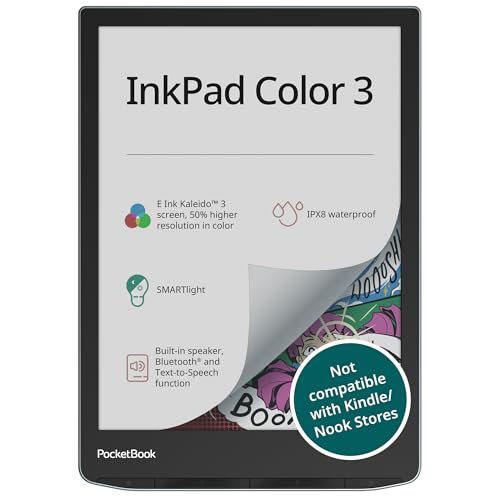
PocketBook InkPad Color 3, 7.8" Color E-Paper Display, Waterproof

Our verdict: The roomiest color page among the closed-system readers.

The InkPad Color 3 has a 7.8-inch color E-paper display, a built-in speaker, 32GB of storage, and a waterproof body, at $200 to $500. Color matters for comics, maps and textbooks, where a gray page loses information, and the speaker supports audio features.

Third place reflects that the larger page suits comics, textbooks and PDFs, yet it costs about as much as the Libra Colour while offering fewer reading conveniences. A bigger page helps technical documents but is awkward in one hand.

Buy it if comics and PDFs are your main reading. The caveats are the bulk for one-handed reading and the costly bracket. Skip it if you want a pocketable reader.

Screen
7.8" color E-paper
Storage
32GB
Audio
Built-in speaker
Price bucket
$200-500

What we like

  • +Largest screen here
  • +32GB storage
  • +Built-in speaker
  • +Waterproof

Watch out for

  • −Bulky for one hand
  • −Costly bracket

Buy it if: Comics, textbooks and PDF readers.

Skip it if: You want a pocketable reader.

4

Best Compact Color

PocketBook Verse Pro Color, 6" E Ink Kaleido 3, IPX8 Waterproof

Our verdict: Color without the Android fiddling, at a mid price.

This is a 6-inch Kaleido 3 color E Ink reader with an IPX8 waterproof rating and a closed, simple software system, for $100 to $200. IPX8 is a strong immersion rating, so a drop in the bath is survivable. A closed system means no Android tinkering: it opens and works.

It lands below the black-and-white Verse Pro since color panels trade sharpness for hue, but it undercuts the larger color readers on price. Against the OBOOK6, it is easier to live with.

Buy it for cheap color in a small body. The caveats are the smaller color page and no Android apps. Skip it if you need the crispest black text, where the Verse Pro is better.

Screen
6" Kaleido 3 color
Water rating
IPX8
Software
Closed, simple system
Price bucket
$100-200

What we like

  • +Color at a mid price
  • +IPX8 waterproofing
  • +Simple software
  • +Compact size

Watch out for

  • −Smaller color page
  • −No Android apps

Buy it if: Readers who want cheap color in a small body.

Skip it if: You need the crispest black text.

5

Best Value Pick

PocketBook Verse E-Reader, 6" E-Ink Carta HD, Bright Blue

Our verdict: File freedom and a memory card slot for the least money in the Pocketbook line.

The standard Verse has a 6-inch Carta HD screen, broad format support, a memory card slot, and up to a month of battery per the listing, at $100 to $200. A memory card slot adds storage cheaply, which the Libra Colour does not allow.

Fifth place comes from how it gives up the waterproofing and extras of the Verse Pro, though it keeps the format freedom. For readers who never take a book near water, the loss is small.

Buy it if you want file freedom and expandable storage on a budget. The caveats are no listed waterproofing and no color. Skip it if you read near water, because the Verse Pro covers that.

Screen
6" E Ink Carta HD
Storage
Memory card slot
Battery
Up to 1 month
Price bucket
$100-200

What we like

  • +Memory card slot
  • +Month-long battery
  • +Broad format support
  • +Budget-friendly

Watch out for

  • −No waterproofing listed
  • −No color

Buy it if: Budget readers with files to open.

Skip it if: You read near water.

6

Best for Android Apps

OBOOK6 eReader (32GB), 6" 300ppi Glare-Free Display, Android

Our verdict: The cheapest way to put real Android apps on an E Ink screen.

The OBOOK6 runs genuine Android on a 6-inch 300ppi glare-free display with 32GB of storage for $50 to $100, the lowest here. Genuine Android means you can install the Kindle app or any other reading app, which the closed systems cannot do.

Last place follows because open Android on a low-cost device is a project, not an appliance, and it comes from a lesser-known brand. Battery life suffers on Android compared with the closed readers.

Buy it for a budget reader that runs your own apps. The caveats are setup effort and a lesser-known brand. Skip it if you want a polished plug-and-play device.

Software
Genuine Android
Display
6" 300ppi glare-free
Storage
32GB
Price bucket
$50-100

What we like

  • +Lowest price here
  • +Runs Android apps
  • +300ppi sharp text
  • +32GB storage

Watch out for

  • −Needs some setup
  • −Less-known brand

Buy it if: Budget readers who want their own apps.

Skip it if: You want a polished plug-and-play device.

Methodology

How We Ranked These

Library access

Whether a reader borrows public library books natively or needs a workaround.

File compatibility

How many book formats open without conversion.

Screen type and size

Color versus black and white, and page size for the content you read.

Controls and build

Physical buttons, waterproofing and how the device feels in one hand.

Price tier

Value within the bracket rather than the absolute cheapest.

Every Primea Score uses the same weights: Performance 30% · Build & Materials 20% · Everyday Usability 20% · Value 20% · Owner Satisfaction 10%. Full scoring rules

Buyer's guide

How to Pick the Right One for You

By Where Your Books Live

Your existing library is the strongest guide.

Your booksOur pick
Public library loansKobo Libra Colour
Folder of EPUBs and filesPocketBook Verse Pro
Comics and PDFsPocketBook InkPad Color 3
Mixed apps including KindleOBOOK6 eReader

By Budget

SpendOur pick
Under $100OBOOK6 eReader
$100-200 black and whitePocketBook Verse
$100-200 colorPocketBook Verse Pro Color
$200-500Kobo Libra Colour

Color vs Black and White

Color

Good for covers, comics and charts but softer for text. The Kobo Libra Colour, InkPad Color 3 and Verse Pro Color use it.

Black and white

Sharper and cheaper for novels. The PocketBook Verse Pro, Verse and OBOOK6 use it.

Most novel readers should default to black and white.

By Durability Needs

Where you readOur pick
Bath or poolPocketBook Verse Pro
Beach with color coversPocketBook Verse Pro Color
Bed, one-handedKobo Libra Colour
Desk, large pagesPocketBook InkPad Color 3

For Library Readers Specifically

Look for

Named OverDrive or Libby support in the listing bullets.

In this ranking

The Kobo Libra Colour lists built-in OverDrive and Libby, making it the straightforward choice.

When to Spend More

Spend more if

You want library borrowing, buttons and color together; the Kobo Libra Colour delivers all three.

Save if

You read plain text novels; the PocketBook Verse or OBOOK6 is enough.

Questions

Frequently Asked Questions

Can these read Kindle books?+

Not natively on Kobo or PocketBook. The Android-based OBOOK6 can run the Kindle app, so it is the route if you have a large Amazon library. Expect more setup and shorter battery life than a closed reader.

Which one works with my public library?+

The Kobo Libra Colour lists built-in OverDrive and Libby support, so you borrow library books directly from your account without a computer. The PocketBook readers rely on other methods, such as sideloading files.

Is color E Ink worth it over black and white?+

Only for comics and illustrated books. Text looks softer, so novel readers should skip it and take the Verse Pro or Verse instead. Color is a bonus only for visual books.

Do I need to convert my files?+

The PocketBook Verse line lists broad format support, so most files open directly. A Kindle would need conversion first, which is a chore the Verse avoids. That saves time if you own many EPUB files.

Are they waterproof?+

The Kobo Libra Colour, Verse Pro, Verse Pro Color and InkPad Color 3 are listed as waterproof. The standard Verse and the OBOOK6 do not list waterproofing, so keep them away from the bath and the pool. A splash is not the same as a dunk.

Is the OBOOK6 a good idea?+

It is a budget Android device with a lesser-known brand. It suits people who like tinkering and want the Kindle app on an E Ink screen. Expect a quirkier experience than a Kobo.

Final take

Buy the Kobo Libra Colour if you borrow from a public library and want buttons and color, and the PocketBook Verse Pro if you already own a folder of non-Kindle files. The InkPad Color 3 suits comics and textbooks, while the Verse Pro Color and Verse cover compact and budget needs. The OBOOK6 is for tinkerers who want Android apps, including the Kindle app.

More Ranked & Reviewed Guides