
Primea ReviewsAll Reviews

Primea Reviews is reader-supported. When you buy through our Amazon links we may earn a commission, at no extra cost to you. Rankings are set by our editors and never sold. Learn more

Ranked & Reviewed by Primea Reviews

The 8 Best Interactive Whiteboards Under $3000 in 2026, Ranked & Reviewed

By the Primea Editorial TeamUpdated November 3, 202611 min read8 products ranked
The 8 Best Interactive Whiteboards Under $3000 in 2026, Ranked & Reviewed

The short answer

The Samsung WAF 75-inch is the best interactive whiteboard in this ranking, with Android 14, Google EDLA certification and an OPS slot that turns it into a Windows display. The JAV 65-inch with a 48MP camera is the best all-in-one for meetings, the JASZDOT 86-inch is the largest, and the KEINONE 55-inch fits small classrooms.

The Primea Scoreboard

Ranked & Reviewed

  1. A 75 inch Android 14 display, EDLA certified, with an OPS slot for a Windows module.

    94Outstanding
    Check price
  2. A 65 inch EDLA board with a 48MP AI camera for hybrid meetings and classes.

    91Excellent
    Check price
  3. An 86 inch 4K board with 20-point infrared touch and one of the longest port lists here.

    89Excellent
    Check price
  4. A rotating EDLA board with Android 14, an AI voice remote and a 6ms stylus.

    87Excellent
    Check price
  5. A 55 inch EDLA board with 20-point touch, AirPlay and built-in teaching tools.

    85Excellent
    Check price
  6. A 75 inch Android 13 board with an octa-core chip, 128GB and 20-point touch.

    83Very Good
    Check price
  7. The 65 inch version of the COOLHOOD, with the same chip, Android 13 and 20-point touch.

    81Very Good
    Check price
  8. A pen-based kit that turns a projected surface up to 90 inches into a touch board for $100 to $200.

    79Very Good
    Check price

The sticker on an interactive whiteboard that matters most is not the resolution. It is whether the Android software is certified by Google. Without EDLA certification, the Play Store and Google services are either missing or sideloaded, and a classroom or office that depends on Google Workspace will find the board half useful. Resolution and touch points are easy to match, and certification and long-term software support are not.

We ranked eight boards from their listings, weighing certification, screen size, touch specification, processor and memory, connectivity and the option of a Windows module. We have not handled any of them, so the maker's touch precision claims are treated as claims. Seven of the eight are priced above $1,000 and the exact price within that range changes often, so check that your chosen size still falls under your $3,000 limit at checkout.

Before you buy

What Actually Matters

01

Google EDLA certification

EDLA means Google has approved the board to run Google Mobile Services, which includes the Play Store, Google Workspace and security updates. Boards without it may run a forked Android with limited apps. Look for the word EDLA in the listing, and for the Android version it runs.

02

Screen size for the room

A common guide is a 65 inch board for a small meeting room of up to about 8 people, 75 inches for a classroom, and 86 inches for large rooms. Sit the furthest viewer within about 6 times the screen height. Measure the wall and check the weight and mount pattern.

03

Touch points and latency

Twenty-point touch lets several students write at once, and latency under about 10ms makes writing feel natural. These figures are the maker's claims and vary with the software. Check for infrared touch and a stated response time.

04

OPS slot and Windows

An OPS slot accepts a small Windows computer module that powers the board when you need Windows apps. It extends a board's life and lets IT teams run their own software. Look for the OPS slot in the ports list and confirm the module is sold separately.

05

Ports and wireless sharing

Front HDMI and USB ports make plugging in a laptop easier, and AirPlay or similar wireless casting helps teachers move around. RS232 and LAN pass-through matter for managed installs. Check the full port list against the equipment you own.

In-depth reviews

Our Ranked Picks, Reviewed

1

Best Overall

SAMSUNG 75" Interactive Display Touch Screen Whiteboard WAF Series, Compatible with Android Devices, EDLA Certified

Our verdict: A 75 inch Android 14 display, EDLA certified, with an OPS slot for a Windows module.

The WAF series runs Android OS 14 with a customisable home screen, and it is EDLA certified, so Google Play, YouTube and Google services are supported. It works with other Android devices and has an OPS slot, which accepts a Windows computer module when you need one. It measures about 67.6 by 40.6 by 3.5 inches. The listing puts it in the over $1,000 price tier.

It wins because a recognised display brand plus EDLA certification plus an OPS slot is the combination that keeps a board useful for years. The OPS slot means you can add Windows later instead of replacing the board. The listing is thin on touch points, latency and processor, so the spec sheet is less detailed than the cheaper boards.

Buy it for a school or company that wants a low-risk, certified board. The caveat is that the OPS module is sold separately.

Size
75 inch
Software
Android OS 14, EDLA certified
Expansion
OPS slot for Windows module
Price tier
Over $1000

What we like

  • +EDLA certified Google services
  • +OPS slot adds Windows later
  • +Android 14 software
  • +Established display brand

Watch out for

  • −Touch spec not detailed
  • −OPS module sold separately

Buy it if: Schools and offices wanting a certified, long-lived board.

Skip it if: You want the most spec detail for the money.

2

Best All-in-One for Meetings

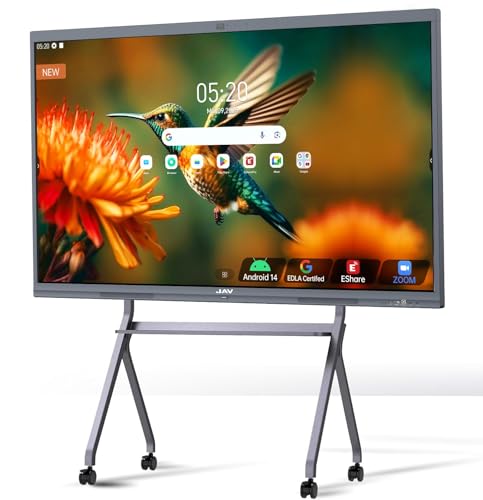
JAV 65" Smart Board Interactive Whiteboard, Google EDLA Certified 4K Touchscreen with 48MP AI Camera

Our verdict: A 65 inch EDLA board with a 48MP AI camera for hybrid meetings and classes.

This JAV 65 inch board is Google EDLA certified with full access to the Play Store, Google Workspace and the Education suite, has a 4K touchscreen and a 48MP AI camera for video calls. The listing positions it for meetings, offices, classrooms, training rooms and hybrid workspaces. The body measures about 58.6 by 36 by 3.8 inches. It is in the over $1,000 tier.

Second place reflects that it matches the Samsung on certification while adding a camera, which saves buying a separate conference camera. It gives up the OPS slot detail and the brand weight. A 65 inch panel also suits rooms of 8 to 10 people, and larger rooms will want the 75 or 86 inch models.

Buy it for a hybrid meeting room. If you already own a conference camera, the Samsung is the safer long-term choice.

Size
65 inch, 4K
Certification
Google EDLA
Camera
48MP AI camera
Price tier
Over $1000

What we like

  • +EDLA gives Play Store access
  • +Built-in 48MP camera
  • +4K touchscreen
  • +Suits hybrid meeting rooms

Watch out for

  • −No OPS slot mentioned
  • −65 inch is small for big rooms

Buy it if: Hybrid meeting rooms and small classrooms.

Skip it if: You already have a conference camera and a large room.

3

Best Large Format

JASZDOT 86'' Smart Board, 4K UHD Interactive Touchscreen Whiteboard, Android 14 8+128GB

Our verdict: An 86 inch 4K board with 20-point infrared touch and one of the longest port lists here.

The JASZDOT is an 86 inch 4K display running Android 14 with 8GB of RAM and 128GB of storage, over 400 nits of brightness, 20-point infrared touch with a stated plus or minus 1mm precision and 6ms response. Connectors are extensive: front USB, HDMI and touch ports, rear TOUCH, USB, TF card, HDMI, RS232 and headphone jack, and bottom LAN in and out, HDMI, VGA, mic, AV, coaxial and DisplayPort. It is about 76 by 45 by 3.5 inches and sits in the over $1,000 tier.

It places third because the size and connectivity are unmatched and the spec sheet is the most detailed, but the listing does not mention EDLA certification, so Google services may be limited. At 86 inches it also needs a wall mount that can take the weight, and a larger budget for installation.

Choose it for a big training room or classroom. Confirm the app situation before buying if you rely on Google Workspace.

Size
86 inch, 4K, 400+ nits
System
Android 14, 8GB RAM, 128GB
Touch
20-point IR, 6ms, 1mm stated
Ports
HDMI, USB, LAN, VGA, DP, RS232

What we like

  • +Largest screen in the ranking
  • +Very complete port selection
  • +Detailed touch specification
  • +Front-panel USB and HDMI

Watch out for

  • −EDLA not mentioned
  • −Heavy, needs a rated mount

Buy it if: Large training rooms and big classrooms.

Skip it if: You depend on certified Google services.

4

Best Rotatable Board

JAV Smart Board, Interactive Whiteboard with EDLA Certified for Office and Classroom, Digital Whiteboard Rotatable

Our verdict: A rotating EDLA board with Android 14, an AI voice remote and a 6ms stylus.

This JAV board runs Android 14 with 8GB of RAM and 128GB of storage, is Google EDLA certified, supports WiFi 5, has an AI voice remote and a stated 6ms stylus response. A gravity sensor lets the screen rotate between landscape and portrait, and the listing adds live broadcast features, the FancShare app for wireless sharing and a live prompter that shows speech text. It is in the over $1,000 tier.

Fourth place reflects its niche: rotation and live-prompter features suit creators and presenters more than a classroom, and the listing does not state a screen size. The EDLA certification and the 8GB and 128GB spec are good for the price.

Buy it if you present or broadcast from the board. Confirm the screen size on the page before ordering.

System
Android 14, 8GB RAM, 128GB
Certification
Google EDLA
Stylus
6ms response
Special
Auto-rotate, AI voice remote

What we like

  • +EDLA certification listed
  • +Rotates for portrait use
  • +AI voice remote
  • +Live prompter for presenters

Watch out for

  • −Screen size not clearly stated
  • −Niche features add little to classes

Buy it if: Presenters and creators using portrait layouts.

Skip it if: You need a plain classroom board.

5

Best Compact Classroom Board

Interactive Smart Board for Classroom, 55" 8+128 GB Electronic Digital Whiteboard Built-in Google EDLA

Our verdict: A 55 inch EDLA board with 20-point touch, AirPlay and built-in teaching tools.

The KEINONE is a 55 inch board with 8GB of RAM and 128GB of storage, built-in Google EDLA certification, 20 touch points and 6ms latency. It includes teaching tools such as handwriting recognition and a range of brushes, and connectivity covers AirPlay, WiFi, USB-C and HDMI. The body is about 49.6 by 30.3 by 3.2 inches, and it sits in the over $1,000 tier.

Fifth place follows from size: 55 inches is small for anything larger than a tutoring room or small meeting space, and the listing gives less detail than the leaders. AirPlay support is a real convenience for iPhone and Mac teachers.

Choose it for a small classroom or a home office that wants a certified board. A larger room needs a larger panel.

Size
55 inch
System
8GB RAM, 128GB, Google EDLA
Touch
20 points, 6ms
Connectivity
AirPlay, WiFi, USB-C, HDMI

What we like

  • +AirPlay for Apple devices
  • +EDLA certification
  • +Built-in teaching tools
  • +Compact for small rooms

Watch out for

  • −55 inch is small for groups
  • −Less spec detail than rivals

Buy it if: Small classrooms and tutoring spaces.

Skip it if: You need to reach a large room.

6

Best Value 75 Inch

COOLHOOD 75" Smart Board, 4K UHD Touchscreen Interactive Digital Whiteboard Display, Electronic All-in-One

Our verdict: A 75 inch Android 13 board with an octa-core chip, 128GB and 20-point touch.

The COOLHOOD 75 inch uses an octa-core processor, runs Android 13 with 128GB of storage, supports 20-point multi-touch, wireless screen sharing, and integrates with Zoom, Google Meet, Microsoft Teams and Webex. It has an open app ecosystem with cloud storage. The listing places it in the over $1,000 tier.

Sixth place reflects the software: Android 13 is a version behind the Samsung and the JAV boards, and the listing does not mention EDLA, so Google services depend on what the open ecosystem allows. The processor and 20-point touch are solid for the class.

Buy it for a 75 inch screen at a lower rank. Check how the Play Store and Workspace are handled before relying on them.

Size
75 inch, 4K
System
Android 13, octa-core, 128GB
Touch
20-point multi-touch
Conferencing
Zoom, Meet, Teams, Webex

What we like

  • +Large 75 inch panel
  • +Octa-core processor
  • +Works with major video platforms
  • +Wireless screen sharing

Watch out for

  • −Android 13, no EDLA mentioned
  • −RAM not stated

Buy it if: Meeting rooms that want a large 4K board.

Skip it if: Certified Google services are a must.

7

Best Mid-Size Value

COOLHOOD 65" Smart Board, 4K UHD Touchscreen Interactive Digital Whiteboard Display, Electronic All-in-One

Our verdict: The 65 inch version of the COOLHOOD, with the same chip, Android 13 and 20-point touch.

The 65 inch COOLHOOD shares the 75 inch model's octa-core processor, Android 13 system and 128GB of storage, 20-point multi-touch, wireless sharing and video conferencing support. The listing says it has an open app ecosystem and cloud storage. It is about 58 by 35 by 3 inches in the listing and sits in the over $1,000 tier.

It places seventh because it duplicates the larger model at a smaller size, with the same software limits, while the JAV 65 inch offers EDLA and a camera. The only reason to prefer it is price.

Choose it for a 65 inch panel at a lower cost. Compare it with the JAV before buying.

Size
65 inch, 4K
System
Android 13, 128GB
Touch
20-point multi-touch
Price tier
Over $1000

What we like

  • +Same hardware as the 75 inch
  • +Video platform integration
  • +Wireless screen sharing
  • +Suits small meeting rooms

Watch out for

  • −No EDLA mentioned
  • −JAV 65 inch has more features

Buy it if: Small meeting rooms on a tighter budget.

Skip it if: You want EDLA or a built-in camera.

8

Best Budget Alternative

Portable Interactive Whiteboard, Smart Teaching Whiteboard, Long Focus Interactive Screen, Auto Calibration

Our verdict: A pen-based kit that turns a projected surface up to 90 inches into a touch board for $100 to $200.

This Design-Pie kit is not a screen at all. It is a smart pen system that connects to a Windows computer by USB and to a projector by HDMI or VGA, turning almost any projection surface into an interactive one up to 90 inches. A 360 degree adjustable sensor, auto calibration and a pen for writing and cursor control are included, and the listing says it can block strong light interference. It costs $100 to $200.

It ranks last because it requires a projector and a Windows PC, which are extra costs, and the experience is far from a self-contained smart board. For a fraction of the price it brings interactivity to an existing projector.

Choose it if you already own a projector and want to try interactive teaching. Anyone who wants an all-in-one board should look higher up.

Type
Pen sensor kit for projectors
Surface
Up to 90 inches
Connection
USB to PC, HDMI or VGA
Price tier
$100 to $200

What we like

  • +Fraction of the price
  • +Works with an existing projector
  • +Auto calibration
  • +Portable

Watch out for

  • −Needs a projector and a PC
  • −Windows listed as the supported OS

Buy it if: Teachers who already own a projector.

Skip it if: You want a self-contained touch display.

Methodology

How We Ranked These

Software certification

Google EDLA certification, Android version and app access carry the most weight, since they decide how useful the board is after the first week.

Screen size and sharpness

We compare panel size and 4K resolution against typical room sizes and viewing distances.

Touch performance

Touch points, stated latency and precision describe how natural writing feels, though they are maker claims.

Connectivity and expansion

OPS slots, front ports, wireless sharing and conferencing support decide how easily the board fits your equipment.

Value against the cap

Seven boards are above $1,000, and we weigh specification depth against that cost and the $3,000 limit.

Every Primea Score uses the same weights: Performance 30% · Build & Materials 20% · Everyday Usability 20% · Value 20% · Owner Satisfaction 10%. Full scoring rules

Buyer's guide

How to Pick the Right One for You

By Room Size

Panel size should match how many people sit in the room and how far back they are.

RoomOur pick
Tutoring room or small officeKEINONE 55 Inch Interactive Smart Board
Small meeting roomJAV 65 Inch Smart Board with 48MP Camera
Classroom of 20 to 30SAMSUNG 75 Inch Interactive Display WAF Series
Large training roomJASZDOT 86 Inch Smart Board
Presenting or broadcastingJAV Rotatable Smart Board

By Budget

SpendOur pick
$100 to $200, existing projectorDesign-Pie Portable Interactive Whiteboard Kit
Over $1000, smallest boardKEINONE 55 Inch Interactive Smart Board
Over $1000, mid-rangeCOOLHOOD 65 Inch Smart Board
Up to your $3,000 limit, best long-termSAMSUNG 75 Inch Interactive Display WAF Series

EDLA Certified vs Open Android

EDLA certified

Includes Google Play, Workspace and security updates. The Samsung, both JAV boards and the KEINONE list it, and it is the safer choice for schools using Google tools.

Open Android

The COOLHOOD boards offer an open ecosystem but do not mention EDLA, so apps may need sideloading and updates depend on the maker.

Choose EDLA certified unless you have confirmed the apps you need run on the open board.

By Expansion Needs

NeedOur pick
Add Windows laterSAMSUNG 75 Inch Interactive Display WAF Series
Most ports and RS232JASZDOT 86 Inch Smart Board
Built-in cameraJAV 65 Inch Smart Board with 48MP Camera
AirPlay for Apple devicesKEINONE 55 Inch Interactive Smart Board

For Classrooms Specifically

Look for

EDLA certification, 20-point touch so groups can write together, a size of 75 inches or more for rows of desks, and a warranty that covers the panel.

In this ranking

The Samsung 75 inch pairs EDLA with an OPS slot, the KEINONE adds teaching tools and AirPlay at 55 inches, and the JASZDOT offers 86 inches for large classes.

When to Spend More

Spend more if

You need a managed fleet, a warranty with on-site service or a board that is installed for a decade. Established education brands offer those, and budgets to $3,000 reach good 75 inch and 86 inch panels.

Save if

You already have a projector and a Windows PC. The Design-Pie kit costs $100 to $200 and adds touch to a surface up to 90 inches.

Questions

Frequently Asked Questions

Do these boards work with a Mac or iPad?+

The Android boards support wireless casting, and the KEINONE lists AirPlay for Apple devices. The Design-Pie kit lists Windows as its supported operating system, so it is not for Mac users.

What is the common mistake when buying an interactive whiteboard?+

Buying for resolution and ignoring certification and mounting. A board without EDLA can lose app access, and a large board needs a wall that can bear its weight, so budget for the mount and installation.

Is a Samsung worth more than a no-name board?+

For schools and companies, usually yes. The Samsung is EDLA certified, has an OPS slot and comes from a brand with a service network, while the lesser-known boards offer more specifications for less money.

How do I set up a smart board?+

Mount it on a wall bracket rated for its weight, connect power and network, then complete the Android setup and sign in. Run calibration if the touch is offset, and update the firmware.

How do I maintain the screen?+

Wipe it with a soft, slightly damp microfibre cloth and no solvents. Keep the vents clear, and use the stylus or finger rather than sharp objects.

Will a 65 inch board be big enough for a class?+

It suits small groups, but students beyond about 4 to 5 metres will struggle to read small text. For a normal classroom, 75 inches or more is the safer choice.

Final take

The Samsung WAF 75-inch is the best interactive whiteboard under $3000 because EDLA certification, Android 14 and an OPS slot protect your investment. The JAV 65-inch with a camera is the better pick for hybrid meetings, and the JASZDOT 86-inch for large rooms. Confirm prices at checkout, since seven of these boards list above $1,000, and keep the cheap Design-Pie kit in mind if you already own a projector.

More Ranked & Reviewed Guides