
Primea ReviewsAll Reviews

Primea Reviews is reader-supported. When you buy through our Amazon links we may earn a commission, at no extra cost to you. Rankings are set by our editors and never sold. Learn more

Ranked & Reviewed by Primea Reviews

The 6 Best Ergonomic Keyboards for Wrist Pain of 2026, Ranked & Reviewed

By the Primea Editorial TeamUpdated November 1, 20269 min read6 products ranked
The 6 Best Ergonomic Keyboards for Wrist Pain of 2026, Ranked & Reviewed

The short answer

The Logitech Ergo K860 is the best ergonomic keyboard for wrist pain: a curved split layout, negative tilt and a dense foam wrist rest. Adding the MX Vertical mouse treats both hands, while the Wave Keys is the gentlest entry point. The Arteck and Perixx are budget splits with real tradeoffs.

The Primea Scoreboard

Ranked & Reviewed

  1. Curved split layout, negative tilt and a dense foam wrist rest. The reference ergonomic board.

    94Outstanding
    Check price
  2. The K860 plus a 57-degree vertical mouse. Treats both hands, not just the typing one.

    92Outstanding
    Check price
  3. The K860 with a smaller vertical mouse for medium and small hands.

    90Excellent
    Check price
  4. A one-piece wave with a cushioned palm rest. The least jarring way to try ergonomics.

    88Excellent
    Check price
  5. Split, angled keys and a cushioned rest over a 2.4G wireless receiver.

    86Excellent
    Check price
  6. A wired, fixed-angle split with a padded wrist rest. The cheapest true split here.

    84Very Good
    Check price

Almost every piece of wrist advice about keyboards comes down to one idea: keep the wrists straight. A flat board bends them upward, while a split, tilted layout lets the hands and forearms rest closer to where they naturally sit. That is the design goal behind every keyboard in this ranking, from a gentle curve to a fully separated frame.

The less obvious point is that the keyboard is only half the story, because the mouse often does as much damage. So we reviewed six models, including three that pair a keyboard with a vertical mouse, and scored them on the Primea framework. None of this replaces advice from a doctor, and persistent pain, numbness or tingling deserves a medical opinion rather than a product swap.

Before you buy

What Actually Matters

01

Split, wave or flat

A split separates the two halves so your hands sit shoulder width apart, a wave curves the keys in one piece, and a flat board does neither. A split changes posture the most and takes days to learn. Check the title for the words split or wave before buying, and be wary of listings that call a flat board ergonomic.

02

Negative tilt

Negative tilt makes the front edge higher than the back, so the wrists do not bend upward. Most standard keyboard feet tilt the other way and push the hands into extension. Look for negative tilt or reverse tilt in the specs, as the Logitech K860 lists. Many cheaper splits omit it, including the Perixx.

03

Mouse matters too

A flat mouse rotates the forearm, which strains the wrist. A vertical mouse at about 57 degrees keeps the hand in a handshake position. If you click all day, pick a bundle. Check the angle in the listing, and size the mouse to your hand, since the MX Vertical is larger than the Lift.

04

Connection type

Bluetooth is convenient but can drop in crowded offices or when many devices compete. A 2.4G receiver or a wired USB link is steadier. If your work depends on constant typing, consider the more stable connection. The Arteck uses 2.4G, the Perixx is wired, and the Logitech boards offer Bluetooth or a Logi Bolt receiver.

05

Adjust gradually

A new split layout feels odd at first, and speed drops for days. Switch for part of the day before committing, and keep your old keyboard handy during the transition. Persistent pain, numbness or tingling should be checked by a doctor, not solved by a keyboard alone, however good the layout is.

In-depth reviews

Our Ranked Picks, Reviewed

1

Best Overall

Logitech Ergo K860 Wireless Ergonomic Split Keyboard with Wrist Rest

Our verdict: Curved split layout, negative tilt and a dense foam wrist rest. The reference ergonomic board.

Logitech built the Ergo K860 around two ideas, a curved split and negative tilt, then added a dense foam wrist rest, multi-device switching and a rechargeable battery. Negative tilt lowers the back edge so the wrists do not bend upward, the reverse of what most keyboard feet do. Splitting the halves keeps the forearms closer to shoulder width.

It ranks first because it delivers the full posture change in one proven board. The Wave Keys is far gentler but only curves, and the Arteck and Perixx lack its negative tilt and refinement.

Buy it for full-time typing where a real layout change matters. The caveat is adjustment: speed drops for days, and it is bigger than a standard board. Skip it if you want zero learning time.

Layout
Curved split, negative tilt
Wrist rest
Integrated dense foam
Connection
Bluetooth or Logi Bolt
Battery
Rechargeable

What we like

  • +Split layout and negative tilt
  • +Dense foam wrist rest
  • +Multi-device switching
  • +Rechargeable battery

Watch out for

  • −Needs days to adjust to
  • −Bigger than a standard keyboard

Buy it if: Full-time typists wanting a proven ergonomic layout.

Skip it if: You want zero adjustment time.

2

Best Keyboard and Mouse Bundle

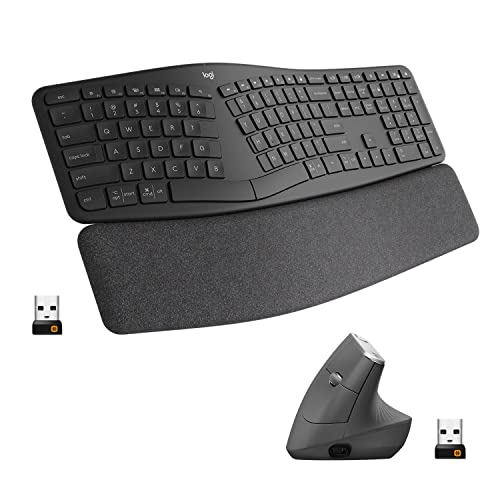
Logitech Ergo K860 Keyboard and MX Vertical Wireless Mouse

Our verdict: The K860 plus a 57-degree vertical mouse. Treats both hands, not just the typing one.

This bundle teams the split K860 with the MX Vertical, a rechargeable wireless mouse tilted to 57 degrees. A flat mouse rotates the forearm, so the hand twists to rest on it, while a 57 degree handshake grip keeps the wrist closer to neutral. Full-size dimensions suit larger hands.

It ranks second because it costs more than the keyboard alone, yet treats the whole problem, not just the typing hand. Against the Lift bundle below, it gives a larger mouse body.

Buy it if you spend hours clicking and want a matched set. Skip it if you only want to change the keyboard. The mouse also requires time to adapt to, because the vertical grip feels odd for the first days.

Keyboard
Ergo K860 with wrist rest
Mouse
MX Vertical, 57 degrees
Pairing
Wireless for both
Battery
Rechargeable mouse

What we like

  • +Keyboard and mouse both ergonomic
  • +57-degree handshake grip
  • +Full-size mouse for larger hands
  • +Wireless for both devices

Watch out for

  • −Higher cost than keyboard alone
  • −Mouse needs time to adapt to

Buy it if: Heavy mouse users wanting a matched set.

Skip it if: You only want to change the keyboard.

3

Best Compact Vertical Mouse Bundle

Logitech Ergo K860 Keyboard and Lift Vertical Ergonomic Mouse

Our verdict: The K860 with a smaller vertical mouse for medium and small hands.

Swap in the Lift and the K860 set gets a compact vertical mouse at 57 degrees, quiet buttons, and the same Bluetooth or Logi Bolt connection. Smaller hands often struggle with full-size vertical mice, where the thumb rest sits too far out, and the Lift's smaller shell solves that.

It ranks third because the mouse is too small for large hands, and it sits in the same price tier as the MX Vertical bundle. The keyboard itself is identical.

Buy it for small to medium hands and compact desks, or where clicking noise matters. Skip it if you have large hands, since the shell will feel cramped. The vertical grip also needs adjusting to, so use it for part of the day at first.

Keyboard
Ergo K860 curved split
Mouse
Lift, 57 degrees
Connection
Bluetooth or Logi Bolt
Mouse size
Compact, quiet clicks

What we like

  • +Compact vertical mouse
  • +Quiet click buttons
  • +Matches the K860 layout
  • +Suits smaller hands

Watch out for

  • −Too small for large hands
  • −Vertical grip needs adjusting to

Buy it if: Small to medium hands and compact desks.

Skip it if: You have large hands.

4

Best Entry Point

Logitech Wave Keys Wireless Ergonomic Keyboard

Our verdict: A one-piece wave with a cushioned palm rest. The least jarring way to try ergonomics.

Logitech's Wave Keys keeps everything in one gently curved frame, with a cushioned palm rest attached, Bluetooth or a USB receiver, and long battery life. It is not a true split, so the hands stay close together. The curve and tilt change posture mildly, which means almost no learning curve.

It ranks fourth because the ergonomic change is smaller than the K860's split and negative tilt. It does cost far less, and it beats the Arteck on polish and Mac compatibility through Bluetooth.

Buy it if you are trying ergonomics for the first time and want the least jarring option. Skip it if you want a full split layout. For a person with real wrist discomfort, a stronger layout change may suit better.

Layout
One-piece wave, not a split
Rest
Cushioned palm rest
Connection
Bluetooth or USB receiver
Battery
Extended life

What we like

  • +Gentle wave and tilt
  • +Almost no learning curve
  • +Cushioned palm rest
  • +Compact

Watch out for

  • −Not a true split
  • −Smaller ergonomic change

Buy it if: First-time ergonomic keyboard buyers.

Skip it if: You want a full split layout.

5

Best Adjustable Split

Arteck Split Ergonomic Keyboard with Cushioned Wrist Rest

Our verdict: Split, angled keys and a cushioned rest over a 2.4G wireless receiver.

Arteck gives you an angled split, a cushioned rest for wrist and palm, and a 2.4G dongle that parks inside the board. It is built for Windows desktops and laptops. A true split at this price is rare, and a 2.4G receiver is steadier than Bluetooth in a crowded office.

It ranks fifth because it works with Windows only and is less refined than the Logitech boards. It lists no negative tilt, which is the feature that most reduces upward wrist bend.

Buy it if you use Windows and want an affordable split. Skip it if you use a Mac. The wrist rest is cushioned, but rest your hands between bursts instead of while typing.

Layout
Split, angled keys
Rest
Cushioned wrist and palm
Connection
2.4G USB receiver
Compatibility
Windows desktop and laptop

What we like

  • +True split layout
  • +Cushioned wrist rest
  • +Stable 2.4G receiver
  • +Dongle stores on board

Watch out for

  • −Windows only
  • −Less refined than Logitech

Buy it if: Windows users wanting an affordable split.

Skip it if: You use a Mac.

6

Best Budget Split Keyboard

Perixx PERIBOARD-512B Wired Ergonomic Split Keyboard with Wrist Rest

Our verdict: A wired, fixed-angle split with a padded wrist rest. The cheapest true split here.

Perixx's PERIBOARD-512B plugs in over USB, with no battery to charge and no pairing to fail, and splits the keys at a fixed angle over a padded rest. A wired link never drops or needs charging, and the natural typing curve separates the hands.

It ranks last because it has no negative tilt and it is wired only. The Arteck gives wireless freedom, and the K860 adds tilt and multi-device switching. It is still the cheapest true split here.

Buy it for a simple, low-cost split on one computer. Skip it if you want wireless or multi-device switching. The fixed angle cannot be adjusted to your shoulder width, so check the fit before relying on it for long days.

Connection
Wired USB
Layout
Fixed-angle split
Rest
Padded wrist rest
Power
No battery needed

What we like

  • +Cheapest true split here
  • +No batteries or pairing
  • +Padded wrist rest
  • +Natural typing curve

Watch out for

  • −No negative tilt
  • −Wired only

Buy it if: Budget buyers wanting a simple wired split.

Skip it if: You want wireless or multi-device switching.

Methodology

How We Ranked These

Wrist position

We looked at split, curve and negative tilt, since they decide how straight the wrists sit while typing.

Adjustment effort

Gentle waves and full splits need different amounts of learning, so each was ranked against the user it suits.

Palm and wrist support

Foam, cushioned and padded rests were compared on how they support the heel of the hand.

Mouse pairing

Vertical mouse bundles were judged separately because mouse use is a major source of wrist strain.

Value within the field

Features were judged against price bracket relative to the others in this guide.

Every Primea Score uses the same weights: Performance 30% · Build & Materials 20% · Everyday Usability 20% · Value 20% · Owner Satisfaction 10%. Full scoring rules

Buyer's guide

How to Pick the Right One for You

By Adjustment Level

Pick how big a change you want to make.

Your goalOur pick
Gentle first stepLogitech Wave Keys Wireless Ergonomic Keyboard
Full split and tiltLogitech Ergo K860 Wireless Ergonomic Split Keyboard with Wrist Rest
Split on a budgetPerixx PERIBOARD-512B Wired Ergonomic Split Keyboard with Wrist Rest
Adjustable split, WindowsArteck Split Ergonomic Keyboard with Cushioned Wrist Rest

By Budget

SpendOur pick
LowestPerixx PERIBOARD-512B Wired Ergonomic Split Keyboard with Wrist Rest
Mid-rangeArteck Split Ergonomic Keyboard with Cushioned Wrist Rest
Premium keyboardLogitech Ergo K860 Wireless Ergonomic Split Keyboard with Wrist Rest
Full setLogitech Ergo K860 Keyboard and MX Vertical Wireless Mouse

Split vs Wave

Split

Separates the halves for a more neutral posture, with a few days of adjustment. Picks: Logitech Ergo K860 and its bundles, Arteck, Perixx.

Wave

A gentle one-piece curve with almost no learning curve, but a smaller change. Pick: Logitech Wave Keys.

Most buyers with real wrist pain should start with a split if they can tolerate the adjustment.

By Hand Size and Mouse Use

You areOur pick
Large hands, heavy mouse useLogitech Ergo K860 Keyboard and MX Vertical Wireless Mouse
Small to medium handsLogitech Ergo K860 Keyboard and Lift Vertical Ergonomic Mouse
Keyboard onlyLogitech Ergo K860 Wireless Ergonomic Split Keyboard with Wrist Rest
Shared desk, quiet clicksLogitech Ergo K860 Keyboard and Lift Vertical Ergonomic Mouse

For Windows Offices Specifically

Look for

A steady 2.4G or wired connection, Windows compatibility and a soft rest, without paying for Bluetooth multi-device features.

In this comparison

The Arteck Split Ergonomic Keyboard uses a 2.4G receiver for Windows desktops and laptops.

When to Spend More

Spend more if

You type or click all day. The Logitech Ergo K860 with the MX Vertical treats both hands.

Save if

You want a split without extras. The Perixx PERIBOARD-512B does that for the least.

Questions

Frequently Asked Questions

Will an ergonomic keyboard cure carpal tunnel?+

No keyboard treats a medical condition. A split, tilted layout like the Logitech K860 can reduce strain by keeping wrists straighter. If you have pain, numbness or tingling, see a doctor instead of relying on equipment.

How long does it take to adjust to a split keyboard?+

Typically several days to a couple of weeks. Speed drops at first. Use it for part of the day, then build up. The Logitech Wave Keys needs far less adjustment than the split K860, Arteck or Perixx, so it suits a cautious first step.

Is the Ergo K860 worth it over the Wave Keys?+

If you want a real posture change, yes. The Wave Keys is a gentler, one-piece curve suited to people who just want to try ergonomics, but it lacks the K860's split and negative tilt.

Do I need a vertical mouse too?+

Often, yes. A flat mouse rotates the forearm. The Logitech MX Vertical and Lift sit at 57 degrees so the hand stays in a handshake position. Pick the Lift for smaller hands and the MX Vertical for larger ones.

Does the Arteck work on a Mac?+

It is listed as compatible with Windows desktops and laptops. Mac users should check compatibility first or choose a Logitech board with Bluetooth, such as the K860 or Wave Keys, which pair with Macs.

Is a wrist rest necessary?+

It supports the heel of the hand during pauses. Rest your wrists between bursts, not while typing, so you keep them floating and straight. The K860's foam rest and the Wave Keys' cushion both work that way.

Final take

The Logitech Ergo K860 is the right ergonomic keyboard for most people dealing with wrist strain, because it combines a split layout, negative tilt and a good rest. Add a vertical mouse if you click all day, and start with the Wave Keys if a split feels like too much. See a doctor for persistent symptoms.

More Ranked & Reviewed Guides