

Primea ReviewsAll Reviews

Primea Reviews is reader-supported. When you buy through our Amazon links we may earn a commission, at no extra cost to you. Rankings are set by our editors and never sold. Learn more

Ranked & Reviewed by Primea Reviews

The 7 Best Standing Desk Converters for Two Monitors, Ranked & Reviewed

By the Primea Editorial TeamUpdated November 3, 202611 min read7 products ranked
The 7 Best Standing Desk Converters for Two Monitors, Ranked & Reviewed

The short answer

The Vari VariDesk Pro Plus 48 is the one to buy if you want two monitors on a wide, proven platform, and the Pro Plus 36 gets you the same lift in a smaller footprint. The VERSADESK PowerPro is the best electric option, the Mount-It is the pick if you want arms included, and the VIVO 32 is the budget route to two screens.

The Primea Scoreboard

Ranked & Reviewed

  1. 01
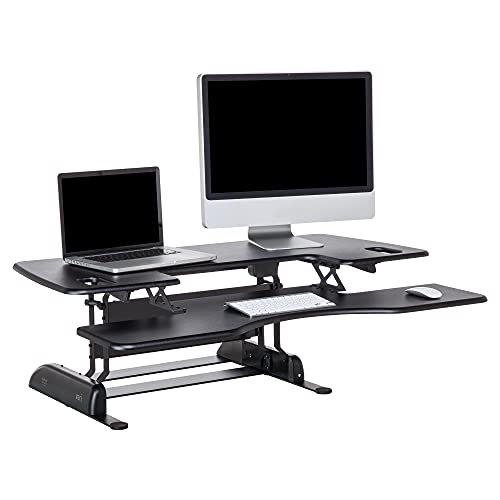
    Vari VariDesk Pro Plus 48

    Best Wide Platform

    Vari VariDesk Pro Plus 48

    The 48 inch platform that gives two monitor bases room to breathe.

    95Outstanding
    Check price
  2. 02
    Vari VariDesk Pro Plus 36

    Best Compact Proven Pick

    Vari VariDesk Pro Plus 36

    Vari's dual-monitor capable 36 inch model at a lower price than the 48.

    93Outstanding
    Check price
  3. A 36 inch platform with push-button electric lift for heavier monitor loads.

    91Excellent
    Check price
  4. Two screen mounts included, so the platform holds the desk and the arms hold the displays.

    89Excellent
    Check price
  5. A 32 inch platform with an integrated stand for two 13 to 30 inch monitors, cheaply.

    87Excellent
    Check price
  6. A 42 inch open platform that lets you place any two monitor stands where you like.

    85Excellent
    Check price
  7. A 36 inch open platform in the $100 to $200 bracket for your own monitor stands.

    83Very Good
    Check price

The usual mistake with a dual monitor converter is measuring the monitors and forgetting the desk. Two screens plus their stands can need more width than the converter platform offers, and a platform that overhangs the desk leaves you with no room for anything else. Width is the first filter, long before lift mechanics or colour.

This ranking sorts seven converters by how well they carry two displays. We reviewed the listings and published specs, comparing platform width, whether monitor mounts are built in, how the lift works, and which price bracket each sits in. Where a listing gives no weight capacity or travel figure, we say so and do not invent one.

Before you buy

What Actually Matters

01

Platform Width

Width decides whether two monitors sit comfortably or crowd each other. Two 27 inch screens plus stands generally want more than 36 inches of clear surface. Measure your monitors with their stands, add room for a keyboard, and compare against the listed platform width and your desk.

02

Monitor Mounting Style

Some converters have an open deck for your own stands, and others integrate arms or a dual stand. Built-in mounts save surface space but need VESA compatible monitors and respect stated size ranges. Check your monitors for mounting holes on the back before choosing.

03

Lift Type

Manual lifts are simple and need no outlet, while electric lifts remove effort when two screens add weight. The easier the lift, the more often people use it. Look for push-button wording on the listing and note whether a power outlet is required.

04

Height Range and Settings

The number of stopping points affects how closely you can match your eye line. The Vari models list 11 settings, which is a useful fine-tuning range. Check the minimum and maximum heights against your own seated and standing elbow heights.

05

Desk Fit and Footprint

A converter must fit the desk beneath it with room to spare for cables and the base. Overhang can make the unit unstable or block drawers. Compare the platform depth and width with your desk, and leave a margin.

In-depth reviews

Our Ranked Picks, Reviewed

1

Best Wide Platform

Vari VariDesk Pro Plus 48

Our verdict: The 48 inch platform that gives two monitor bases room to breathe.

The Pro Plus 48 is a 48 inch wide sit-stand converter with 11 height settings, sold in the $500+ bracket. Its width is the headline: two monitor stands fit side by side with space left for a keyboard and notes.

It is first because width is what a dual setup needs most. A narrower platform forces monitors to crowd the centre or hang off the edge, and the Pro Plus 48 avoids both problems. The 11 height settings let you fine tune where the screens sit relative to your eyes. The cost is the price, the highest here, and the sheer footprint, which only suits a desk wide enough to take a 48 inch unit.

Buy it if you have a large desk, use two full-size screens and want a converter that has a long track record. Skip it if your desk is under about five feet wide or the budget is tight.

Platform width
48 in
Height settings
11
Lift
Manual
Price bracket
$500+

What we like

  • +48 inch platform fits two stands
  • +11 height settings for fine fit
  • +Proven name in sit-stand desks
  • +Room left for keyboard and papers

Watch out for

  • −Highest price in this ranking
  • −Needs a wide desk to fit

Buy it if: People with large desks who run two full-size monitors.

Skip it if: Your desk is narrow or the budget is limited.

2

Best Compact Proven Pick

Vari VariDesk Pro Plus 36

Our verdict: Vari's dual-monitor capable 36 inch model at a lower price than the 48.

The Pro Plus 36 shares the 11 height settings of its larger sibling on a 36 inch platform, in the $200 to $500 bracket. It is the practical way into the Vari line for a standard desk.

It ranks second because it keeps the proven mechanism while costing less and fitting more desks. The tradeoff is directly related to width: two big monitors on 36 inches will sit tight, and it is easier with smaller screens or two compact bases. Choose the 48 if your displays are wide, and this one if desk space is the limit.

It suits most home offices with a desk about four to five feet wide. Skip it if you run two ultrawide or oversized panels.

Platform width
36 in
Height settings
11
Lift
Manual
Price bracket
$200 to $500

What we like

  • +Same 11 height settings as the 48
  • +Fits standard desks better
  • +Lower price than the wide model
  • +Established, widely used design

Watch out for

  • −Two large monitors fit tightly
  • −Still costs more than budget rivals

Buy it if: Home offices that need a proven dual-monitor converter.

Skip it if: You use two oversized or ultrawide screens.

3

Best Electric Lift

VERSADESK PowerPro 36 Inch Electric Standing Desk Converter

Our verdict: A 36 inch platform with push-button electric lift for heavier monitor loads.

The PowerPro is a 36 inch converter with electric push-button lift, in the $200 to $500 bracket. The motor is the whole story, because two monitors and their stands can be heavy enough to make a manual spring lift awkward.

It ranks third because effortless adjustment changes how often you actually stand. A manual unit loaded with two screens needs a deliberate heave, and many owners stop raising it. The electric model removes that friction. It sits behind the Varis because it needs a power outlet near the desk and adds a motor that can eventually fail, and the listing gives no capacity or speed figures to compare.

Pick it if your setup is heavy or you want one-touch changes through the day. Skip it if you want a mechanism with nothing to plug in.

Platform width
36 in
Lift
Electric push-button
Suited to
Heavier dual setups
Price bracket
$200 to $500

What we like

  • +Electric lift needs no effort
  • +Push-button height changes encourage standing
  • +Suits heavier monitor loads
  • +36 inch platform fits most desks

Watch out for

  • −Needs a nearby power outlet
  • −No capacity figure on the listing

Buy it if: Heavy dual-monitor setups where manual lifting is a chore.

Skip it if: You want a purely mechanical unit with no cable.

4

Best Built-In Monitor Arms

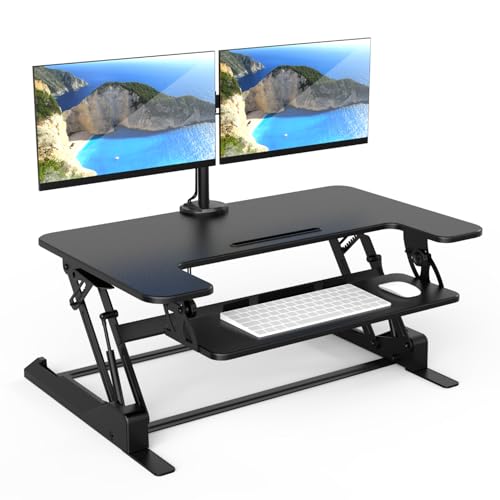
Mount-It! Standing Desk Converter Dual Monitor

Our verdict: Two screen mounts included, so the platform holds the desk and the arms hold the displays.

The Mount-It converter ships with integrated dual monitor mounts, in the $200 to $500 bracket. That moves the screens off the platform and onto arms, which frees surface for the keyboard and mouse.

It ranks fourth because the built-in mounts solve a real problem: monitor stands eat the work surface, and two of them eat a lot. The tradeoff is that monitors must be VESA compatible to use arms, so older panels without mounting holes need an adapter. You also lose the freedom to place each screen anywhere on an open deck.

It is a good buy for VESA-ready monitors and for people who want a tidy desk. Skip it if your screens lack mounting holes.

Monitor mounts
Two included
Monitors
Dual screens
Lift
Manual sit-stand
Price bracket
$200 to $500

What we like

  • +Arms included, no extra purchase
  • +Frees platform space for peripherals
  • +Tidier layout than two stands
  • +Built for dual screens

Watch out for

  • −Monitors need VESA mounting holes
  • −Less freedom than an open platform

Buy it if: Buyers with VESA monitors who want a clean desk.

Skip it if: Your monitors cannot accept an arm.

5

Best Budget Dual Setup

VIVO 32 Inch Standing Desk Converter with Dual Monitor Stand

Our verdict: A 32 inch platform with an integrated stand for two 13 to 30 inch monitors, cheaply.

The VIVO 32 inch converter integrates a dual stand for 13 to 30 inch monitors, in the $100 to $200 bracket. It is the least expensive route in this list to having both screens and the lift in a single box.

It ranks fifth because the 32 inch width and the screen size window set clear limits. Two 27 inch monitors are within range but will fill the platform, and anything larger falls outside the stated 30 inch maximum. It does what it promises for the price, but the smaller footprint leaves less desk room than the wider models.

Choose it for a small desk, two modest monitors and a firm budget. Skip it if you run screens bigger than 30 inches.

Platform width
32 in
Monitor size
13 to 30 in each
Mounting
Integrated dual stand
Price bracket
$100 to $200

What we like

  • +Dual stand integrated into the unit
  • +Supports 13 to 30 inch screens
  • +Low price for a dual setup
  • +Compact 32 inch footprint

Watch out for

  • −Screens above 30 inches do not fit
  • −Limited desk room beside monitors

Buy it if: Small desks and budget-minded dual-screen users.

Skip it if: Your monitors are larger than 30 inches.

6

Most Flexible Layout

VIVO Black 42 Inch Standing Desk Converter DESK-V000VL

Our verdict: A 42 inch open platform that lets you place any two monitor stands where you like.

The DESK-V000VL is a 42 inch open platform with no built-in monitor stand, in the $200 to $500 bracket. You bring your own stands or arms and arrange them freely.

It lands sixth because open space is a double-edged feature. You can mix a 27 inch and a 24 inch screen, or add a laptop riser, without fighting a fixed bracket. But the listing offers little beyond width, so it ranks below units that include mounts or a motor at similar money.

It suits people who already own good monitor stands and want a wide base. Skip it if you want everything included.

Platform width
42 in
Layout
Open platform
Mounts
None included
Price bracket
$200 to $500

What we like

  • +42 inches for free placement
  • +Works with any monitor stands
  • +Mixed screen sizes are fine
  • +Wider than most budget units

Watch out for

  • −No monitor mounts included
  • −Sparse detail on the listing

Buy it if: Owners of existing stands who want a wide base.

Skip it if: You need mounts included in the box.

7

Cheapest Open Platform

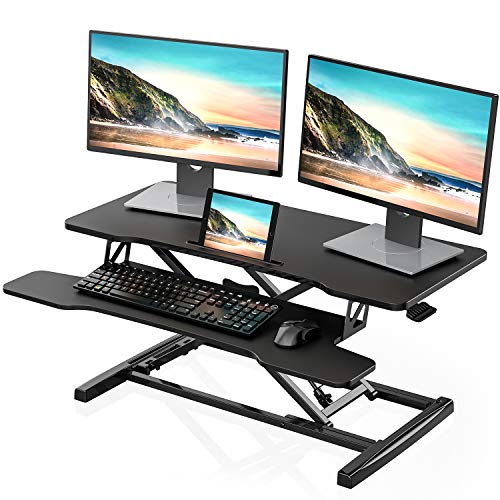
FITUEYES Height Adjustable Standing Desk 36 Inch Wide Converter

Our verdict: A 36 inch open platform in the $100 to $200 bracket for your own monitor stands.

The FITUEYES converter is a 36 inch open sit-stand platform in the $100 to $200 bracket. It offers the width of a mid-range unit without the cost.

It ranks last because open 36 inch decks are tight for two bases, and the listing offers few specifics on capacity or lift mechanism. For two compact monitors on slim stands it works, but you will feel the edges sooner than on the 42 or 48 inch options.

It is a sensible choice for a budget buyer with small monitors. Skip it if you run two large screens.

Platform width
36 in
Layout
Open platform
Mounts
None included
Price bracket
$100 to $200

What we like

  • +Low price for a 36 inch deck
  • +Open surface suits own stands
  • +Simple sit-stand design
  • +Fits many standard desks

Watch out for

  • −Tight for two large monitors
  • −Capacity details missing from listing

Buy it if: Budget buyers running two smaller monitors.

Skip it if: Your monitors are large or very heavy.

Methodology

How We Ranked These

Platform Width

We compared the listed widths against the footprint two monitors and a keyboard really need.

Monitor Support

Built-in mounts, stated screen sizes and open decks were scored on how well they hold two displays.

Lift Mechanism

Manual and electric lifts were judged on effort, adjustment steps and the practical chance owners keep standing.

Desk Fit

Overall size and power needs were weighed against typical home and office desks.

Value for the Bracket

Features were weighed against each price bucket, with credit for clear listings and penalties for missing specs.

Every Primea Score uses the same weights: Performance 30% · Build & Materials 20% · Everyday Usability 20% · Value 20% · Owner Satisfaction 10%. Full scoring rules

Buyer's guide

How to Pick the Right One for You

By Platform Width

Width is the first filter for a two-monitor converter, so match it to your desk and your screens.

PlatformOur pick
32 inchVIVO 32 Inch Dual Monitor Converter
36 inchVari VariDesk Pro Plus 36
42 inchVIVO 42 Inch Converter DESK-V000VL
48 inchVari VariDesk Pro Plus 48

By Budget

SpendOur pick
$100 to $200VIVO 32 Inch Dual Monitor Converter
$100 to $200, open deckFITUEYES 36 Inch Converter
$200 to $500VERSADESK PowerPro 36
$500 and upVari VariDesk Pro Plus 48

Open Platform vs Built-In Mounts

Open platform

You use any monitor stands and place them freely. The VIVO 42 and FITUEYES 36 are the open-deck picks, and they accept screens of mixed sizes.

Built-in mounts

Arms or an integrated stand hold the screens, leaving more room for peripherals. The Mount-It and the VIVO 32 follow this model but require compatible monitors.

Open platforms are the safer default if your monitors vary, and mounts are better when screens are VESA ready.

By Lift Type

LiftOur pick
Electric push-buttonVERSADESK PowerPro 36
Manual with 11 settings, wideVari VariDesk Pro Plus 48
Manual with 11 settings, compactVari VariDesk Pro Plus 36
Manual with built-in armsMount-It Dual Monitor Converter

For Two 27 Inch Monitors Specifically

Look for

At least 42 inches of platform, or arms that lift the screens off the deck. Anything narrower will feel cramped once stands and a keyboard are in place.

In this ranking

The Vari VariDesk Pro Plus 48 and VIVO 42 offer the width, and the Mount-It takes the screens off the surface. The VIVO 32 handles 27 inch screens only snugly.

When to Spend More

Spend more if

You stand for long stretches, use heavy screens or want fewer compromises on width. The Vari 48 and the electric VERSADESK are the upgrades worth considering.

Save if

Your monitors are small and your desk is compact. The VIVO 32 and FITUEYES 36 cover the basics at a modest price.

Questions

Frequently Asked Questions

Will a converter fit my existing desk?+

Measure the desk depth and width, then compare with the platform size on the listing. Leave a margin so the base does not overhang the edge. A 48 inch unit needs a desk at least that wide to sit properly.

What is the biggest mistake with dual monitor converters?+

Buying on lift features and ignoring width. Two monitors plus stands need space, and a narrow platform leaves them cramped. Measure the setup you plan to use before buying.

Is an electric converter worth it over a manual one?+

It is when two heavy monitors make a manual lift tiring. The VERSADESK removes effort, which tends to increase how often you stand. If your screens are light, a manual Vari model saves money and avoids a power cord.

How do I set up monitor arms on a converter?+

Check that your monitors have VESA mounting holes on the rear, then attach the arms to the platform following the instructions. Route cables before raising the unit to avoid tugging on ports. Test the full height range with the screens attached.

Do these converters need maintenance?+

Very little. Occasionally check that fasteners are tight and wipe the surface. On the electric model, keep the cable clear of the lifting mechanism and avoid overloading it.

Can I use ultrawide monitors on these?+

Only with care. The VIVO 32 lists support for screens up to 30 inches, and ultrawide panels are wide and heavy. Choose a wider open platform like the Vari 48 and check your monitor weight and stand width first.

Final take

Buy the Vari VariDesk Pro Plus 48 if you have the desk and want the best two-screen platform. The Pro Plus 36 is the smarter pick for a standard desk, and the VERSADESK PowerPro is the one to get if lifting is a chore. The Mount-It suits VESA monitors, while the VIVO 32 is the budget answer for small screens. Measure your monitors first.

More Ranked & Reviewed Guides