
Primea ReviewsAll Reviews

Primea Reviews is reader-supported. When you buy through our Amazon links we may earn a commission, at no extra cost to you. Rankings are set by our editors and never sold. Learn more

Ranked & Reviewed by Primea Reviews

The 8 Best Digital Calendar Day Clocks of 2026, Ranked & Reviewed

By the Primea Editorial TeamUpdated November 1, 20269 min read8 products ranked
The 8 Best Digital Calendar Day Clocks of 2026, Ranked & Reviewed

The short answer

The Raynic 7 inch clock is the best calendar day clock, with 20 custom alarms, 12 themes, automatic DST and dimming. SSYA spells out the day and month in full, and SSINI offers 15 alarms and five colors for little money. American Lifetime is a purpose-built layout at a higher price.

The Primea Scoreboard

Ranked & Reviewed

  1. The most reminders and the most flexibility on a 7 inch screen.

    95Outstanding
    Check price
  2. A dedicated calendar layout with custom alarms and clear numbers.

    92Outstanding
    Check price
  3. Shows full day and month names, with 12 alarm options.

    90Excellent
    Check price
  4. Fifteen alarms and five display colors for little money.

    88Excellent
    Check price
  5. The same spelled-out dates on a larger screen with extra display modes.

    86Excellent
    Check price
  6. The black model's layout in a white finish.

    84Very Good
    Check price
  7. A 7 inch calendar clock named for elderly readability.

    82Very Good
    Check price
  8. A straightforward 7 inch date clock with few listed extras.

    80Very Good
    Check price

Big digits get all the attention in this category, and they are not the problem. The failure is a display that shortens WEDNESDAY to WED and JANUARY to JAN, because a reader who is confused about the day has to decode the abbreviation before they can use it. That decoding step defeats the point of owning a day and date clock, and it is the first thing worth checking.

We reviewed eight calendar clocks on paper, focusing on screen size, whether day and month are spelled out, alarm count, and extras such as automatic daylight saving and dimming. Several listings omit alarm counts or dimming, so we mark the gaps instead of guessing. Simplicity matters as much as features: a clock with twelve themes can confuse the person it is meant to help.

Before you buy

What Actually Matters

01

Spelled-out dates

A clock can abbreviate the day as WED and the month as JAN, or spell both in full. For someone who is disoriented, full words remove a decoding step. Look for non-abbreviated in the listing title or bullets, as on the SSYA clocks, and ask when a listing is silent, because a retailer photo can show abbreviations the title never mentions.

02

Screen size

Seven inches is the common size, and larger variants help low vision. Size matters because a clock is read from across the room. Check the stated inches in the title, and be wary of vague wording such as larger than standard, which the SSYA variant uses without a number, and compare screens against your seating distance.

03

Alarm count

Alarms double as medication or meal reminders, so more is better, from 12 to 20 here. Confirm that alarms are custom and labeled, not just repeating tones. Look for the exact number in the title, and check whether alarms are easy to set up from the buttons on the clock, because a hard setup means they never get used.

04

Auto DST and dimming

Automatic daylight saving adjustment prevents a clock being an hour wrong twice a year, which matters when the date is a safety cue. A dimmable display keeps a bedroom dark at night. Check the listing for auto DST and dimmable wording. Only the Raynic states both, so for the others assume you will adjust by hand.

05

Simplicity

Too many themes and settings can confuse the person the clock is for. Weigh the feature list against how simple setup needs to be. Look at how many buttons and modes the listing describes, and choose a plainer clock if the user is easily overwhelmed. A clock that is never set correctly is worse than a simple one.

In-depth reviews

Our Ranked Picks, Reviewed

1

Best Overall

Raynic Digital Clock, 7" Digital Calendar Day Clock for Seniors, 20 Custom Alarms & Reminders, 12 Themes, Auto DST, Dimmable

Our verdict: The most reminders and the most flexibility on a 7 inch screen.

The Raynic is a 7 inch calendar day clock with 20 custom alarms and reminders, 12 themes, automatic daylight saving adjustment and a dimmable display, in the $25 to $50 bucket. Alarms are the feature that turns a clock into a care tool. Twenty custom slots can cover medications, meals and appointments across a day, so the clock does more than show the date.

It ranks first because 20 reminders is the highest count here, ahead of the SSINI's 15, and automatic DST plus dimming remove two routine annoyances: an hour error twice a year, and a bright screen in a dark bedroom.

Buy it for someone who needs many daily reminders. The caveat is complexity: 12 themes mean more settings to learn, and a simple needs list may find it busy. Keep the setup minimal when you configure it.

Screen
7 inch
Alarms
20 custom
Themes
12
Extras
Auto DST, dimmable

What we like

  • +Twenty custom alarms
  • +Twelve display themes
  • +Automatic DST
  • +Dimmable screen

Watch out for

  • −More settings to learn
  • −Busy for simple needs

Buy it if: People who need many daily reminders.

Skip it if: You want the simplest possible clock.

2

Best Established Brand

American Lifetime New 2026 Dementia Clock Large Digital Clock for Seniors, Black

Our verdict: A dedicated calendar layout with custom alarms and clear numbers.

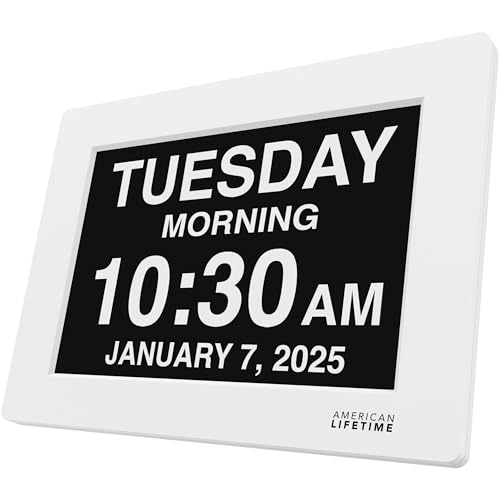
The American Lifetime clock uses a dedicated calendar clock layout with a large display, custom alarms and clear numbers, in black, in the $50 to $100 bucket. It is marketed specifically for memory loss, and the layout is built around that audience rather than adapted from a general clock.

It ranks second because the price sits above most clocks here and the listing offers fewer alarms than the Raynic. Its draw is the purpose-built layout and a product name with a long record in this niche.

Buy it if you value an established product name and a dedicated design. Skip it if you want the most features for the money. For a lower price you get more alarms from the Raynic, and the black clock offers no stated dimming or DST in its listing.

Layout
Calendar clock
Alarms
Custom
Numbers
Clear, large display
Finish
Black

What we like

  • +Dedicated calendar layout
  • +Custom alarms
  • +Clear large numbers
  • +Black finish

Watch out for

  • −Higher price bucket
  • −Fewer alarms than Raynic

Buy it if: Buyers who want a purpose-built dementia clock.

Skip it if: You want the most features for the money.

3

Best Spelled-Out Dates

SSYA Digital Calendar Alarm Clock, 7 Inch, Non-Abbreviated Day & Month

Our verdict: Shows full day and month names, with 12 alarm options.

The SSYA 7 inch clock spells out the day and month in full rather than abbreviating them, uses a calendar-focused layout and offers 12 alarm options, in the $25 to $50 bucket. Full spelling is the point. A reader sees Wednesday and March with no decoding, which is the failure this guide opened with.

It ranks third because 12 alarms trail the Raynic and the SSINI, and the listing names few extras. But the spelled-out text is the real advantage for anyone who struggles with short forms.

Choose it for readers who need Wednesday, not WED. Skip it if you need more than a dozen alarms. The lack of listed DST and dimming wording means you may be adjusting the time by hand twice a year, so confirm in the product page.

Screen
7 inch
Date text
Non-abbreviated
Alarms
12 options
Layout
Calendar-focused

What we like

  • +Full day and month text
  • +Twelve alarm options
  • +Calendar-focused layout
  • +Low price bucket

Watch out for

  • −Fewer alarms than Raynic
  • −Fewer extras

Buy it if: People who need full, spelled-out dates.

Skip it if: You need a large number of alarms.

4

Best Budget Color Options

SSINI Digital Calendar Dementia Alarm Clock with Day and Date for Elderly, 15 Alarms, 5 Colors Display (7in Black)

Our verdict: Fifteen alarms and five display colors for little money.

The SSINI is a 7 inch calendar clock with 15 alarms and five display colors, in the $25 to $50 bucket. The color options let you pick a screen that suits the lighting or the reader's eyes, which is a real convenience in a bright room.

It ranks fourth because it offers fewer alarms than the Raynic and does not list automatic DST or dimming. It does give more alarms than the SSYA, and it is the lowest-cost route to the calendar layout with plenty of reminders. The listing does not state whether the day and month are spelled out.

Choose it if you want color choice and plenty of alarms on a budget. Skip it if you need a guaranteed spelled-out month. Confirm that detail on the product page before buying.

Screen
7 inch
Alarms
15
Colors
5 display options
Layout
Calendar

What we like

  • +Fifteen alarms
  • +Five display colors
  • +Calendar layout
  • +Low price bucket

Watch out for

  • −No auto DST listed
  • −Spelling style not stated

Buy it if: Budget buyers who want many alarms.

Skip it if: You need guaranteed full date wording.

5

Best Larger SSYA

SSYA Digital Calendar Clock, Larger Screen Variant, Non-Abbreviated Day & Month

Our verdict: The same spelled-out dates on a larger screen with extra display modes.

This SSYA variant keeps the non-abbreviated text and adds a larger screen and additional display modes, in the $25 to $50 bucket. Bigger text matters for low vision, where a seven inch display can still be too small from across a room.

It ranks fifth because the listing gives no alarm count, while the 7 inch SSYA states 12. For readers with weaker eyesight, the larger screen may be worth that trade. The exact screen size is not stated either.

Best for low-vision readers who want bigger text and the same spelled-out dates. Skip it if you need a published alarm count. Check the listing for the actual size before ordering, since larger than standard is not a measurement, and compare it with the 7 inch models.

Screen
Larger than standard
Date text
Non-abbreviated
Modes
Additional display modes
Layout
Calendar

What we like

  • +Larger screen
  • +Full day and month text
  • +Extra display modes
  • +Low price bucket

Watch out for

  • −No alarm count listed
  • −Exact size not stated

Buy it if: Readers who want larger text.

Skip it if: You want a stated alarm count.

6

Best White Finish

American Lifetime New 2026 Dementia Clock Large Digital Clock for Seniors, White

Our verdict: The black model's layout in a white finish.

The white American Lifetime clock offers the same calendar clock layout and custom alarms as the black one, in a white finish, in the $50 to $100 bucket. The listing gives no extra features.

It ranks sixth because it duplicates the black version at a similar price and trails the cheaper Raynic on features. The choice between the two American Lifetime models is purely color, which is why it sits just below the black one.

Best for bright rooms and white decor, where a black clock would look out of place. Skip it if you want more alarms for less. A white body can show dust and marks in a care setting, so think about where you will place it before choosing finish over function.

Layout
Calendar clock
Alarms
Custom
Finish
White
Price bucket
$50-100

What we like

  • +Calendar clock layout
  • +Custom alarms
  • +White finish
  • +Same layout as black

Watch out for

  • −Higher price bucket
  • −No extras listed

Buy it if: Rooms with white decor.

Skip it if: You want more features for the money.

7

Best Plain Elderly Clock

Clock with Day and Date for Elderly, 7" Large Display Digital Calendar Clock

Our verdict: A 7 inch calendar clock named for elderly readability.

This is a 7 inch large-display digital calendar clock marketed for elderly users, in the $25 to $50 bucket. The listing details few features beyond the display, so what you know is the size, the layout and the audience.

It ranks seventh because the Raynic, SSINI and SSYA all state alarm counts, and this one does not. A calendar layout at a low price is useful, but a listing with no alarms, DST or dimming detail gives you less to rely on.

Best for a simple, no-extras purchase where a big readable screen is enough. Skip it if you want documented alarms or themes. Ask whether the day and month are spelled out before ordering, because that single detail decides how useful it will be to a confused reader.

Screen
7 inch large display
Type
Calendar clock
Audience
Elderly use
Price bucket
$25-50

What we like

  • +Large 7 inch display
  • +Calendar clock layout
  • +Aimed at elderly readers
  • +Low price bucket

Watch out for

  • −Few documented features
  • −No alarm count listed

Buy it if: A simple clock with a big readable screen.

Skip it if: You want documented alarm options.

8

Best Compact Date Clock

Soobest Dementia Clocks for Seniors, 7" Digital Date Clock Large Display

Our verdict: A straightforward 7 inch date clock with few listed extras.

The Soobest is a 7 inch large-display clock with a date-focused layout, in the $25 to $50 bucket. The spec sheet lists nothing beyond screen size and layout, which gives it the thinnest feature list in the ranking.

It ranks last for that reason. A clock needs to show the right date reliably, and the listing says nothing about alarms, DST or whether the date is spelled out. Without those details you are buying on a screen size and trust.

Best for readers who only want a plain date display. Skip it if you want alarms or color options. If you are shopping for someone with memory loss, the SSYA gives a documented spelled-out date for the same bucket, and the Raynic offers far more reminders.

Screen
7 inch
Layout
Date-focused
Type
Large display
Price bucket
$25-50

What we like

  • +Large 7 inch display
  • +Date-focused layout
  • +Simple design
  • +Low price bucket

Watch out for

  • −Thin listed features
  • −No alarm count listed

Buy it if: People who want a plain date display.

Skip it if: You need documented alarms or themes.

Methodology

How We Ranked These

Date clarity

We checked whether the day and month are spelled out or abbreviated and how clear the layout is.

Display size

We compared stated screen sizes, mostly 7 inches, and noted larger variants.

Alarms and reminders

We counted listed alarms, from 12 up to 20, and noted custom reminder support.

Comfort features

We credited auto DST, dimming, themes and color options where listed.

Value for price

We weighed features against each price bucket, from $25-50 to $50-100.

Every Primea Score uses the same weights: Performance 30% · Build & Materials 20% · Everyday Usability 20% · Value 20% · Owner Satisfaction 10%. Full scoring rules

Buyer's guide

How to Pick the Right One for You

By Who Is Using It

The reader's needs matter more than the spec sheet.

ReaderOur pick
Needs many remindersRaynic 7 inch
Needs full day namesSSYA 7 inch
Low visionSSYA Larger Screen
Prefers established brandAmerican Lifetime Black
Wants plain simplicitySoobest 7 inch

By Budget

SpendOur pick
$25 to $50, most featuresRaynic 7 inch
$25 to $50, spelled outSSYA 7 inch
$25 to $50, many alarmsSSINI 7 inch
$25 to $50, plainSoobest 7 inch
$50 to $100American Lifetime Black

Feature-Rich vs Simple

Feature-rich

More alarms, themes and automatic settings. The Raynic and the SSINI lead here.

Simple

Fewer buttons and fewer modes. The Soobest and the plain 7 inch elderly clock keep it minimal.

Most buyers should choose the Raynic, but pick a simple clock if the user is easily confused by settings.

By Finish and Look

PreferenceOur pick
Black finishAmerican Lifetime Black
White finishAmerican Lifetime White
Color display optionsSSINI 7 inch
Many themesRaynic 7 inch
Bigger screenSSYA Larger Screen

For Memory Loss Care Specifically

Look for

Full day and month names, a clear layout and reminders for routines.

In this ranking

The SSYA 7 inch spells out day and month, and the Raynic adds 20 custom alarms and reminders.

When to Spend More

Spend more if

You value a purpose-built layout. The American Lifetime clocks are the only ones in the $50-100 bucket.

Save if

You want the most features for less. The Raynic and SSINI both sit in the $25-50 bucket.

Questions

Frequently Asked Questions

Do these clocks adjust for daylight saving?+

Only the Raynic lists auto DST. For the others, check the listing or plan to adjust manually twice a year, and make sure someone remembers to do it, since a wrong date is more misleading than no clock.

What is the common mistake with these clocks?+

Choosing a display that abbreviates the day and month. The SSYA clocks spell both out, which is easier for confused readers than a short form like WED or JAN, and removes the guesswork.

Is the American Lifetime worth it over a cheaper clock?+

Only if you prefer its dedicated layout and brand. The Raynic offers more alarms for less money, with automatic DST and dimming, so American Lifetime is a preference call, not an upgrade, and the black and white models differ only in color.

How do I set one up?+

Plug it in, set the time and date, and add alarms for medications or meals. Keep the settings simple so the user is not confused, and test each alarm before leaving, so you hear how loud it is and whether the user notices it.

Can I dim the display at night?+

The Raynic is listed as dimmable. Check the listing for the other models before assuming they dim, because a bright screen can disturb sleep in a small room, and a night light effect can confuse some users.

Are these only for dementia care?+

No. They also suit anyone who wants a large, clear day and date display, such as a person recovering from illness or someone who simply loses track of days, such as a night-shift worker or a retiree with no fixed routine.

Final take

Buy the Raynic for the most reminders and the most flexibility, or the SSYA when full day and month names are the priority. SSINI suits budget buyers who want alarms, and American Lifetime fits those who prefer its dedicated layout. If the user is easily confused by settings, pick the simplest clock.

More Ranked & Reviewed Guides