
Primea ReviewsAll Reviews

Primea Reviews is reader-supported. When you buy through our Amazon links we may earn a commission, at no extra cost to you. Rankings are set by our editors and never sold. Learn more

Ranked & Reviewed by Primea Reviews

The 7 Best Computer Mice for Home, Office and Travel in 2026, Ranked & Reviewed

By the Primea Editorial TeamUpdated November 3, 202610 min read7 products ranked
The 7 Best Computer Mice for Home, Office and Travel in 2026, Ranked & Reviewed

The short answer

The Logitech MX Master 3S is the best computer mouse for most people, with 8000 DPI tracking, quiet clicks and MagSpeed scrolling over Bluetooth. The MX Master 4 adds haptic feedback and an Actions Ring for power users, the M720 Triathlon is the best multi-device buy, and the M185 and Amazon Basics models cover cheap travel and spare duty.

The Primea Scoreboard

Ranked & Reviewed

  1. 8000 DPI tracking, quiet clicks and MagSpeed scrolling in the shape most people prefer.

    95Outstanding
    Check price
  2. The flagship, with a Haptic Sense Panel and an Actions Ring for custom shortcuts.

    94Outstanding
    Check price
  3. Switches among three computers over Bluetooth or USB with a 24 month battery.

    91Excellent
    Check price
  4. A full-size contoured mouse with soft rubber grips and a two-year battery.

    89Excellent
    Check price
  5. A small ambidextrous mouse for laptop bags, left-handers and small hands.

    86Excellent
    Check price
  6. 06
    Logitech B100 Wired Mouse

    Best Never-Charge Backup

    Logitech B100 Wired Mouse

    A plug-in, ambidextrous mouse with an 800 dpi sensor and no batteries.

    83Very Good
    Check price
  7. A basic 1000 dpi wired optical mouse for light use and spare computers.

    80Very Good
    Check price

A mouse is the one piece of computer gear most people use for eight hours a day and shop for in eight minutes. That mismatch explains why the plain, free-with-the-PC mouse is still the default on millions of desks. The difference between a throwaway and a good mouse is not DPI or gaming lights. It is how the shape fits your palm, how the wheel feels after a long spreadsheet and whether the battery outlasts your patience.

This ranking covers seven mice across three tiers: bare-bones wired models under $25, mid-range wireless workhorses at $25 to $50, and the Logitech MX Master line at the top. We reviewed each for shape, connection, battery life, scrolling and extras, using the listings and owner patterns instead of benchmarks, and we call out where the page leaves a detail blank.

Before you buy

What Actually Matters

01

Shape and hand fit

A mouse should fill your palm without forcing your fingers to stretch or curl. Large hands want a full-size shape like the M510 or MX Master, while small hands do better with compact models. Check the listing for size and whether it is ambidextrous or right-hand only.

02

Connection type

A 2.4 GHz receiver works instantly on any computer with a USB port, while Bluetooth saves a port but needs a Bluetooth-equipped machine. Wired mice never lag or drop out. Choose the type that matches the ports on your computer.

03

Battery life

Listings quote battery life in months or years, and these depend on usage and DPI setting. A two year battery means you replace cells rarely, while a rechargeable one needs a cable now and then. Wired mice sidestep the question entirely.

04

Sensor and DPI

DPI describes how far the cursor moves per inch of hand travel. An 800 dpi sensor suits a small display, and 4000 or more helps on large screens. Glass tracking, as on the MX Master 3S, shows the sensor can cope with slick surfaces.

05

Scroll wheel and buttons

A wheel that switches between ratcheted steps and free spin is a joy in long documents. Side buttons can be mapped to shortcuts. Look for the scroll mechanism name, and note how many buttons the listing gives you.

In-depth reviews

Our Ranked Picks, Reviewed

1

Best Overall

Logitech MX Master 3S Bluetooth Wireless Mouse

Our verdict: 8000 DPI tracking, quiet clicks and MagSpeed scrolling in the shape most people prefer.

The MX Master 3S is a Bluetooth-only mouse with an 8000 DPI sensor, Quiet Clicks that the listing says cut click noise by 90 percent, MagSpeed scrolling and the ability to track on glass. There is no USB receiver in the box. It sits in the $50 to $100 range.

What earns it the top spot is the combination of a sculpted, thumb-supporting shape and a scroll wheel that can flick through a long document and then click into precise steps. The sensor handles glass desks and slick surfaces that defeat cheaper optics. Against the MX Master 4 it gives up haptics and the overlay menu, but costs notably less.

Buy it for long daily sessions in an office or home studio. Skip it if your computer lacks Bluetooth and you want a plug-in receiver.

Sensor
8000 DPI
Connection
Bluetooth only
Clicks
Quiet Clicks, 90 percent less noise
Scrolling
MagSpeed

What we like

  • +Quiet clicks suit shared offices
  • +MagSpeed wheel is fast and precise
  • +Tracks on glass surfaces
  • +Comfortable sculpted shape

Watch out for

  • −No USB receiver included
  • −Pricier than mainstream mice

Buy it if: Daily heavy users who want comfort and precision.

Skip it if: Your computer has no Bluetooth and you want a dongle.

2

Best for Power Users

Logitech MX Master 4 Wireless Mouse with Haptics

Our verdict: The flagship, with a Haptic Sense Panel and an Actions Ring for custom shortcuts.

The MX Master 4 adds a Haptic Sense Panel for tactile feedback, an Actions Ring overlay for custom shortcuts and a MagSpeed scroll wheel rated at 1,000 lines per second. The shape is ergonomic and the buttons are customizable. It is the most expensive mouse here, in the $100 to $200 range.

Second place is no knock on the mouse. The haptic panel and ring are impressive for people who live in creative or productivity apps and want shortcuts under the thumb. The reason it trails the 3S is value: most buyers will not use the extra features enough to justify the jump in price, and the listing says nothing of quieter clicks.

Buy it if you assign shortcuts and want the best Logitech has built. Take the 3S if you just want a great mouse.

Feedback
Haptic Sense Panel
Overlay
Actions Ring
Scrolling
MagSpeed, 1,000 lines per second
Customization
Fully customizable

What we like

  • +Haptic feedback adds a tactile layer
  • +Actions Ring speeds up shortcuts
  • +MagSpeed scrolling at 1,000 lines
  • +Highly customizable buttons

Watch out for

  • −Highest price in the ranking
  • −Extra features need setup time

Buy it if: Creatives and power users who assign many shortcuts.

Skip it if: You want a great mouse without paying for extras.

3

Best Multi-Device

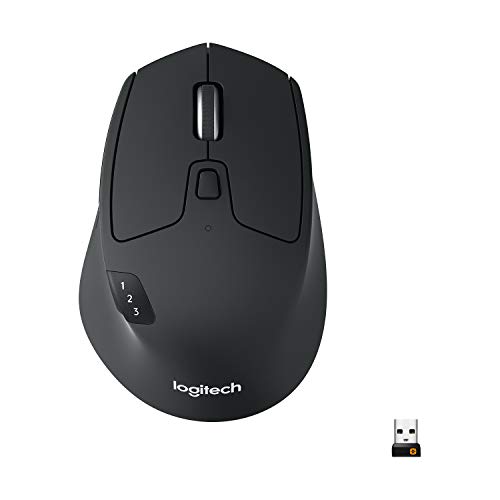
Logitech M720 Triathlon Wireless Mouse

Our verdict: Switches among three computers over Bluetooth or USB with a 24 month battery.

The M720 Triathlon is a full-size right-hand mouse with a rubber body, hyper-fast scrolling, Bluetooth or USB receiver connection and a battery the listing rates at 24 months. It works with computers, laptops and tablets, and sits in the $25 to $50 range.

The pitch here is easy switching. A button on the mouse jumps the cursor from a desktop to a laptop to a tablet, so one mouse serves a whole workspace. It ranks third because it lacks the premium sensor and scroll mechanism of the MX Master line, but its battery life and flexibility are hard to beat at the price.

Buy it for a mixed-device setup, or if you hate changing batteries. Skip it if you are left-handed, since the shape is right-handed.

Connection
Bluetooth or USB-A receiver
Battery
24 months
Devices
Up to three
Shape
Full size, right hand

What we like

  • +24 month battery life
  • +Switches among three devices
  • +Hyper-fast scrolling
  • +Rubber body feels secure

Watch out for

  • −Right-handed shape only
  • −Basic sensor versus MX line

Buy it if: Anyone juggling a desktop, laptop and tablet.

Skip it if: You are left-handed.

4

Best Everyday Comfort

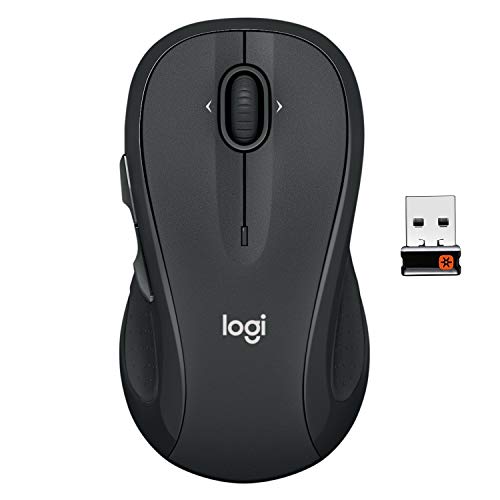
Logitech M510 Full Size Wireless Mouse

Our verdict: A full-size contoured mouse with soft rubber grips and a two-year battery.

The M510 is a full-size contoured wireless mouse with soft rubber grips, a 2.4 GHz nano receiver, tilt-to-scroll and a battery the listing rates at two years. Pricing is $25 to $50.

It ranks fourth because it is the most comfortable plain mouse at the mid price, with a size that fits larger hands that compact models cramp. The receiver is tiny and stays in a laptop port, and two years of battery means you can forget about it. It loses to the M720 on multi-device use and to the MX line on precision.

Buy it for a desktop that needs a dependable, comfortable workhorse. Choose something else if you need Bluetooth.

Connection
2.4 GHz USB-A nano receiver
Battery
Two years
Shape
Full size, contoured
Scrolling
Tilt-to-scroll wheel

What we like

  • +Two year battery life
  • +Soft rubber grips for comfort
  • +Full size suits larger hands
  • +Tiny nano receiver

Watch out for

  • −No Bluetooth connection
  • −Single device only

Buy it if: Desktop users with larger hands who want low upkeep.

Skip it if: You want Bluetooth or multi-device switching.

5

Best for Travel

Logitech M185 Compact Wireless Mouse

Our verdict: A small ambidextrous mouse for laptop bags, left-handers and small hands.

The M185 is a compact ambidextrous wireless mouse with a 2.4 GHz nano receiver, line-by-line scrolling and up to a year of battery life. It works with Windows and Mac and sits under $25.

It ranks fifth because it covers the basics at a very low price and fits left or right hands equally. The small size is a double-edged feature: great in a laptop bag, cramped on a desk for a large hand. The sensor and wheel are plain, but the nano receiver stores neatly.

Buy it for travel, a small hand or a left-handed user on a budget. Skip it if you want comfort for long sessions.

Connection
2.4 GHz USB-A nano receiver
Battery
Up to one year
Shape
Compact, ambidextrous
Compatibility
Windows and Mac

What we like

  • +Ambidextrous for left or right
  • +Compact for laptop bags
  • +Up to a year of battery
  • +Priced under $25

Watch out for

  • −Too small for long sessions
  • −Basic wheel and sensor

Buy it if: Travelers, left-handers and small hands.

Skip it if: You work at a desk all day with a large hand.

6

Best Never-Charge Backup

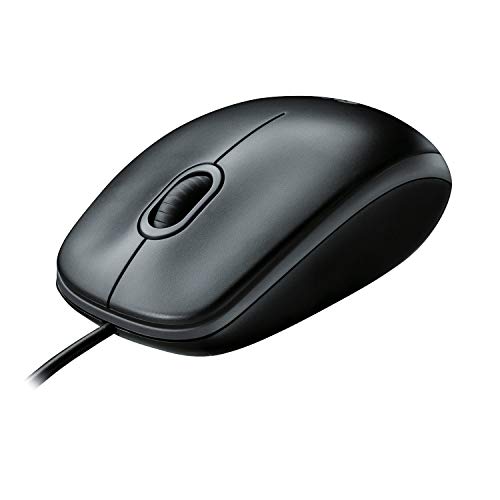
Logitech B100 Wired Mouse

Our verdict: A plug-in, ambidextrous mouse with an 800 dpi sensor and no batteries.

The B100 is a corded USB mouse with an ambidextrous shape, an 800 dpi sensor and side-to-side scrolling and zoom. It needs no batteries and is priced under $25.

It takes sixth because wired mice in this class do one thing: work every time you plug them in. No pairing, no charging, no dongle to lose. The 800 dpi sensor is low, so the cursor needs more hand travel on a big monitor. The cable is the obvious drawback on a clean desk or in a bag.

Buy it as a family, classroom or backup mouse. Skip it if you want a tidy, wire-free desk.

Connection
USB corded
Sensor
800 dpi
Shape
Ambidextrous
Power
No batteries

What we like

  • +Never needs batteries or charging
  • +Ambidextrous shape
  • +Plug-and-play reliability
  • +Very low cost

Watch out for

  • −Cord limits movement
  • −800 dpi is slow on big screens

Buy it if: Backup, classroom and shared family computers.

Skip it if: You want a cable-free setup or fast cursor speed.

7

Cheapest Spare

Amazon Basics 3-Button USB Wired Mouse

Our verdict: A basic 1000 dpi wired optical mouse for light use and spare computers.

The Amazon Basics mouse is a wired USB-A optical model with 1000 dpi tracking, three buttons and plug-and-play setup on Windows and Mac. It costs under $25.

It ranks last because it gives you the minimum: three buttons, no thumb rest and a plain shape. The 1000 dpi sensor is a notch above the Logitech B100, and the whole package is simple and cheap. It is the sort of mouse you buy for a guest computer or a PC build.

Buy it for light use or as a spare. Anyone who works long hours should step up to the M510 or higher.

Connection
USB-A wired
Sensor
1000 dpi optical
Buttons
Three
Compatibility
Windows and Mac

What we like

  • +Lowest cost option
  • +1000 dpi optical tracking
  • +Plug and play on Windows and Mac
  • +No batteries to manage

Watch out for

  • −Only three buttons
  • −Plain shape with no thumb rest

Buy it if: Spare computers and very light daily use.

Skip it if: You use a mouse for hours each day.

Methodology

How We Ranked These

Shape and comfort

We compared full-size, compact and ambidextrous shapes, grips and thumb support, since fit decides comfort over a long day.

Connection and battery

Bluetooth, USB receivers and wired links were rated alongside listed battery life, from one year up to two years or none.

Sensor and scrolling

DPI figures, glass tracking and wheel mechanisms such as MagSpeed were weighed for precision and speed.

Extra features

Quiet clicks, haptics, shortcuts and multi-device switching were credited when they add real everyday value.

Price tier

We ranked within the under $25, $25 to $50, $50 to $100 and $100 to $200 tiers, rewarding mice that beat their price.

Every Primea Score uses the same weights: Performance 30% · Build & Materials 20% · Everyday Usability 20% · Value 20% · Owner Satisfaction 10%. Full scoring rules

Buyer's guide

How to Pick the Right One for You

By Use Case

Start with where and how you use the mouse, since a travel mouse and a daily driver are different tools.

UseOur pick
Long daily sessionsLogitech MX Master 3S
Shortcuts and creative appsLogitech MX Master 4
Several devicesLogitech M720 Triathlon
Desktop comfortLogitech M510
Travel or left-handedLogitech M185

By Budget

SpendOur pick
Under $25, wirelessLogitech M185
Under $25, wiredLogitech B100
$25 to $50Logitech M720 Triathlon
$50 to $100Logitech MX Master 3S
$100 to $200Logitech MX Master 4

Wireless vs Wired

Wireless

No cable on the desk and easy to carry. The MX Master 3S and 4, the M720, M510 and M185 are wireless, and each offers a different mix of battery and connection.

Wired

Never needs charging and never drops out. The Logitech B100 and Amazon Basics 3-Button are wired, and they make good backups and shared-computer mice.

Choose wireless for a main desk, and keep a cheap wired mouse in a drawer as a spare.

By Hand Size

HandOur pick
LargeLogitech MX Master 3S
Large, simpleLogitech M510
MediumLogitech M720 Triathlon
Small or left-handedLogitech M185
Any, plain wiredLogitech B100

For Office Work Specifically

Look for

Quiet clicks if you share a room, a scroll wheel that handles long spreadsheets and either Bluetooth or a receiver that suits your laptop. Battery life that outlasts a quarter helps.

In this ranking

The Logitech MX Master 3S is the best office mouse with its quiet clicks, and the M720 Triathlon is the sensible budget choice for a laptop and desktop.

When to Spend More

Spend more if

You use the mouse for hours daily or work in design, code or spreadsheets. The MX Master 3S at $50 to $100 pays back in comfort and speed.

Save if

The mouse is for occasional use, travel or a spare desk. The M185, B100 or Amazon Basics under $25 cover the basics.

Questions

Frequently Asked Questions

Does the MX Master 3S work without Bluetooth?+

It is Bluetooth only, with no USB receiver in the box. If your computer lacks Bluetooth, you would need a separate adapter. The M720 Triathlon and M510 are better if you want a dongle.

What is the common mistake when buying a mouse?+

Choosing by DPI or looks and ignoring shape. A mouse that does not fit your hand will tire it no matter how good the sensor. Match the size and handedness to your hand first.

Is the MX Master 4 worth it over the 3S?+

Only if you want haptics and the Actions Ring for custom shortcuts. The 3S has quiet clicks and strong scrolling at a lower price. Most people will be happy with the 3S.

How do I pair a mouse to multiple devices?+

Use the device-switch button on mice like the M720 Triathlon to cycle between paired computers. Pair each device once through Bluetooth or the receiver. Check the manual for the exact button sequence.

How long do wireless mouse batteries last?+

Printed lifespans are best-case numbers that assume light use. Heavy typing days and high DPI settings drain cells faster, so keep a spare AA handy during the first year, especially with the M510 and M720.

Can I use a wired mouse with a tablet or phone?+

Only with the right adapter, and some devices do not support it. Bluetooth mice like the MX Master 3S and M720 are easier. Check your device's input support first.

Final take

The Logitech MX Master 3S is the mouse most people should buy, thanks to its comfort, precise scrolling and quiet clicks. Choose the MX Master 4 only if you want haptics and shortcut rings, and the M720 Triathlon if one mouse must serve several devices. For small budgets, the M185 covers travel and left hands, while the B100 and Amazon Basics models make cheap spares.

More Ranked & Reviewed Guides