
Primea ReviewsAll Reviews

Primea Reviews is reader-supported. When you buy through our Amazon links we may earn a commission, at no extra cost to you. Rankings are set by our editors and never sold. Learn more

Ranked & Reviewed by Primea Reviews

The 5 Best Cable Management Boxes Under $30 of 2026, Ranked & Reviewed

By the Primea Editorial TeamUpdated November 3, 202610 min read5 products ranked
The 5 Best Cable Management Boxes Under $30 of 2026, Ranked & Reviewed

The short answer

The Cinati under-desk tray is the one to buy for most desks: it clamps on without drilling and costs less than a lunch out. The metal mesh two-hole clamp tray is the better call if you hide several power bricks, the GZOKMOG suits short desks, the Delamu two-pack covers wide or shared desks, and the Naeety enclosed box is the right answer when the mess lives on the floor.

The Primea Scoreboard

Ranked & Reviewed

  1. The cheapest clean way to lift a power strip and its cords off the floor, with no drilling.

    91Excellent
    Check price
  2. An open metal mesh basket that lets air move around stacked adapters while it hangs on a clamp.

    88Excellent
    Check price
  3. A short, metal, no-drill tray that fits desks where a full-width tray would hang past the legs.

    85Excellent
    Check price
  4. Two 15.75 inch U-channel trays in one pack, handy for wide desks and shared workstations.

    82Very Good
    Check price
  5. A true enclosed box that hides a power strip and its cords, sitting on the floor or a shelf.

    79Very Good
    Check price

The most common mistake with cable management is buying a container before deciding where the clutter actually lives. A tray bolted under the desk does nothing for a power strip sitting on the carpet, and a closed floor box does nothing for the cables dangling from your monitor arm to the wall. Pick the wrong shape and you spend ten dollars to move the mess about forty centimeters.

So this ranking sorts by problem first and price second. We reviewed five products that stay under $30 using their listed mounting method, size, material and finish, and we scored them on how well each solves one clearly defined clutter problem. Several are trays rather than literal boxes, because for most desks an open tray is the better answer, and the one true enclosed box is ranked for the job it does well.

Before you buy

What Actually Matters

01

Mounting method

This is how the tray attaches, and for products under $30 it is usually a clamp or a screw-in bracket. It matters because a clamp avoids drilling but depends on your desk edge, while screws are more secure but permanent. Check your desktop thickness and look for an apron or crossbar under the edge that could block the clamp, then compare that against the listing photos.

02

Tray length

Length decides how much cable and how many strips the product can carry, and whether it clears desk legs, drawers and a standing desk motor. A short tray fits small desks but caps capacity. Measure the clear span under your desk between obstructions and subtract an inch or two for the clamp hardware.

03

Open or enclosed design

A mesh or open tray lets heat out and keeps access easy, while a solid or boxed design hides more but traps warmth. Warm adapters and a loaded power strip generate real heat over a day. If you stack bricks, favor open mesh or a box with vents, and keep cables from touching the hottest adapters.

04

Material

Metal trays resist sagging and feel more stable under a heavy strip than thin plastic ones, and they usually carry a longer service life. Read the listing for the material and look for rounded edges so the tray does not nick cable jackets. If the listing never names the material, treat the tray as light duty.

05

Finish and desk match

Color seems cosmetic, but it decides how visible the tray is when someone sits across from you or when you roll a chair back. A white tray under a white desk nearly disappears, while a black one under a dark top does the same. Match the finish to the underside of your desk and look for the same design in both colors.

In-depth reviews

Our Ranked Picks, Reviewed

1

Best Overall

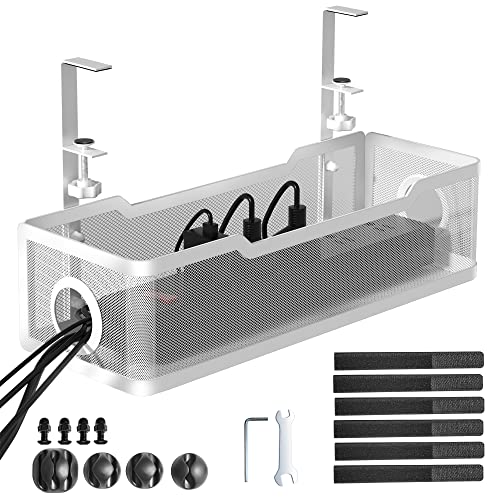
Cinati Under Desk Cable Management Tray, White

Our verdict: The cheapest clean way to lift a power strip and its cords off the floor, with no drilling.

The Cinati is a clamp-mounted tray that grips the rear or side edge of the desktop, so you never put a screw through a desk you may want to resell or return. It comes in white as reviewed here, with a matching black version, and its price falls in the cheapest bracket of this ranking.

It ranks first because it solves the single most common problem, a power strip and adapter tangle, with the least effort and the lowest cost. A clamp tray installs in a couple of minutes with one hand tool, and it can be moved if you rearrange the room. It edges out the metal mesh tray below mainly on price and simplicity; mesh gives better airflow but the listing for the Cinati gives no reason to think heat is a concern for an ordinary power strip.

Buy it if you have a standard desk with a flat underside edge and want a tidy result today. The caveat is that clamp trays depend on desktop thickness and edge shape, so a glass top, a very thick butcher block, or a desk with a deep apron can defeat the clamp. Check your desk edge before you order.

Mounting
No-drill clamp
Finish
White
Price bucket
Under $25
Also offered
Black version

What we like

  • +No drilling or screws needed
  • +Cheapest pick in the ranking
  • +Quick installation with simple tools
  • +Matching black finish available

Watch out for

  • −Clamp needs a compatible desk edge
  • −Not enclosed, cords stay visible from below

Buy it if: Standard desk owners who want a quick, cheap, reversible fix.

Skip it if: Your desk has a glass top or a very thick edge.

2

Best for Power Bricks

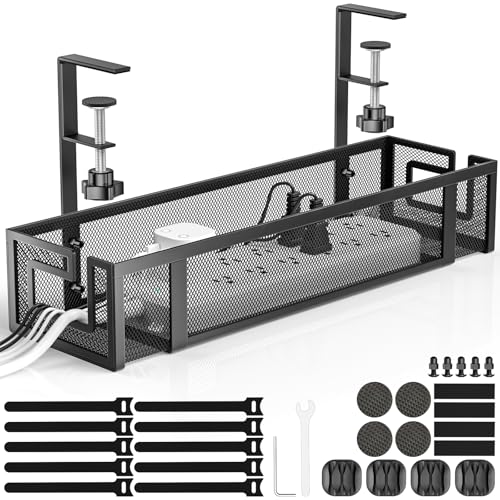
Under Desk Cable Management Tray, Metal Mesh, 2-Hole Clamp Mount

Our verdict: An open metal mesh basket that lets air move around stacked adapters while it hangs on a clamp.

This tray uses a metal mesh body and a two-hole clamp mount, with a no-drill installation. The open weave is the point: it lets air pass around bundled cables and chargers instead of trapping it, and it lets you see and reach everything from below without lifting a lid.

It places second because mesh is the more sensible shape when you are hiding several power adapters, a laptop brick and a USB hub, all of which run warm under load. Against the Cinati it asks for slightly more care at install, since the two-hole clamp has to line up with your desk edge, and the open weave shows the cables more than a solid tray would. If hiding the cables from a visitor's eye line matters more than airflow, the solid pick wins.

Choose it if your cable bundle is thick or includes bulky transformers. The caveat is that the listing shares little about the weight rating, so keep the load moderate and do not treat a clamp tray as a shelf for a heavy surge protector with a dozen plugs.

Material
Metal mesh
Mounting
2-hole clamp, no drill
Airflow
Open weave
Price bucket
Under $25

What we like

  • +Open mesh lets heat escape
  • +Easy access from below
  • +No-drill clamp installation
  • +Metal construction feels sturdier

Watch out for

  • −Cables stay more visible
  • −Weight rating not stated

Buy it if: People hiding several chargers, adapters and a hub.

Skip it if: You want a solid tray that hides everything.

3

Best for Small Desks

GZOKMOG Under Desk Cable Management Tray, 15.75"

Our verdict: A short, metal, no-drill tray that fits desks where a full-width tray would hang past the legs.

At 15.75 inches, the GZOKMOG is the compact option here. It is a metal tray with a no-drill clamp mount, built for smaller desks, a bedroom nook, or a corner where a longer tray would collide with a leg or a drawer unit.

It sits third because a short tray holds less, and there is no point pretending otherwise. A single power strip and a couple of adapters fit comfortably; a full workstation with a dock, two monitors and a printer does not. Compared with the Cinati, the advantage is fit rather than capacity: on a narrow desk, the right size is the one that clears the legs and still leaves room for your knees.

Buy it if your desk is a small writing table or a compact student desk. The caveat is capacity. If you already own more than one power strip, the short length will frustrate you, and the Delamu two-pack below is the better route.

Length
15.75 in
Material
Metal tray
Mounting
No-drill clamp
Price bucket
Under $25

What we like

  • +Compact size suits narrow desks
  • +Metal body feels solid
  • +No-drill clamp installation
  • +Low cost for a metal tray

Watch out for

  • −Limited room for big bundles
  • −Only one strip fits comfortably

Buy it if: Small desks, student tables and compact home setups.

Skip it if: You need to hide a dock, hub and several adapters.

4

Best for Wide Desks

Delamu 2-Pack Metal Under Desk Cable Management Tray

Our verdict: Two 15.75 inch U-channel trays in one pack, handy for wide desks and shared workstations.

The Delamu pack contains two metal U-channel trays, each 15.75 inches long, plus a mix of mounting accessories. It is the only product here in the $25 to $50 bucket on pack price, but the cost per tray works out lower than buying two single units, which is the reason to consider it.

It ranks fourth because the use case is narrower. Two trays let you separate a power strip on one side from a cable run on the other, or split a wide desk into two zones, and that arrangement is useful on a bench, a standing desk with a long top, or a two-person setup. For a standard desk with a single power strip you would use one tray and leave the other in a drawer.

Buy it if you share a long desk or want to keep power and data cables in separate runs. The caveat is that the included mounting accessories add choice but also complexity, so read the listing to see which fitting suits your desk edge before you start.

Pack
2 trays
Length each
15.75 in
Design
Metal U-channel
Price bucket
$25 to $50

What we like

  • +Two trays lower the unit cost
  • +Lets you split power and data
  • +Metal U-channel build
  • +Mixed mounting accessories included

Watch out for

  • −Pack price crosses the $25 line
  • −Spare tray is wasted on small desks

Buy it if: Wide desks, benches and two-person workstations.

Skip it if: You only have one power strip to hide.

5

Best for Floor Clutter

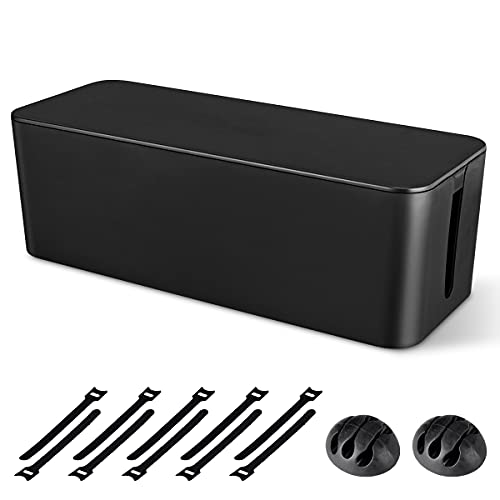
Naeety Cable Management Box, Large Cord Organizer

Our verdict: A true enclosed box that hides a power strip and its cords, sitting on the floor or a shelf.

The Naeety is the only literal box in this ranking. It is a large enclosed organizer designed to swallow a power strip and the cords plugged into it, and it needs no mounting because it sits on the floor or on a shelf.

It lands last only because it solves a different problem from the trays above. If the visible mess is a power strip and plug tangle on the floor behind a TV stand or beneath a desk, an enclosed box does a more complete job than any tray, and it is the right choice for renters who do not want to touch the furniture. It does nothing for the cables that run vertically from desktop to outlet, and the closed shape makes heat management something you should watch with a loaded strip.

Pick it if your clutter lives at floor level and you want it out of sight, including from kids and pets. Skip it if the problem is under the desktop, and look for vent slots on the box before packing it with several large power bricks.

Design
Large enclosed box
Placement
Floor or shelf
Mounting
None needed
Price bucket
Under $25

What we like

  • +Hides strip and cords completely
  • +No mounting required
  • +Works on a floor or shelf
  • +Good for renters and pets

Watch out for

  • −Does not tidy desk cables
  • −Enclosed shape traps heat

Buy it if: Floor-level power strips behind a desk or TV stand.

Skip it if: The mess hangs under your desktop.

Methodology

How We Ranked These

Problem fit

We judged whether each product solves a clearly defined clutter problem, such as under-desk routing, power strip hiding or wide-desk coverage, rather than treating all cable products as interchangeable.

Mounting and reversibility

No-drill clamp mounts and freestanding designs score higher, because most buyers rent, share furniture or plan to move.

Capacity and size

We compared the listed length and shape against the typical load of a power strip plus a few adapters, and we penalized products that are only suitable for a very small bundle.

Airflow and safety

Open mesh and vented shapes score better for warm adapters, while fully enclosed designs lose points unless the use case clearly justifies them.

Value under $30

Every pick had to stay inside the budget, and we weighted material, mounting hardware and finish options against the per-unit cost.

Every Primea Score uses the same weights: Performance 30% · Build & Materials 20% · Everyday Usability 20% · Value 20% · Owner Satisfaction 10%. Full scoring rules

Buyer's guide

How to Pick the Right One for You

By Desk Size

Desk width and the position of legs and drawers decide which tray length works, so start there.

Desk typeOur pick
Small writing desk or student tableGZOKMOG Under Desk Cable Management Tray, 15.75"
Standard home office deskCinati Under Desk Cable Management Tray, White
Long bench or wide standing deskDelamu 2-Pack Metal Under Desk Cable Management Tray
Desk with a lot of warm adaptersUnder Desk Cable Management Tray, Metal Mesh, 2-Hole Clamp Mount

By Budget

SpendOur pick
Under $25, cheapest tidy fixCinati Under Desk Cable Management Tray, White
Under $25, better airflowUnder Desk Cable Management Tray, Metal Mesh, 2-Hole Clamp Mount
Under $25, floor levelNaeety Cable Management Box, Large Cord Organizer
$25 to $50, two zonesDelamu 2-Pack Metal Under Desk Cable Management Tray

Tray vs Box

Tray

A tray hangs under the desktop and keeps cords off the floor and out of the vacuum's path. It is the better answer for most home offices, and the Cinati, mesh tray and GZOKMOG all work this way.

Box

A box sits on the floor and hides a power strip completely, which suits living rooms and entertainment centers. The Naeety is the one pick built this way, and it is the better option when you cannot clamp anything to the furniture.

Default to a tray for a desk, and use a box only when the strip lives on the floor.

By Clutter Type

What you are hidingOur pick
One power strip and a few cordsCinati Under Desk Cable Management Tray, White
A strip plus bulky chargers and a hubUnder Desk Cable Management Tray, Metal Mesh, 2-Hole Clamp Mount
Power on one side, data on the otherDelamu 2-Pack Metal Under Desk Cable Management Tray
A floor tangle behind furnitureNaeety Cable Management Box, Large Cord Organizer

For Small Desks Specifically

Look for

A tray under about 16 inches long, a clamp that works without drilling, and a metal body that stays rigid when loaded. Leave room so the tray does not collide with knees, a drawer or a leg.

In this ranking

The GZOKMOG at 15.75 inches is the purpose-built choice. The Cinati is the fallback if your desk edge is deep enough, and the Delamu works if you split the two trays between two nearby tables.

When to Spend More

Spend more if

You run a standing desk with a motor, a heavy surge protector or a drop-in dock, because those loads call for a sturdier tray or a screw-mounted cable raceway above $30. The Delamu pack is the step up here.

Save if

You have a single strip and a few cords, since the Cinati or the GZOKMOG already does the job. Spending more rarely produces a visibly tidier desk at this scale.

Questions

Frequently Asked Questions

Will a clamp tray fit a glass or very thick desktop?+

Often not. Clamp trays are designed for standard desktop thicknesses and an exposed underside, so a tempered glass top, a thick butcher block or a deep apron can defeat the grip. Measure the thickness and free edge before ordering, and consider a freestanding box if the clamp will not fit.

What is the most common cable management mistake?+

Buying a container before deciding where the clutter lives. Trays solve under-desk problems, boxes solve floor problems, and neither fixes the loose cables that hang between the desktop and the wall. Route the vertical run too, using a sleeve or a few adhesive clips, or the tray only moves the mess.

Is a metal tray worth it over a plastic one?+

For anything heavier than a light power strip, yes. Metal resists sagging, holds its clamp shape and tends to tolerate warm adapters better than thin plastic. The extra cost is small at this price, which is why every tray in the ranking is metal.

How do I install an under-desk tray?+

Remove everything from the underside edge, position the tray so it clears legs and drawers, and tighten the clamp or screws until it sits level. Leave a few inches of slack for the cords, then plug the strip in, route the cables over the lip and test with the chair rolled back.

How do I keep a cable tray safe with a loaded power strip?+

Keep cables from being pinched, do not stack warm adapters on top of each other, and give the strip some airflow. Open mesh helps, while an enclosed box should have vents. Replace any strip that feels hot or discolored rather than hiding it.

Can I use a cable box on a shelf instead of the floor?+

Yes, the enclosed Naeety is designed to sit on the floor or on a shelf. Make sure the shelf is stable and that the box does not block ventilation for any equipment next to it, and keep the lid or vents free if you load it with chargers.

Final take

For most desks, buy the Cinati tray and be done in five minutes. Move up to the metal mesh tray if you hide a pile of warm adapters, take the GZOKMOG for small desks, and add the Delamu pack for wide or shared workspaces. Buy the Naeety only when the mess sits on the floor, because no tray will fix that, and remember that tidy routing from desktop to outlet matters as much as the container.

More Ranked & Reviewed Guides