
Primea ReviewsAll Reviews

Primea Reviews is reader-supported. When you buy through our Amazon links we may earn a commission, at no extra cost to you. Rankings are set by our editors and never sold. Learn more

Ranked & Reviewed by Primea Reviews

The 6 Best Bluetooth Trackers of 2026, Ranked & Reviewed

By the Primea Editorial TeamUpdated November 4, 20269 min read6 products ranked
The 6 Best Bluetooth Trackers of 2026, Ranked & Reviewed

The short answer

Apple's second-generation AirTag is the strongest tracker if everyone in your house carries an iPhone, thanks to Ultra Wideband arrow guidance. The Chipolo POP is the pick for mixed households because you choose Apple Find My or Google Find Hub when you buy. UGREEN's rechargeable four-pack covers keys, bags and bikes in one purchase. The Chipolo CARD is the cleanest option for wallets, and Tile remains the answer when a family shares both phone platforms.

The Primea Scoreboard

Ranked & Reviewed

  1. 01
    Apple AirTag (2nd Generation)

    Best Overall for iPhone

    Apple AirTag (2nd Generation)

    Ultra Wideband guidance and the Find My network make this the tag that actually gets things back.

    94Outstanding
    Check price
  2. The tag to buy when you want a loud, colorful keyring tracker on either phone platform.

    91Excellent
    Check price
  3. Four rechargeable tags on a year-long charge, so one purchase covers keys, bag, bike and backpack.

    89Excellent
    Check price
  4. A credit-card-shaped tag that disappears into a wallet and charges wirelessly once a year.

    87Excellent
    Check price
  5. 05
    Life360 Tile Bluetooth Tracker, iOS and Android

    Best for Families on Both Platforms

    Life360 Tile Bluetooth Tracker, iOS and Android

    Platform-neutral and phone-ringing, with safety extras the others skip.

    85Excellent
    Check price
  6. A cheap four-tag set on Apple's network, with a user-replaceable CR2032 battery.

    83Very Good
    Check price

A Bluetooth tracker has no GPS inside it, and that single fact decides whether the thing finds your keys or just sits in the drawer looking clever. What you are really buying is access to a crowd: when a stranger's phone passes within Bluetooth range, it quietly relays the tag's location back to you. Pick a tag tied to a network your friends and neighbours do not use, and the tracker is nearly blind outside your own living room.

That is why this ranking starts with network, then moves to the details people argue about later: ring volume, how the battery is handled, and whether the tag clips to something. We reviewed six trackers from the spec sheets and listing details, scored each on the Primea framework, and weighted network compatibility heaviest because a tag on the wrong platform fails at the one job it has.

Before you buy

What Actually Matters

01

Which network it reports through

A Bluetooth tag has no GPS, so it borrows nearby phones to report its position. Apple Find My, Google Find Hub and Tile each have different crowd sizes. Check the listing for the exact network name and your phone's OS requirement, because a tag built for one will not appear in the other's app.

02

Ring volume and precision finding

Loudness is measured in decibels, and a figure near 120 dB cuts through a cluttered room far better than a mid-80s chirp. Ultra Wideband adds directional guidance on supported iPhones. Look for a stated dB number and the words Precision Finding rather than generic claims like loud alarm.

03

Battery type and upkeep

Coin-cell tags run for roughly a year then need a fresh CR2032, while rechargeable ones need a charging routine. Both fail silently if ignored. Read whether the battery is replaceable, what charging method it uses, and whether the app warns you before it runs out.

04

Form factor and attachment

A tag that cannot attach to the item gets left behind anyway. Round tags need a hole or case for keys, while card-shaped ones suit wallets. Check dimensions, thickness and whether a keyring hole is built in before assuming it will fit your use.

05

Privacy and anti-stalking safeguards

Because a tracker can be slipped into someone's bag, platforms add alerts for unknown tags travelling with you. Certified products, such as MFi tags on Apple's network, are built to trigger those alerts. Prefer listings that mention encryption or certification over unbranded tags with no such detail.

In-depth reviews

Our Ranked Picks, Reviewed

1

Best Overall for iPhone

Apple AirTag (2nd Generation)

Our verdict: Ultra Wideband guidance and the Find My network make this the tag that actually gets things back.

The second-generation AirTag pairs an upgraded Ultra Wideband chip with Bluetooth, and that combination is the whole story. Instead of a vague proximity bar, an iPhone or Apple Watch can point an arrow at the tag through Precision Finding. The speaker is also 50% louder than before, which matters when the tag is buried under couch cushions.

It tops the Chipolo POP because its reach comes from Apple Find My, the largest crowd network in this group, so a lost bag has the best odds of being pinged by a passing phone. Sharing works with trusted contacts, and the listing mentions support on 50+ airlines for bag recovery. The tradeoff is rigidity: you give up everything outside Apple.

Buy it if every phone in your circle is an iPhone. Skip it if any Android user needs to see the tag, because it simply will not show up for them.

Network
Apple Find My
Precision finding
iPhone and Apple Watch
Speaker
50% louder than before
Sharing
Trusted contacts, 50+ airlines

What we like

  • +Arrow guidance via Ultra Wideband
  • +Louder speaker than the original
  • +Works with Apple Watch
  • +Airline bag sharing supported

Watch out for

  • −No Android support at all
  • −Needs a separate case for keys
  • −Tied entirely to one ecosystem

Buy it if: iPhone households that want the fastest way to pinpoint a lost item.

Skip it if: Anyone who tracks things from an Android phone.

2

Best for Mixed Households

Chipolo POP Tracker Tag, Find My or Find Hub

Our verdict: The tag to buy when you want a loud, colorful keyring tracker on either phone platform.

Chipolo sells the POP in two flavors: one speaks Apple Find My, the other Google Find Hub, so the tag you buy matches the phone you carry. It rings up to 120 dB, which is the loudest figure in this roundup, and the casing comes in bright colors that make a dropped tag easier to spot on a dark floor.

It sits one rung below the AirTag because it lacks the Ultra Wideband arrow, so the last few feet are a listen-and-hunt exercise. It earns its place above the cheaper multipacks with a built-in keyring hole and a 2-year warranty, a rarity at this level. Check the variant carefully, since the two networks do not cross over.

A good fit for anyone carrying an Android phone who still wants a name-brand tag. The caveat is that one tag talks to one network only.

Networks
Apple Find My or Google Find Hub
Ring volume
Up to 120 dB
Attachment
Built-in keyring hole
Warranty
2 years

What we like

  • +Loudest ring in the group
  • +Keyring hole built in
  • +Choose your network at purchase
  • +Two-year warranty included

Watch out for

  • −No Ultra Wideband precision arrow
  • −One tag works with one network
  • −Costs more than multipack rivals

Buy it if: Android users and mixed households that want a brand with a warranty.

Skip it if: You need guided, arrow-style finding at close range.

3

Best Multipack

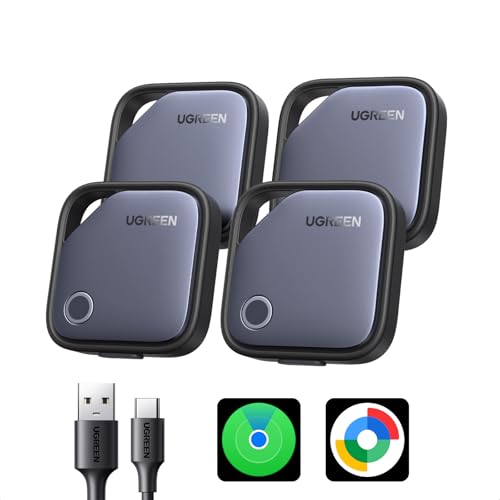
UGREEN Finder Duo Air Tracker Tags 4 Pack

Our verdict: Four rechargeable tags on a year-long charge, so one purchase covers keys, bag, bike and backpack.

UGREEN's pack gives you four tags, each rechargeable over USB-C and claimed to last 365 days per charge. That choice sidesteps the coin-cell routine that kills most trackers quietly: the battery dies, nobody notices, and the tag is dead weight when you finally need it. It supports Apple Find My or Google Find Hub, with end-to-end encryption.

It ranks behind the Chipolo POP because you give up the louder ring and the dedicated warranty, but it wins on coverage per dollar. Four tags is a household kit, not a single-item fix. The compromise is upkeep: a rechargeable battery needs a yearly plug-in, and four tags means four reminders.

Pick it if you lose several things regularly and would rather charge than hunt for CR2032 cells. Skip it if you want one tag you can forget about for years.

Networks
Apple Find My or Google Find Hub
Battery
Rechargeable, 365 days
Charging
USB-C
Pack
4 tags

What we like

  • +Four tags in one pack
  • +USB-C recharging, no coin cells
  • +End-to-end encryption listed
  • +Works on either major network

Watch out for

  • −Annual charging chore times four
  • −Ring volume not stated
  • −Lesser-known tracker brand

Buy it if: Families or travelers tagging keys, bags and bikes in one go.

Skip it if: You want a replaceable-battery tag that runs for years untouched.

4

Best for Wallets

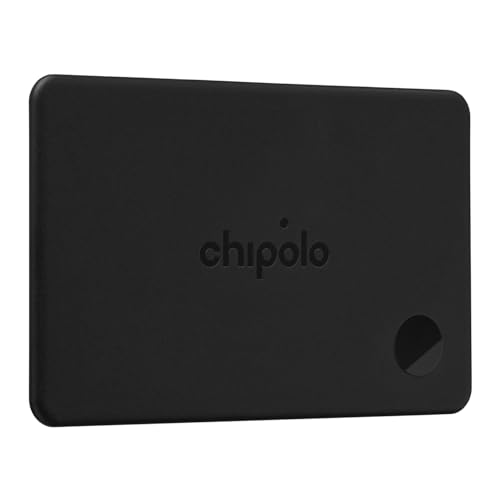
Chipolo CARD Rechargeable Wallet Tracker

Our verdict: A credit-card-shaped tag that disappears into a wallet and charges wirelessly once a year.

The CARD trades the round keyring shape for a thin wallet card, so it slides into a billfold slot where a bulky tag never would. Charging is Qi magnetic and the listing quotes up to 1 year per charge. It runs on Apple Find My or Google Find Hub depending on the version, and carries the same 2-year warranty as the POP.

It lands below the multipacks because it only solves one problem. For keys or a backpack it is the wrong shape, and the Qi charger is not included, so you need a compatible pad before the first top-up. Within wallets, though, it beats clip-on tags that make your pocket bulge.

Ideal for anyone who has left a wallet behind in a taxi or café. The caveat is the missing charger, a small extra cost.

Shape
Thin wallet card
Battery
Rechargeable, up to 1 year
Charging
Qi magnetic, charger not included
Warranty
2 years

What we like

  • +Slips into any wallet slot
  • +Wireless magnetic charging
  • +Up to a year per charge
  • +Two-year warranty

Watch out for

  • −Qi charger not included
  • −Wrong shape for keys or bags
  • −Single tag costs more than packs

Buy it if: People who misplace wallets, passport pouches or ID holders.

Skip it if: You mostly lose keys and bags, where a round tag attaches better.

5

Best for Families on Both Platforms

Life360 Tile Bluetooth Tracker, iOS and Android

Our verdict: Platform-neutral and phone-ringing, with safety extras the others skip.

Tile is the veteran of the category and the only tag here that lives outside both Apple and Google networks, running on its own free app instead. That makes it equally usable on iOS and Android. It also does the reverse trick, ringing your phone even when the handset is set to silent, and adds a discreet SOS alert plus a Life360 family map.

It ranks fifth because a standalone network has fewer passing phones to lean on than Find My does, so recovery away from home is less certain. What you gain is flexibility: one app, any phone, and packs of one, two or four. For a family split between platforms, that is genuinely useful.

Buy it if you share trackers across iPhone and Android. The caveat is that the best features sit inside the Life360 ecosystem.

Compatibility
iOS and Android
Find phone
Rings even when silenced
Safety
Discreet SOS alert
Packs
1, 2 and 4 packs

What we like

  • +Works on iOS and Android
  • +Rings a silenced phone
  • +SOS alert built in
  • +Sold in several pack sizes

Watch out for

  • −Smaller crowd network than Find My
  • −Best features tied to Life360
  • −Needs its own separate app

Buy it if: Families mixing iPhone and Android who want one shared system.

Skip it if: You want the largest possible recovery network.

6

Best Budget Apple Pack

Ultrbeka Air Tag Tracker 4 Pack, MFi Certified

Our verdict: A cheap four-tag set on Apple's network, with a user-replaceable CR2032 battery.

Ultrbeka puts four tags on Apple Find My for a small outlay and carries Apple's MFi certification, which is the badge that tells you the tag was built to Apple's specification. Each tag is rated IP67 for dust and splashes and runs on a replaceable CR2032 coin cell, so there is no charging dock to remember. The tag plays a sound from the app.

It sits last because it lacks Apple's Ultra Wideband guidance, so finding it nearby leans on the sound alone. Against the UGREEN pack you trade rechargeability and encryption claims for a swap-in battery and a lower price. Quality control is the unknown with any budget multipack.

Choose it for tagging bags and gear across an iPhone household on a tight budget. Skip it for anything valuable you cannot afford to lose.

Network
Apple Find My (MFi certified)
Protection
IP67
Battery
Replaceable CR2032
Pack
4 tags

What we like

  • +MFi certified for Apple Find My
  • +IP67 dust and water rating
  • +Swap-in coin cell battery
  • +Four tags at a low price

Watch out for

  • −iPhone only, no Android
  • −No Ultra Wideband guidance
  • −Budget brand with less track record

Buy it if: iPhone owners tagging luggage, bags and gear cheaply.

Skip it if: You carry an Android phone or need premium reliability.

Methodology

How We Ranked These

Network reach

The platform a tag reports through sets its real-world range, so Apple Find My, Google Find Hub and Tile's own network were weighed by how many passing phones can relay a ping.

Finding precision

We ranked tags higher for Ultra Wideband guidance or a loud ring, since both shorten the last few feet of any search.

Battery design

Replaceable coin cells and rechargeable packs were compared on how likely each is to die unnoticed, and how easy the fix is.

Form and attachment

A keyring hole, wallet-card shape or case-free design decides whether the tag stays on the item it protects.

Value and support

Pack size, warranty length and certification such as MFi were weighed against the listed price bucket.

Every Primea Score uses the same weights: Performance 30% · Build & Materials 20% · Everyday Usability 20% · Value 20% · Owner Satisfaction 10%. Full scoring rules

Buyer's guide

How to Pick the Right One for You

By Phone Platform

The phone in your pocket decides which tags even show up in your app, so settle this first.

Your phoneOur pick
iPhone onlyApple AirTag (2nd Generation)
Android onlyChipolo POP Tracker Tag, Find My or Find Hub
Both in one householdLife360 Tile Bluetooth Tracker, iOS and Android
iPhone, four items to tagUltrbeka Air Tag Tracker 4 Pack, MFi Certified

By Budget

SpendOur pick
Under $25Apple AirTag (2nd Generation)
Under $25 for four tagsUltrbeka Air Tag Tracker 4 Pack, MFi Certified
$25 to $50 for a branded tagChipolo POP Tracker Tag, Find My or Find Hub
$25 to $50 for a rechargeable setUGREEN Finder Duo Air Tracker Tags 4 Pack

Replaceable Battery vs Rechargeable

Replaceable coin cell

The Ultrbeka pack uses a CR2032 you can swap in seconds, so a dead tag is a thirty-second fix with no charger. The downside is remembering to buy cells.

Rechargeable

The UGREEN pack and Chipolo CARD charge over USB-C or Qi and quote about a year per charge. You avoid cell waste, but you need a cable or magnetic pad on hand.

For most people the replaceable cell is easier to live with, but the Chipolo CARD is the exception because a wallet tag should never be opened.

By What You Are Tracking

ItemOur pick
KeysChipolo POP Tracker Tag, Find My or Find Hub
WalletChipolo CARD Rechargeable Wallet Tracker
Checked luggageApple AirTag (2nd Generation)
Several family itemsUGREEN Finder Duo Air Tracker Tags 4 Pack

For Travel Specifically

Look for

A large crowd network, an easy way to share location with an airline, and a battery that will not die mid-trip.

In this ranking

The Apple AirTag (2nd Generation) supports sharing with 50+ airlines, and the UGREEN pack's 365-day charge suits long trips.

When to Spend More

Spend more if

You want arrow-style finding or a warranty: the Apple AirTag (2nd Generation) adds Ultra Wideband, and the Chipolo POP carries a 2-year warranty.

Save if

You are tagging low-stakes gear. The Ultrbeka four-pack covers backpacks, gym bags and bikes without a big spend.

Questions

Frequently Asked Questions

Will an AirTag work with my Android phone?+

No. The Apple AirTag (2nd Generation) reports through Apple Find My only, so Android phones cannot see or set it up. Android users should choose the Chipolo POP in its Google Find Hub version, or the cross-platform Life360 Tile.

What is the most common mistake when buying a tracker?+

Buying a tag for the wrong network. The Chipolo POP and UGREEN pack both list Find My or Find Hub, but each tag works with only one. Match the version to your phone before checking out.

Is the Chipolo POP worth it over the cheaper multipacks?+

Yes, if you need loud ring volume and a warranty. The POP reaches up to 120 dB and carries two years of cover, while the UGREEN and Ultrbeka packs win on count rather than polish.

How do I set up a tracker with my phone?+

Open the tracker's native app or your phone's find-device menu, hold the tag close and follow the pairing prompt. The Apple AirTag (2nd Generation) pairs through the iPhone, while Tile and Chipolo run through their own apps.

How do I keep the battery from dying silently?+

Set a yearly reminder. The Ultrbeka pack needs a fresh CR2032 about annually, and the UGREEN tags and Chipolo CARD need recharging on a similar cycle. Check the battery status in the app each time you travel.

Can a tracker be used to follow people without their knowledge?+

Platforms guard against it by alerting phones to unknown tags moving with them. MFi certification on the Ultrbeka tags and Apple's own network on the AirTag are built around those alerts. Treat any unfamiliar tag alert seriously.

Final take

For iPhone households, the Apple AirTag (2nd Generation) is the easiest recommendation in this ranking because its network and Ultra Wideband arrow solve both halves of the search. Mixed or Android households should reach for the Chipolo POP, and anyone tagging a lot of gear will get more from the UGREEN four-pack. Match the tag to your phone first and everything else becomes a small decision.

More Ranked & Reviewed Guides